当前位置:网站首页>Deep learning environment configuration tensorflow2+keras
Deep learning environment configuration tensorflow2+keras
2022-07-19 16:25:00 【Half_ A】
Anaconda
Anaconda Is to manage each python Package tools , Here we mainly use numpy, And some other commonly used bags .
Anaconda The website links :https://www.anaconda.com/
Of each system version Anaconda The installer can be downloaded and installed directly , For relevant usage methods, please refer to The article
CUDA
- First Check your computer GPU Corresponding cuda edition , As shown in the figure open NVIDIA Control panel -> help -> system information -> Components ( It can be opened in the control center or the notice bar in the lower right corner ), I'm here GPU Corresponding cuda The version is 11.6.106, So the installation cuda Cannot exceed this version .

Or in cmd Command line input nvidia-smi You can also view CUDA edition .
- Get into CUDA Toolkit Archive Website Select a version lower than the one just found cudatoolkit, This article chooses CUDA Toolkit 11.0 Update 3, Download installation package about 2.7G.
Be careful : Here's the choice cuda The version will decide to install later cudnn and tensorflow-gpu Version of , The three are related , If the version does not match, you will not be able to use , Specific matching version reference https://tensorflow.google.cn/install/source_windows, The following table is an excerpt .
| edition | Python edition | compiler | Building tools | cuDNN | CUDA |
|---|---|---|---|---|---|
| tensorflow_gpu-2.6.0 | 3.6-3.9 | MSVC 2019 | Bazel 3.7.2 | 8.1 | 11.2 |
| tensorflow_gpu-2.5.0 | 3.6-3.9 | MSVC 2019 | Bazel 3.7.2 | 8.1 | 11.2 |
| tensorflow_gpu-2.4.0 | 3.6-3.8 | MSVC 2019 | Bazel 3.1.0 | 8.0 | 11.0 |
| tensorflow_gpu-2.3.0 | 3.5-3.8 | MSVC 2019 | Bazel 3.1.0 | 7.6 | 10.1 |
| tensorflow_gpu-2.2.0 | 3.5-3.8 | MSVC 2019 | Bazel 2.0.0 | 7.6 | 10.1 |
| tensorflow_gpu-2.1.0 | 3.5-3.7 | MSVC 2019 | Bazel 0.27.1-0.29.1 | 7.6 | 10.1 |
| tensorflow_gpu-2.0.0 | 3.5-3.7 | MSVC 2017 | Bazel 0.26.1 | 7.4 | 10 |
| tensorflow_gpu-1.15.0 | 3.5-3.7 | MSVC 2017 | Bazel 0.26.1 | 7.4 | 10 |
| tensorflow_gpu-1.14.0 | 3.5-3.7 | MSVC 2017 | Bazel 0.24.1-0.25.2 | 7.4 | 10 |
| tensorflow_gpu-1.13.0 | 3.5-3.7 | MSVC 2015 update 3 | Bazel 0.19.0-0.21.0 | 7.4 | 10 |
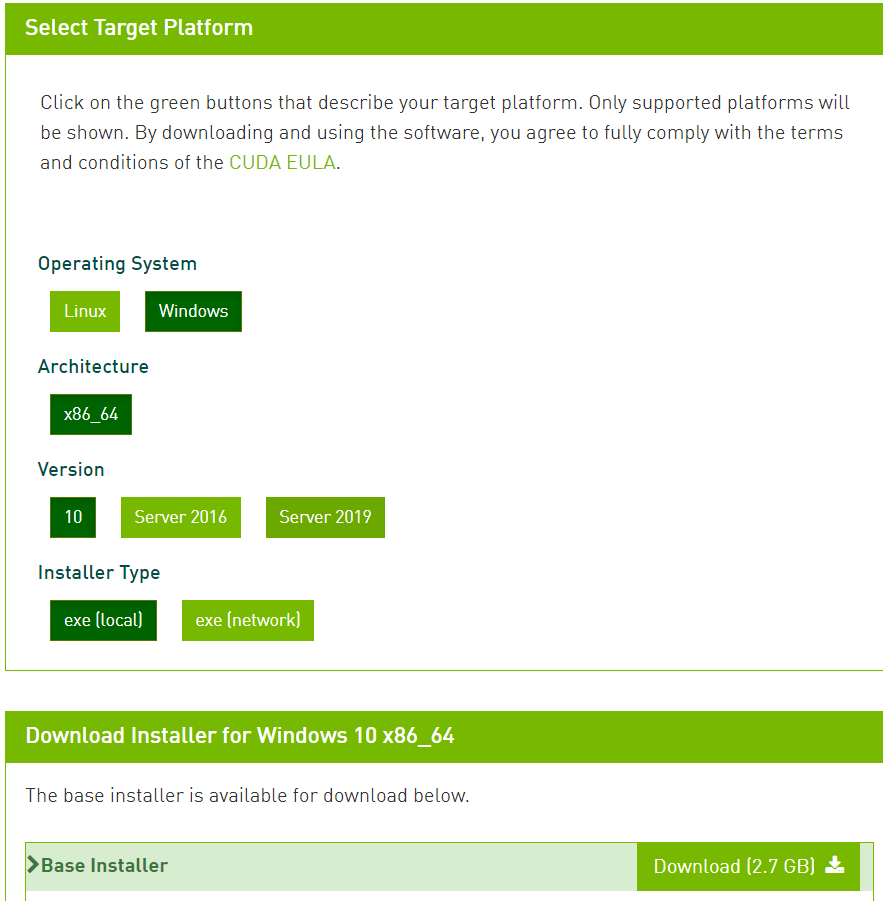
- Double-click the downloaded exe Installation package , choice Temporary decompression Location , And then click ok, The decompression time is about two minutes .

- Agree to the license agreement , And then choose Custom installation Options , And then click next step


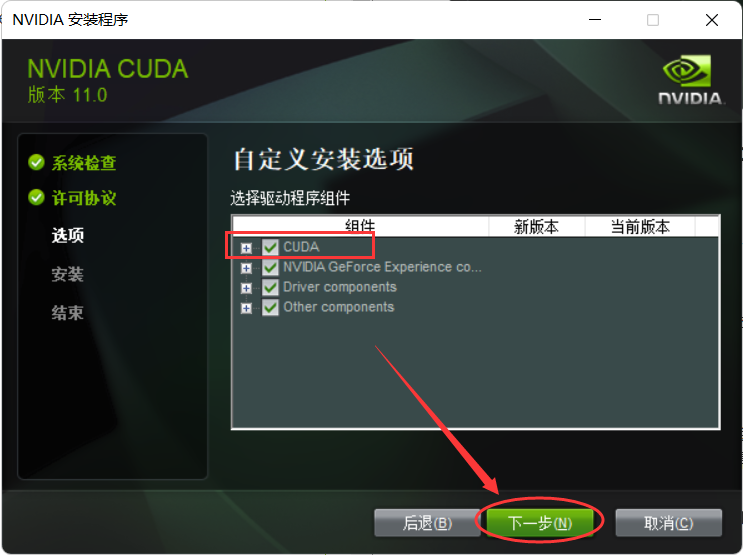
- Select driver components , must do Check CUDA, And then click next step .
- Choose an installation location on your computer , then Start installation .

Wait for the installation to finish , This computer 18 Notebook mechanical hard disk installation It takes about 5 minute
Check environment variables , Generally, the environment variables will be automatically configured after the installation , open Set up - System - system information - Advanced system setup - environment variable Inspection , If not, you need to add it yourself ( Note that when adding, change to your own installation path )
- Whether there is CUDA and NVCUDASAMPLES Two sets of environment variables .

- Open Path, See if there are the following environment variables .

- CUDA installation is complete
cnDNN
- open cudnn Official website , Check what you should download according to the table above cuDNN edition , my CUDA Version is 11.0, Corresponding cuDNN Version is 8.0, Pay attention to see clearly cuDNN There is a corresponding CUDA edition , One cuDNN It may correspond to multiple versions CUDA, When downloading, you will be required to register first NVIDIA account number .

- Unzip the file , Move the unzipped file to CUDA In the corresponding installation directory

- cuDNN installation is complete
install TensorFlow
- open cmd Command line interface ( It is recommended to open as an administrator ), Switch opentuna Of pip Mirror source
pip config set global.index-url https://opentuna.cn/pypi/web/simple
- Creating a virtual environment , Followed by the computer installation python edition , Pay attention to whether it is related to
conda create -n tensorflow2 python=3.8
- Activate the virtual environment
conda activate tensorflow2
- install tensorflow, The specific version number corresponds to the table above .
pip install tensorflow-gpu==2.3.0

- Verify that the installation was successful , open cmd Interface , Enter the following command , Check whether the output Successfly
python
import tensorflow as tf
tf.config.list_physical_devices('GPU')

If appear Could not load dynamic library 'cudart64_110.dll' Don't panic , It means that the computer is not restarted after the installation , Just restart and run again .
Keras
- TensorFlow And Keras Refer to the following table for the corresponding version
| Tensorflow | Keras |
|---|---|
| TensorFlow 2.0.0 | Keras 2.3.1 |
| TensorFlow 2.1.0 | Keras 2.3.1 |
| TensorFlow 2.2.0 | Keras 2.3.1 |
| TensorFlow 2.4.0 | Keras 2.4.3 |
| TensorFlow 2.6.0 | Keras 2.6.0 |
- Still running Anaconda Of tensorflow2 Run the following instructions in the environment
pip install keras==2.4.3

This blog post was first published on the personal blog website :https://www.mahaofei.com/, Welcome to .
边栏推荐
- 基于深度学习的人脸识别闸机开发(基于飞桨PaddlePaddle)
- PwnTheBox,Web:Double-S
- Financial banking software testing super large strategy, the most popular financial banking big secret cover questions
- CH549/CH548学习笔记6 - 读取芯片ID
- [MCU simulation project] advertising lamp (Proteus schematic +keil code)
- Solve the problem of "license manager error -8" after matlab installation (the personal test is valid)
- Force buckle 565 Array nesting
- Ch549/ch548 learning notes 8 - USB device interrupt processing
- Fiddler:增加IP列
- CSGO突然返回桌面,并且其他应用无反应,如何不重启关闭
猜你喜欢

Okaleido or get out of the NFT siege, are you optimistic about it?

信创环境下达梦数据库唯一索引异常无法拦截DuplicateKeyException

UGUI源码解析——ClipperRegistry

2022/07 CSI TOOL 安装过程记录
2022/07 CSI tool installation process record
深度学习环境配置TensorFlow2+Keras

Liquibase learning 1 - installation, simple use

MySQL -调整列的约束

Financial banking software testing super large strategy, the most popular financial banking big secret cover questions

UGUI源码解析——IClipper
随机推荐
【深度学习基础】如何理解卷积神经网络中的通道channel
关于QProcess的使用问题解释
Thinking and speculation on passing based on binary tree
Okaleido或杀出NFT重围,你看好它吗?
MySQL - 表字段的唯一键约束
UGUI源码解析——ClipperRegistry
CH549/CH548学习笔记3 - UART
[MCU simulation project] the nixie tube displays 0 to 5 in turn (Proteus schematic +keil code)
[dry goods] how much do you know about MySQL infrastructure design?
干货!综合的公平冷启动推荐系统
STM32+A4988控制步进电机
LeetCode 565 数组嵌套[dfs 记忆化] HERODING的LeetCode之路
MySQL - adjust column constraints
反馈性学习
Identity server 4 uses openid connect to add user authentication (3)
ArrayList source code analysis I
Liquibase learning 2 - Introduction to the extension plug-in liquibase data
Promise 中的 then 第二个参数和 catch 有什么区别?
Ch549/ch548 learning notes 9 - USB device endpoint processing
Ugui source code analysis - iclipper