当前位置:网站首页>Pytorch version: yolov4 integrating attention and mobilenet
Pytorch version: yolov4 integrating attention and mobilenet
2022-07-19 12:22:00 【Xiaobai learns vision】
Click on the above “ Xiaobai studies vision ”, Optional plus " Star standard " or “ Roof placement ”
Heavy dry goods , First time delivery From this year 4 month YOLOv4 After the release of , For this target detection framework , Perhaps the most frequently asked question is :distance YOLO v4 Launch , It's over 5 More than a month .YOLO Frame adoption C Language as the underlying code , This is for the customary Python For the researchers , It's really a little unfriendly . Therefore, there are many online based on various in-depth learning frameworks YOLO Duplicate version . In recent days, , There are researchers GitHub Based on PyTorch Of YOLOv4.
「 Have any classmates reappeared YOLOv4 Of , Can you talk about it 」.
Because of the original YOLO Use C Programming with language , This alone makes many students flinch . There are many online TF/Keras and Caffe Etc , But many projects only give code , There is no given model in COCO、PASCAL VOC Training results on the dataset .
In recent days, , There are researchers GitHub Open source a project on : be based on PyTorch Deep learning framework YOLOv4 Duplicate version , This version is based on YOLOv4 The implementation given by the author AlexeyAB/darknet, And in PASCAL VOC、COCO And custom datasets .
Project address :https://github.com/argusswift/YOLOv4-PyTorch
in addition to , The project also adds some useful Attention method , And implemented mobilenetv2-YOLOV4 and mobilenetv3-YOLOV4.
attentive YOLOv4
The project adds some attention methods to the backbone , Such as SEnet、CBAM.

SEnet (CVPR 2017)
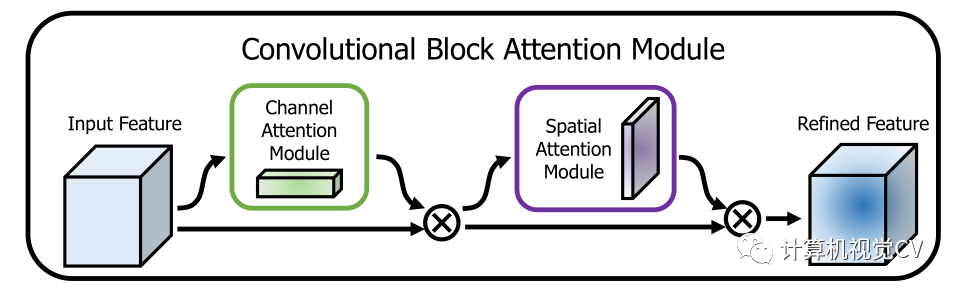
CBAM (CVPR 2018)
mobilenet YOLOv4
The research also achieved mobilenetv2-YOLOV4 and mobilenetv3-YOLOV4( Just change config/yolov4_config.py Medium MODEL_TYPE that will do ).
The following table shows mobilenetv2-YOLOV4 Performance results of :

Now let's look at the details and requirements of the project .
Environmental requirements
Nvida GeForce RTX 2080TI
CUDA10.0
CUDNN7.0
windows or linux System
python 3.6
characteristic
DO-Conv (https://arxiv.org/abs/2006.12030) (torch>=1.2)
Attention
fp_16 training
Mish
Custom data
Data Augment (RandomHorizontalFlip, RandomCrop, RandomAffine, Resize)
Multi-scale Training (320 to 640)
focal loss
CIOU
Label smooth
Mixup
cosine lr
Install dependencies
Run the script to install dependencies . You need to provide conda The installation path ( for example ~/anaconda3) And created conda Name of environment ( Here is YOLOv4-PyTorch).
pip3 install -r requirements.txt --userIt should be noted that : The installation script is already Ubuntu 18.04 and Window 10 Tested on the system . If something goes wrong , Please check the detailed installation instructions :https://github.com/argusswift/YOLOv4-PyTorch/blob/master/INSTALL.md.
preparation
1. git Copy YOLOv4 library
The first step in preparation is to copy YOLOv4.
git clone github.com/argusswift/YOLOv4-PyTorch.gitThen update the configuration file 「config/yolov4_config.py」 in 「PROJECT_PATH」.
2. Data set preparation
The project is ready Pascal VOC and MSCOCO 2017 Data sets . among PascalVOC The dataset includes VOC 2012_trainval、VOC 2007_trainval and VOC2007_test,MSCOCO 2017 The dataset includes train2017_img、train2017_ann、val2017_img、val2017_ann、test2017_img、test2017_list.
PascalVOC Data set download command :
# Download the data.cd $HOME/data
wget http://host.robots.ox.ac.uk/pascal/VOC/voc2012/VOCtrainval_11-May-2012.tar
wget http://host.robots.ox.ac.uk/pascal/VOC/voc2007/VOCtrainval_06-Nov-2007.tar
wget http://host.robots.ox.ac.uk/pascal/VOC/voc2007/VOCtest_06-Nov-2007.tar# Extract the data.
tar -xvf VOCtrainval_11-May-2012.tar
tar -xvf VOCtrainval_06-Nov-2007.tar
tar -xvf VOCtest_06-Nov-2007.tar
MSCOCO 2017 Data set download command :
#step1: download the following data and annotation
 2017 Train images [118K/18GB]
 2017 Val images [5K/1GB]
 2017 Test images [41K/6GB]
 2017 Train/Val annotations [241MB]
 #step2: arrange the data to the following structure
 COCO
 ---train
 ---test
 ---val
 ---annotations
After downloading the data set , You need to do the following :
Put the dataset into the directory , to update config/yolov4_config.py Medium DATA_PATH Parameters .
( about COCO Data sets ) Use coco_to_voc.py take COCO The data type is converted to VOC data type .
Transform data format : Use utils/voc.py or utils/coco.py take pascal voc *.xml Format ( or COCO *.json Format ) Convert to *.txt Format (Image_path xmin0,ymin0,xmax0,ymax0,class0 xmin1,ymin1,xmax1,ymax1,class1 ...).
3. Download the weight file
1)darknet Pre training weights :yolov4(https://drive.google.com/file/d/1cewMfusmPjYWbrnuJRuKhPMwRe_b9PaT/view).
2)Mobilenet Pre training weights :
mobilenetv2:(https://pan.baidu.com/share/init?surl=sjixK2L9L0YgQnvfDuVTJQ, Extraction code :args);
mobilenetv3:(https://pan.baidu.com/share/init?surl=75wKejULuM0ZD05b9iSftg, Extraction code :args).
3) Create in the root directory weight Folder , Put the downloaded weight file into weight / Under the table of contents .
4) Training in config/yolov4_config.py Set in MODEL_TYPE.
4. Convert to a custom dataset ( Training based on custom datasets )
1) Put the pictures of the custom dataset into JPEGImages Folder , Put the comment file in Annotations Folder .
2) Use xml_to_txt.py File write the list of training and testing files ImageSets/Main/*.txt.
3) Transform data format : Use utils/voc.py or utils/coco.py take pascal voc *.xml Format ( or COCO *.json Format ) Convert to *.txt Format (Image_path xmin0,ymin0,xmax0,ymax0,class0 xmin1,ymin1,xmax1,ymax1,class1 ...).
Training
Run the following command to start training , For details, see config / yolov4_config.py. When training, you should DATA_TYPE Set to VOC or COCO.
CUDA_VISIBLE_DEVICES=0 nohup python -u train.py --weight_path weight/yolov4.weights --gpu_id 0 > nohup.log 2>&1 &It also supports resume Training , add to --resume, Use the following command to automatically load last.pt.
CUDA_VISIBLE_DEVICES=0 nohup python -u train.py --weight_path weight/last.pt --gpu_id 0 > nohup.log 2>&1 &testing
Modify the detection image path :DATA_TEST=/path/to/your/test_data# your own images.
for VOC dataset:
CUDA_VISIBLE_DEVICES=0 python3 eval_voc.py --weight_path weight/best.pt --gpu_id 0 --visiual $DATA_TEST --eval --mode det
for COCO dataset:
CUDA_VISIBLE_DEVICES=0 python3 eval_coco.py --weight_path weight/best.pt --gpu_id 0 --visiual $DATA_TEST --eval --mode det
The result can be in output / View in , As shown below :

assessment (Pascal VOC Data sets )
Modify the evaluation dataset path :DATA_PATH=/path/to/your/test_data # your own images
for VOC dataset:
CUDA_VISIBLE_DEVICES=0 python3 eval_voc.py --weight_path weight/best.pt --gpu_id 0 --visiual $DATA_TEST --eval -
assessment (COCO Data sets )
Modify the evaluation dataset path :DATA_PATH=/path/to/your/test_data # your own images
CUDA_VISIBLE_DEVICES=0 python3 eval_coco.py --weight_path weight/best.pt --gpu_id 0 --visiual $DATA_TEST --eval --mode val

type=bbox
Running per image evaluation...      DONE (t=0.34s).
Accumulating evaluation results...   DONE (t=0.08s).
 Average Precision  (AP) @[ IoU=0.50:0.95 | area=   all | maxDets=100 ] = 0.438
 Average Precision  (AP) @[ IoU=0.50      | area=   all | maxDets=100 ] = 0.607
 Average Precision  (AP) @[ IoU=0.75      | area=   all | maxDets=100 ] = 0.469
 Average Precision  (AP) @[ IoU=0.50:0.95 | area= small | maxDets=100 ] = 0.253
 Average Precision  (AP) @[ IoU=0.50:0.95 | area=medium | maxDets=100 ] = 0.486
 Average Precision  (AP) @[ IoU=0.50:0.95 | area= large | maxDets=100 ] = 0.567
 Average Recall     (AR) @[ IoU=0.50:0.95 | area=   all | maxDets=  1 ] = 0.342
 Average Recall     (AR) @[ IoU=0.50:0.95 | area=   all | maxDets= 10 ] = 0.571
 Average Recall     (AR) @[ IoU=0.50:0.95 | area=   all | maxDets=100 ] = 0.632
 Average Recall     (AR) @[ IoU=0.50:0.95 | area= small | maxDets=100 ] = 0.458
 Average Recall     (AR) @[ IoU=0.50:0.95 | area=medium | maxDets=100 ] = 0.691
 Average Recall     (AR) @[ IoU=0.50:0.95 | area= large | maxDets=100 ] = 0.790
Visualization heat map
stay val_voc.py Set in showatt=Ture, The network can output the heat map .
for VOC dataset:
CUDA_VISIBLE_DEVICES=0 python3 eval_voc.py --weight_path weight/best.pt --gpu_id 0 --visiual $DATA_TEST --eval
for COCO dataset:
CUDA_VISIBLE_DEVICES=0 python3 eval_coco.py --weight_path weight/best.pt --gpu_id 0 --visiual $DATA_TEST --eval
stay output / You can view the heat map , As shown below :

The good news !
Xiaobai learns visual knowledge about the planet
Open to the outside world

 download 1:OpenCV-Contrib Chinese version of extension module

 stay 「 Xiaobai studies vision 」 Official account back office reply : Extension module Chinese course , You can download the first copy of the whole network OpenCV Extension module tutorial Chinese version , Cover expansion module installation 、SFM Algorithm 、 Stereo vision 、 Target tracking 、 Biological vision 、 Super resolution processing and other more than 20 chapters .


 download 2:Python Visual combat project 52 speak
 stay 「 Xiaobai studies vision 」 Official account back office reply :Python Visual combat project , You can download, including image segmentation 、 Mask detection 、 Lane line detection 、 Vehicle count 、 Add Eyeliner 、 License plate recognition 、 Character recognition 、 Emotional tests 、 Text content extraction 、 Face recognition, etc 31 A visual combat project , Help fast school computer vision .


 download 3:OpenCV Actual project 20 speak
 stay 「 Xiaobai studies vision 」 Official account back office reply :OpenCV Actual project 20 speak , You can download the 20 Based on OpenCV Realization 20 A real project , Realization OpenCV Learn advanced .


 Communication group

Welcome to join the official account reader group to communicate with your colleagues , There are SLAM、 3 d visual 、 sensor 、 Autopilot 、 Computational photography 、 testing 、 Division 、 distinguish 、 Medical imaging 、GAN、 Wechat groups such as algorithm competition ( It will be subdivided gradually in the future ), Please scan the following micro signal clustering , remarks :” nickname + School / company + Research direction “, for example :” Zhang San + Shanghai Jiaotong University + Vision SLAM“. Please note... According to the format , Otherwise, it will not pass . After successful addition, they will be invited to relevant wechat groups according to the research direction . Please do not send ads in the group , Or you'll be invited out , Thanks for your understanding ~边栏推荐
- PyTorch版:集成注意力和MobileNet的YOLOv4
- 【C语言编程7】BTB模型
- 2022-07-07:Spire.Office 7.7.2 for net 闪亮登场
- C语言绘画示例-进度条
- Nature | the carbon sequestration rate of groundwater is similar to that of oligotrophic marine system
- C语言绘图示例-繁花图案
- 2022年了,跨端技术方案应该怎么选?
- Mysql-1366 - Incorrect string value: ‘\xE5\xBC\xA0\xE4\xB8\x89‘ for column ‘userName‘ at row 1
- 米哈游2023秋季招聘正式开始~提前批有机会免笔试!
- 2022安全员-C证上岗证题目及答案
猜你喜欢

How to apply applet container technology to develop hybrid app

RAID 磁盘阵列详解,RAID分类及优缺点

C语言绘图示例-繁花图案

MySQL learning notes - constraints

Nintendo patent shows that the follow-up products of fitness ring accessories may be under development

MyCat2搭建mysql主从分离

一个技巧;教你轻松下载抖音直播视频,抖音直播视频下载新方案!
HCIP(6)

Mysql学习笔记-分页-表的创建-数据类型

深度学习参数初始化(二)Kaiming初始化 含代码
随机推荐
Use native JS to realize the function of selecting all buttons, which is simple and clear
Editing skills
谷歌开发者社区分享——Flutter动画的分享已发布
Talk about the redis cache penetration scenario and the corresponding solutions
Notes on the fifth day
Matlab (4) functions and files
机器学习作业1
Understanding of rapid exploring random trees (RRT) path planning method
HarmonyoS快速入门:Hello world
Solution: code error: error reported by error could not resolve
ros(26):ros::Time::now(),ros::Duration,toSec(),toNSec(); Calculate program execution time
Mysql学习笔记-分页-表的创建-数据类型
详细分析一个ROS2 CMakeLists.txt文件
米哈游2023秋季招聘正式开始~提前批有机会免笔试!
Genesis与BlueRun Ventures展开深度交流
Simple implementation of scrapy keyword crawler (take Xinhuanet and people's network as examples)
HICP first day notes
Leetcode 20. 有效的括号
HCIP(6)
Core base station_ The error "no gateways configured" is reported when starting the CPA file