当前位置:网站首页>Robotframework advanced (I) integrated pychart and UI automation use case writing
Robotframework advanced (I) integrated pychart and UI automation use case writing
2022-07-18 03:03:00 【M1kasal】
Preface
This chapter focuses on combination pycharm, Write test cases
In general , On our own basis 【robotframework】 In the project of secondary development , We will not use 【ride client 】 Write test cases , All of them write their own use cases directly , Then quote in it 【 Custom keywords 】
- ps: I think this framework is very easy to use after I am used to it , And at present, most companies use automated testing frameworks 【robotframework】
in addition ,robotframework The official document of is written in great detail , If there is something you don't understand , All the suggestions are Unified access to official documents
【robotframework frame 】 Related address :
- Framework website :https://robotframework.org/
- github Address :https://github.com/robotframework/robotframework
- pypi Address :https://pypi.org/project/robotframework/
【Selenium2Library】 Related address
- selenium Keyword query :https://robotframework.org/Selenium2Library/Selenium2Library.html
One 、pychram Integrate robotframework
1、 Related dependent package download

pip install robotframework==3.1.2

pip install robotframework-seleniumlibrary==4.3.0

pip install selenium==3.141.0
2、 Plugin Download


3、external Tools To configure
- Be careful : To configure external Tools Need to restart after Pycharm Will take effect
# 1、 name
run_robot_testcase
# 2、robot.exe Address , stay pythoon/cripts Next
D:\develop\Python36\Scripts\robot.exe
# 3、 Run the command , Execute the selected use case , Generate report and put results Next
-d results -t "$SelectedText$" ./
# 4、 Run all directories of the current file
$FileDir$

# 1、 name : Run all test cases under the current file
run Robot Suite
# 2、robot.exe Address , stay pythoon/cripts Next
D:\develop\Python36\Scripts\robot.exe
# 3、 Run the command , Execute the selected use case , Generate report and put results Next
-d results $FileName$
# 4、 Run all directories of the current file
$FileDir$

# 1、 name : Run all use cases in the directory where the file is located
run robot_filedir
# 2、robot.exe Address , stay pythoon/cripts Next
D:\develop\Python36\Scripts\robot.exe
# 3、 Run the command , Execute the selected use case , Generate report and put results Next
-d results $FileDir$
# 4、 Run all directories of the current file
$FileDir$


Two 、UI Automate use case writing
Be careful : pycharm It's written in robot The test case , There is no automatic completion prompt for keywords , Can only go to Browse the document, copy and paste
- selenium Keyword query :https://robotframework.org/Selenium2Library/Selenium2Library.html

1、 Simple UI Use case writing


*** Settings ***
Documentation      test suite 1
Suite Setup       #  Preparation before testing the suite
Suite Teardown    #  The final work after the test suite
Library           SeleniumLibrary


*** Test Cases ***
Case-001
    Open Browser    https://blog.csdn.net/Makasa?type=blog    Chrome
    Click Element    id:toolbar-search-input
    Input Text    id:toolbar-search-input    Django( Two ) Exquisite blog construction (15) Project summary
    Click Element    id:toolbar-search-button
    Sleep    2s
    ${
    count}    Get Element Count    xpath://*[@id="search"]
    Should Be True    ${
    count} >= 0
    [Teardown]    Close Browser
2、 Custom keywords UI Use case writing
- In fact, this is what I talk about in this chapter Key content , It is a common method in our work ,robot Keyword 【 Custom keywords 】, I will only write a very simple example here , Everyone knows how to think
- What's more , For example, public methods 【 User login operation 】, Like this 【 Public keywords 】 We will screw it out separately and write it in a file , Then import the package dependency reference where you need it


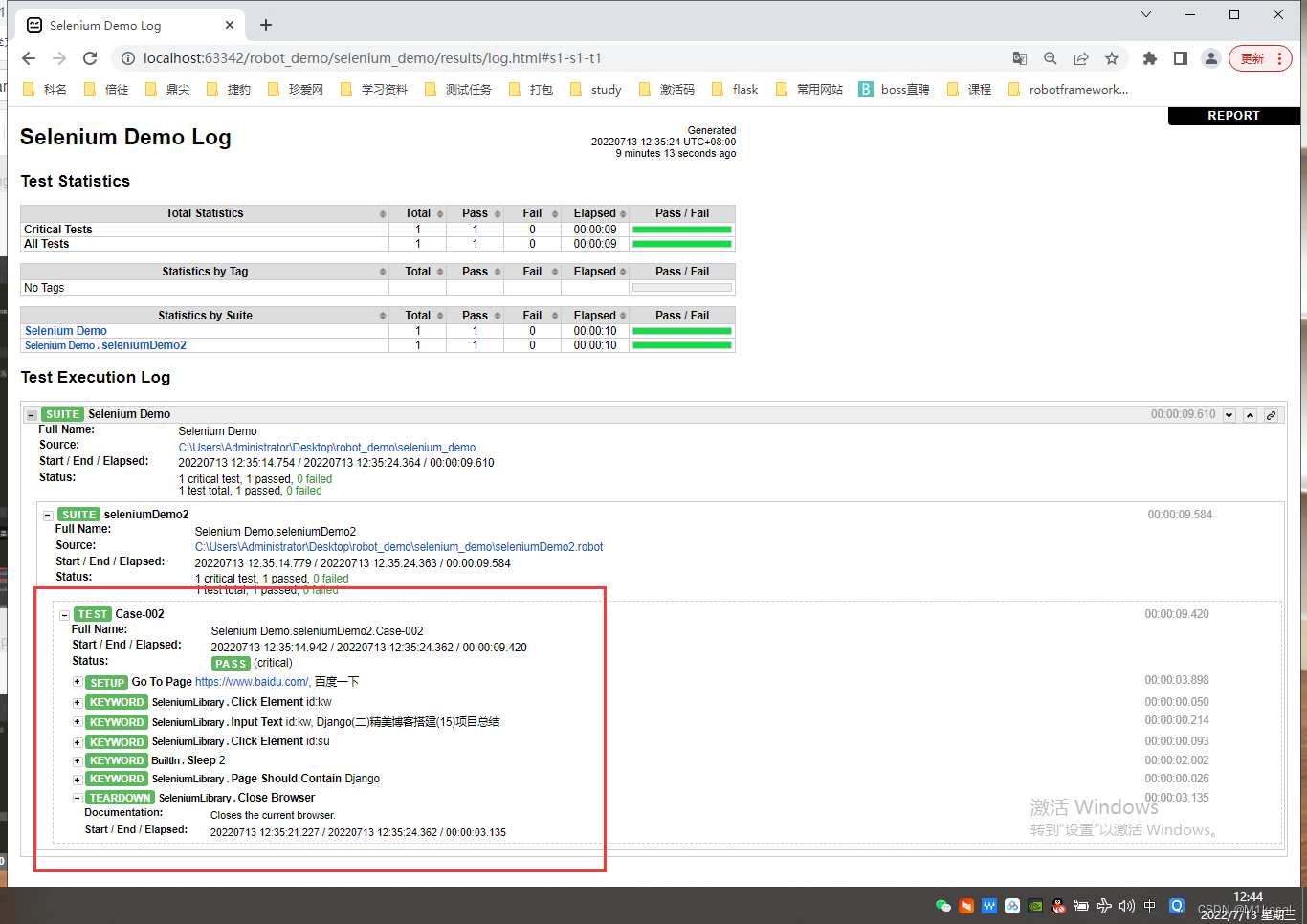
*** Settings ***
Library  SeleniumLibrary
Test Setup  Go To Page   https://www.baidu.com/     use Baidu Search
Test Teardown  Close Browser

*** Test Cases ***
Case-002
    Click Element   id:kw
    Input Text     id:kw    Django( Two ) Exquisite blog construction (15) Project summary
    Click Element   id:su
    Sleep  2
    Page should Contain  Django

*** Keywords ***
Go To Page
    [Arguments]  ${
    url}  ${
    title}
    Open Browser  ${
    url}  Chrome
    Sleep  2
    Page should Contain  ${
    title}
边栏推荐
- Adding an index by Oracle causes other users to lose their query permissions on this table
- 金融市场暴跌忍不住想抄底?劝你看完本文再做决定
- Send your code into space and develop 'the greatest work' with Huawei cloud
- umi 3.0模版
- 斗地主包含抢地主环节
- Why is it difficult for girls to learn programming? Is it the wrong way of thinking or the wrong way of learning?
- H5实现生成urlscheme并从H5跳转到小程序
- Ignore, on duplicate key update, delayed in MySQL
- Storage system lighting sorting
- 51nod 1413 权势二进制
猜你喜欢

女生学编程为什么难?是思维方式不对还是学习方式不对?

Wechat applet uni app uses uni Getuserprofile to realize wechat authorized login (with source code)

"Open source star picking program" harbor high availability cluster design and deployment (practice + video), based on offline installation

Shanghai port shipping AI container AI Unicorn gathers flying pupils, and the market share of port and shipping AI products is leading, driving the development of the whole industrial chain of port an

Basic concepts
ModuleNotFoundError: No module named ‘fake_ useragent‘

【直播回顾】OpenHarmony知识赋能六期第三课—OpenHarmony智能家居项目之控制面板功能实现

ESP8266 lua入门(二)

实现意识的远程直接电磁通信,东大团队联合新加坡国大等构建电磁脑机超表面,有望成为全新通信范式

验证码与登录页面
随机推荐
万字详解SSH(SSH登录原理+SSH配置+模拟实现SSH免密登录)
吴恩达撰文:发展 AI 职业生涯的重要步骤——项目实践
UMI 3.0 template
埃森哲22年《技术展望》报告:数字化转型将迎来下一个十年
RobotFramework进阶(一)集成Pycharm及UI自动化用例编写
[design topics] project summary of graduation design topics based on C51 single chip microcomputer - 500 cases
验证码与登录页面
风险评估简介
GRE,MGRE实验
torch.max()和numpy.max()使用辨析
Vector
HCIP笔记(2)
第八十九期:对Pinia的简单思考
马斯克中止推特收购,分手费10亿美元
使用USBasp 通过ICSP模式给arduino UNO烧写程序
爱可可AI前沿推介(7.15)
The difference between arrow function and arrow function
C language · bugs and Solutions
顺序表
剧说职场:资深HR告诉你职场强人都有什么特征