当前位置:网站首页>普通异步发送代码编写
普通异步发送代码编写
2022-07-17 00:07:00 【Hyf 。】
目录
异步发送代码编写
1、创建Kafka工程

2、导入依赖
内容如下:
<dependencies>
<dependency>
<groupId>org.apache.kafka</ groudId>
<artifactId>kafka-clients</ artifactId>
<version>3.0.0</ version>
<dependency>
</ dependencies>

3、创建包:com.atguigu.kafka.producer
编写代码如下:
package com.atguigu.kafka.producer;
import org.apache.kafka.clients.producer.KafkaProducer;
import org.apache.kafka.clients.producer.ProducerConfig;
import org.apache.kafka.clients.producer.ProducerRecord;
import org.apache.kafka.common.serialization.StringSerializer;

import java.util.Properties;

public class CustomProducer {

    public static void main(String[] args) {

        // 0配置
        Properties properties = new Properties();

        // 连接集群 bootstrap.servers
        properties.put(ProducerConfig.BOOTSTRAP_SERVERS_CONFIG,"hadoop102:9092,hadoop103:9092");

        // 指定对应的key和value的序列化类型
        properties.put(ProducerConfig.KEY_SERIALIZER_CLASS_CONFIG,StringSerializer.class.getName());
        properties.put(ProducerConfig.VALUE_SERIALIZER_CLASS_CONFIG, StringSerializer.class.getName());

        // 1创建kafka生产者对象

        // “”hello
        KafkaProducer<String, String> kafkaProducer = new KafkaProducer<>(properties);


        // 2发送数据
        for (int i=0; i<5; i++) {

            kafkaProducer.send(new ProducerRecord<>("first","atguigu"+i));

        }
        // 3关闭资源
        kafkaProducer.close();
    }


}
4、测试前期准备
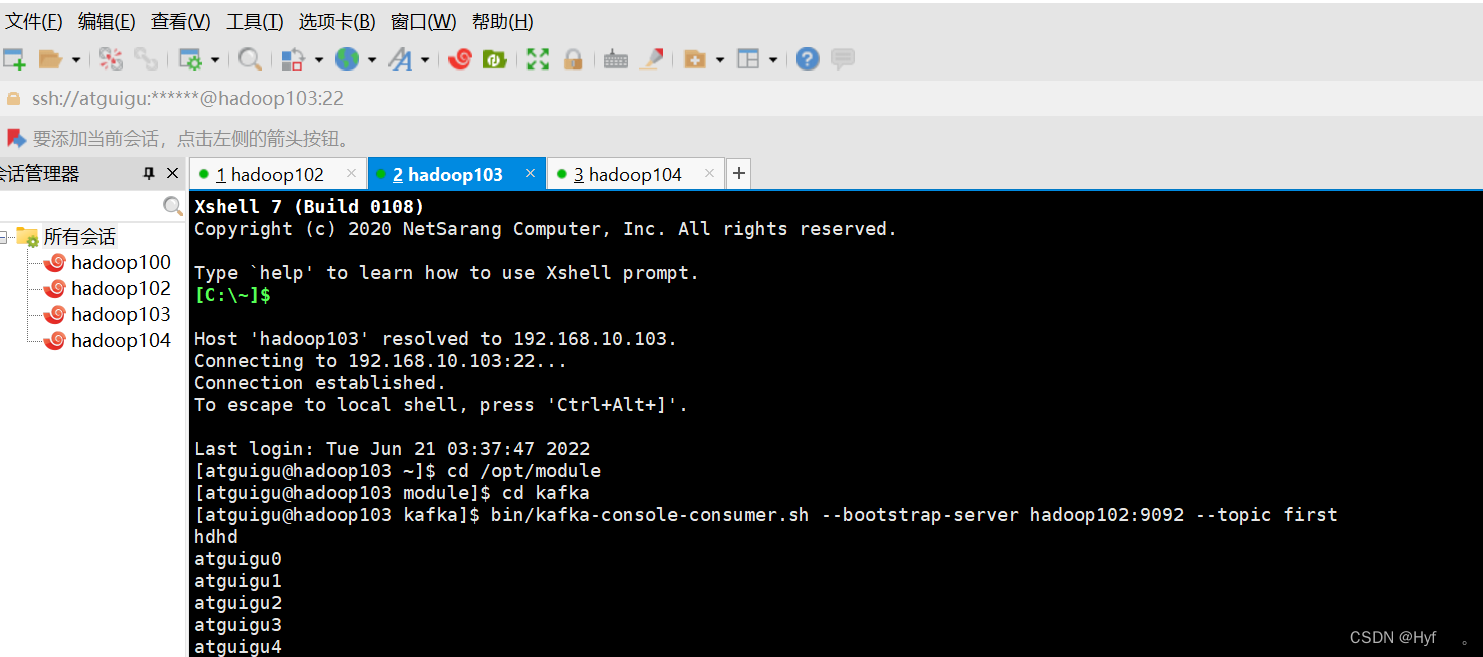
1)在Hadoop103上开启Kafka消费者
[[email protected] kafka]$ bin/kafka-console-consumer.sh --bootstrap-server hadoop102:9092 --topic first2)在 IDEA 中执行代码,观察 hadoop103 控制台中是否接收到消息。
如图所示则为正确
带回调函数的异步发送代码编写
回调函数会在producer收到ack时调用,为异步调用,该方法有两个参数,分别是元数据信息(RecordMetadata)和异常信息(Exception),如果 Exception 为 null,说明消息发 送成功,如果 Exception 不为 null,说明消息发送失败。
注意:消息发送失败会自动重试,不需要我们在回调函数中手动重试。
Ctrl+C + Ctrl+V
可以重新创建一个包名:CustomProducerCallback
代码编写:
只需更改for语句下的对应代码即可

测试前期准备
1)在Hadoop103上开启Kafka消费者
[[email protected] kafka]$ bin/kafka-console-consumer.sh --bootstrap-server hadoop102:9092 --topic first2)在 IDEA 中执行代码,观察 hadoop103 控制台中是否接收到如下消息。
3)在 IDEA 控制台观察回调信息。

同步发送API代码编写
同步发送API代码编写如下
Ctrl+C + Ctrl+V
可以重新创建一个包名:CustomProducerSync
代码编写:
只需更改for语句下的对应代码即可
只需在异步发送的基础上,再调用一下 get()方法即可。

还要注意他get类别

测试前期准备
1)在Hadoop103上开启Kafka消费者
[[email protected] kafka]$ bin/kafka-console-consumer.sh --bootstrap-server hadoop102:9092 --topic first2、在 IDEA 中执行代码,观察 hadoop103 控制台中是否接收到消息。
边栏推荐
- JS string to object JS object to string JS string to object
- ethereum rpc
- nmap和nikto扫描
- let和const、let、const和var的区别
- Uniapp calls the map to query the location and mark the location
- 元宇宙会给万亿市场的音乐产业带来哪些变化?
- 04_理解MVVM
- The applet is embedded in the web page, jumps to the applet and transmits parameters. The wechat applet realizes the authorization of official account to obtain openid
- router和keep-alive
- iptables和snort基本配置
猜你喜欢

Cento7安装mysql5.5以及升级5.7

波卡生态中“中继链”、“DOT”的常见问题解答

一文揭秘育碧等传统游戏大厂的NFT策略

自己封装的风格化的开关卡片组件
软件漏洞分析入门(三)
![[elementui El date picker date selector, the end time must not be earlier than the start time, and only the date of the specified number of days from the start time can be selected]](/img/73/af7ca3f670ffee18081b9ca6a9ccf6.png)
[elementui El date picker date selector, the end time must not be earlier than the start time, and only the date of the specified number of days from the start time can be selected]

uni-app微信公众号(4)——地址管理页面
自己封裝的風格化的開關卡片組件

知名啤酒百威布局NFT,试图揭开“蓄谋已久”的上链面纱?

Express的使用方法,路由的匹配与使用
随机推荐
15 设计电影租借系统
Modifier of v-on
记一次用canvas做出腾讯云首页banner流光效果的经历
Use bat to automatically execute CMD commands (multiple commands or a single command)
同学们不要全抄我的代码哈 记得改一改 要不我俩都要G
(6) Test command
今天的码农女孩做了关于生命周期的笔记以及动态时钟的练习
let和const、let、const和var的区别
el-form特殊字符校验
一文盘点估值超过1亿美元的NFT项目
JSX compilation
Introduction to software vulnerability analysis (II)
Timestamp conversion time
Promise的基本使用
二分法查找
uni-app微信小程序——商城(8)——订单详情
Uni app wechat official account (5) - add and modify addresses
JS replaces a character in the string, and JS modifies the specified character in the string
15 数据流的第 K 大数值
Uni app wechat applet - Mall (7) - Product Details