当前位置:网站首页>Use VRRP technology to realize gateway equipment redundancy, with detailed configuration experiments
Use VRRP technology to realize gateway equipment redundancy, with detailed configuration experiments
2022-07-26 03:20:00 【Network siege lion summary】
List of articles
Preface
In the enterprise network, layer-3 switches or routers are generally used as gateway devices , The gateway device is connected with an exit router or firewall to access the external network , If the gateway device in the enterprise fails , As a result, the terminal equipment of the intranet cannot access the public network . To avoid this happening ,VRRP( Virtual router redundancy protocol ) Technology can realize redundant backup of gateway equipment , Even if one gateway device goes down , The other can also forward traffic , Ensure that the intranet terminal can access the Internet normally .
One 、VRRP The principle of Technology
Because a network card can only be configured with one gateway address , So the two gateway devices jointly create one ip Address , When one of the devices goes down , Another device can also continue to maintain this virtual ip, Realize the redundant backup effect of gateway equipment .
Two 、VRRP Experiment and configuration
1、 The topology
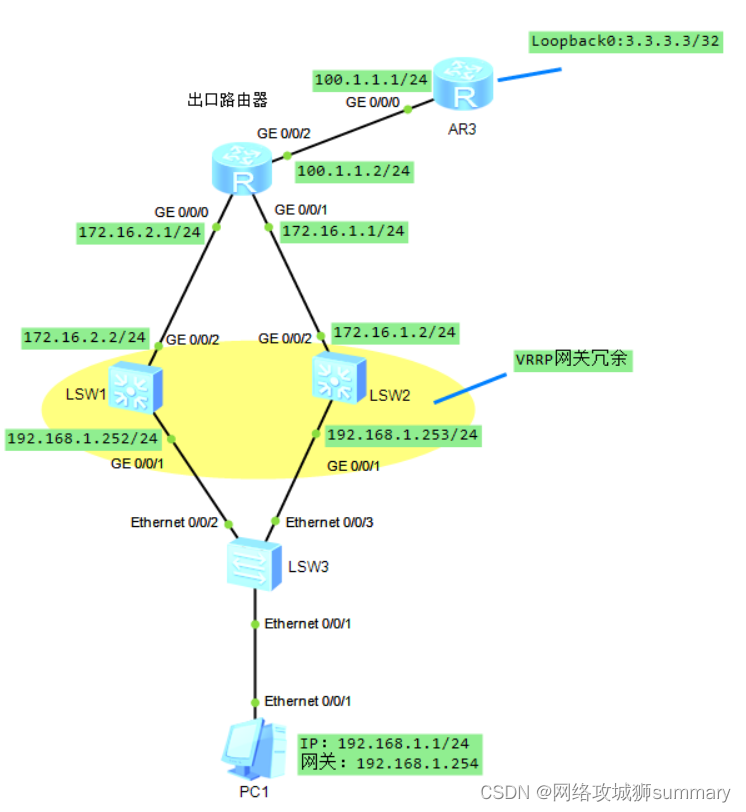
2、 Introduction to experimental topology
- PC1 It is the terminal equipment of the intranet .LSW3 It's the access switch .
- LSW1 and LSW2 It's a gateway device , Used to realize gateway redundancy .LSW1 Of GE0/0/1 Oral ip The address is 192.168.1.252/24,LSW2 Of GE0/0/1 Oral IP The address is 192.168.1.253/24, They use VRRP Technology jointly virtualizes a gateway address 192.168.1.254/24.
- Above the gateway device is an exit router .
- Router AR3 Simulate operator network , The loopback port simulates an address in the public network .
3、 Experimental configuration
VRRP Configuration command
| command | remarks |
|---|---|
| vrrp vrid 10 virtual-ip 192.168.1.254 | Configure under this port VRRP, And set the virtual address to 192.168.1.254 |
| vrrp vrid 10 priority 200 | Set the primary routing priority of this port to 200, The default priority is 100 |
| vrrp vrid 10 track interface g0/0/2 reduced 150 | When an uplink port failure is detected , Automatically reduce priority 150, Make the standby port the primary port |
| display vrrp | Show vrrp Configuration result |
Device configuration
LSW3:
vlan 10
int e0/0/2
port link-type trunk
port trunk allow-pass vlan 10 // Allow labeling VLAN10 The data frame passes through

int e0/0/3
port link-type trunk
port trunk allow-pass vlan 10 // Allow labeling VLAN10 The data frame passes through

int e0/0/1
port link-type access
port de v 10
LSW1:
vlan 10
int vlanif 10 // establish vlanif Interface
ip add 192.168.1.252 24
int g0/0/1
port link-type trunk
port trunk allow-pass v 10
int vlanif 10
vrrp vrid 10 virtual-ip 192.168.1.254 // Configure under this port VRRP, And set the virtual address to 192.168.1.254
 vrrp vrid 10 priority 200 // Set the primary routing priority of this port to 200, The default priority is 100

// When an uplink port failure is detected , Automatically reduce priority 150, Make the standby port the primary port
vrrp vrid 10 track interface g0/0/2 reduced  150

vlan 20
int vlanif 20
ip add 172.16.2.2 24
int g0/0/2
port link-type access
p d v 20

// Configure dynamic routing protocol in the intranet OSPF, Ensure intranet communication
ospf 1 router-id 2.2.2.2
area 0
network 172.16.2.0 0.0.0.255
network 192.168.1.0 0.0.0.255

ip route-s 0.0.0.0 0 172.16.2.1  // Configure the default route with static route
LSW2:
vlan 10
int vlanif 10
ip add 192.168.1.253 24
int g0/0/1
port link-type trunk
port trunk allow-pass v 10
int vlanif 10
 vrrp vrid 10 virtual-ip 192.168.1.254  // Configure under this port VRRP, And set the virtual address to 192.168.1.254

vlan 20
int vlanif 20
ip add 172.16.1.2 24
int g0/0/2
port link-type access
p d v 20

// Configure dynamic routing protocol in the intranet OSPF, Ensure intranet communication
ospf 1 router-id 1.1.1.1
area 0
network 172.16.1.0 0.0.0.255
network 192.168.1.0 0.0.0.255

ip route-s 0.0.0.0 0 172.16.1.1  // Configure the default route with static route
 Exit router :
int g0/0/0
ip add 172.16.2.1 24
int g0/0/1
ip add 172.16.1.1 24
int g0/0/2
ip add 100.1.1.2 24

// To configure easy ip, Convert the packet source address of the intranet accessing the public network into the public network address of the interface
acl number 2000
 rule 5 permit
int g0/0/2
nat outbound 2000

ip route-s 0.0.0.0 0 100.1.1.1

// Configure dynamic routing protocol in the intranet OSPF, Ensure intranet communication , Two gateway devices ,OSPF It can also play the role of equipment redundancy
ospf 1 router-id 3.3.3.3
area 0
network 172.16.2.0 0.0.0.255
network 172.16.1.0 0.0.0.255
 Operator router :
int g0/0/0
ip add 100.1.1.1 24
int loo0
ip add 3.3.3.3 32
3、 ... and 、 experimental result
- Use command
display vrrpYou can see vrrp The state of the interface , You can see that in the picture LSW1 yes Master Main equipment , fictitious ip yes 192.168.1.254, Priority is 200.

- LSW2 The state of is Backup Spare equipment , fictitious ip yes 192.168.1.254, Priority is the default 100.

- Use PC1ping The address of the public network , Discovery is through .

- When the main link is disconnected, simulate the main equipment downtime , After a period of time, the backup device will automatically forward traffic .


summary
Use VRRP Redundancy of gateway equipment , Avoid a single point of failure , Suitable for deployment in the enterprise network . Of course, it's not just gateways , Any important node ip Both devices can be used for redundancy , So as to increase the stability of the system .
边栏推荐
- STM32——DMA笔记
- Opencv 以指定格式保存图片
- Leetcode · daily question · sword finger offer | | 115. reconstruction sequence · topological sorting
- 【无标题】
- YOLOv3: An Incremental Improvement
- Unknown-Aware Object Detection:Learning What You Don’t Know from Videos in the Wild(CVPR 2022)
- Leetcode · 83 biweekly match · 6128. best poker hand · simulation
- els 初始化窗口类
- ue4如何进行静态渲染?5个步骤生成静态渲染
- Canvas - ECG design and how to clean the canvas
猜你喜欢

UE4 how to render statically? 5 steps to generate static rendering
图解LeetCode——5. 最长回文子串(难度:中等)

TCP experimental verification

Opencv annotates the image (picture frame + writing)
Opencv 在图像上进行标注(画框+写字)
![[STL]优先级队列priority_queue](/img/79/d13913cbb9d98f936a9501633b38bf.png)
[STL]优先级队列priority_queue

js中数组排序的方法有哪些
![[NOIP2001 普及组]装箱问题](/img/b7/1310b3e68d0ee016465fc069315af6.png)
[NOIP2001 普及组]装箱问题

Quick check of OGC WebGIS common service standards (wms/wmts/tms/wfs)

大厂面试都面试些啥,看了不亏(一)
随机推荐
Completion report of communication software development and Application
An article allows you to understand the relevance of cloud native containerization
Understand preloading and lazy loading, and learn slow animation
Win11 hide input method status bar method
[noip2001 popularization group] the problem of maximum common divisor and minimum common multiple
班级里有一群学生考试结果出来了,考了语文和数学两门,请筛选出总分是第一的同学
Swin Transformer【Backbone】
Configuration and use of virtualservice, gateway and destinationrule of istio III
canvas——心电图的设计,以及如何清理画布
Cloud native guide what is cloud native infrastructure
ext4、ntfs、xfs、btrfs、zfs、f2fs和reiserFS性能对比
LeetCode·
2022-07-21 study notes of group 4 self-cultivation class (every day)
els 窗口设置、WM_CREATE、WM_PAINT
LeetCode·每日一题·剑指 Offer || 115.重建序列·拓扑排序
Jsd-2204-cool shark Mall (Management Commodity module) -day02
Installation and operation of orb-slam2 under ROS
Use eventlog analyzer for log forensics analysis
在混合云中管理数据库:八个关键注意事项
Opening method of win11 microphone permission