当前位置:网站首页>Common CMD instructions
Common CMD instructions
2022-07-26 07:00:00 【Favour72】
Catalog
Directory related instructions
The catalog represents compliance
cd Directory name Switch to the corresponding directory
Create directory md Directory name
View the contents of the catalog file dir
type text file View the contents of the text file
del Directory name Delete all files in the directory , But don't delete the directory
rd Directory name /s /q Delete the directory with content
Command history On the keyboard ↑ Next ↓ key
help help Check all commands help command View command usage
View Unicom ping + The name of the plane ping www,baidu.com
.cmd Command run
Press on the computer keyboard at the same time win and R key ( stay alt The left side of the key ), A window will pop up

Input cmd,anenter Or confirm to enter cmd In the operation panel

Access disk
If you want to quickly access your computer D Disk or E disc , You can input d: e:( Case insensitive )
( In the following example, the system cannot find the specified drive because my computer does not d disc )

Directory related instructions
The catalog represents compliance
| / | representative root directory |
| ./ | Current directory |
| ../ | Previous Directory |
Toggle directory
cd Instructions
cd Directory name Switch to the corresponding directory
| cd ../ | Switch to the previous Directory |
| cd / | Switch to the root directory |
| cd Users | Switch to Users Catalog |
| cd Users\Administrator | Switch to Users\Administrator Catalog |
Take a chestnut :
Pay attention to the path problem in the red box

Tips
If the file character is too long, you can use the following prompt
The first letter +tab You can complete the corresponding documents / Folder name
Create directory md Directory name
md my Create a name my The catalog of

At this time, we can see in C A file named my Folder
We create a folder called my Of txt file , Now to use cmd Command to check him
View the contents of the catalog file dir

About this my.txt file , You should know the following two instructions
type text file View the contents of the text file
The text is as follows

see text file The content of ( When there is no content written, it will be displayed as empty )

Now delete this my.txt file
del file Delete file

Folder my Medium my.txt The document was deleted

del Directory name Delete all files in the directory , But don't delete the directory
(y yes yes ,N yes no, Ask if you want to delete )
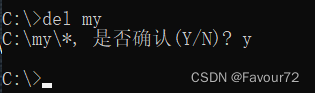
rd Directory name /s /q Delete the directory with content
rd /s /q quiet Mode delete directory and content
First switch to the upper level and then delete , Otherwise I can't find it
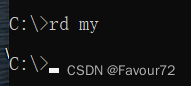
Command history
On the keyboard ↑ Next ↓ key
It is very convenient when instructions need to be reused
help
help Check all commands
help command View command usage
If you forget how to use an instruction , It would be help

Find an instruction alone
help rd see rd Tutorial on the use of commands 
cls Clear the screen
There are too many instructions and data , Clear the screen
View this machine ip
ipconfig
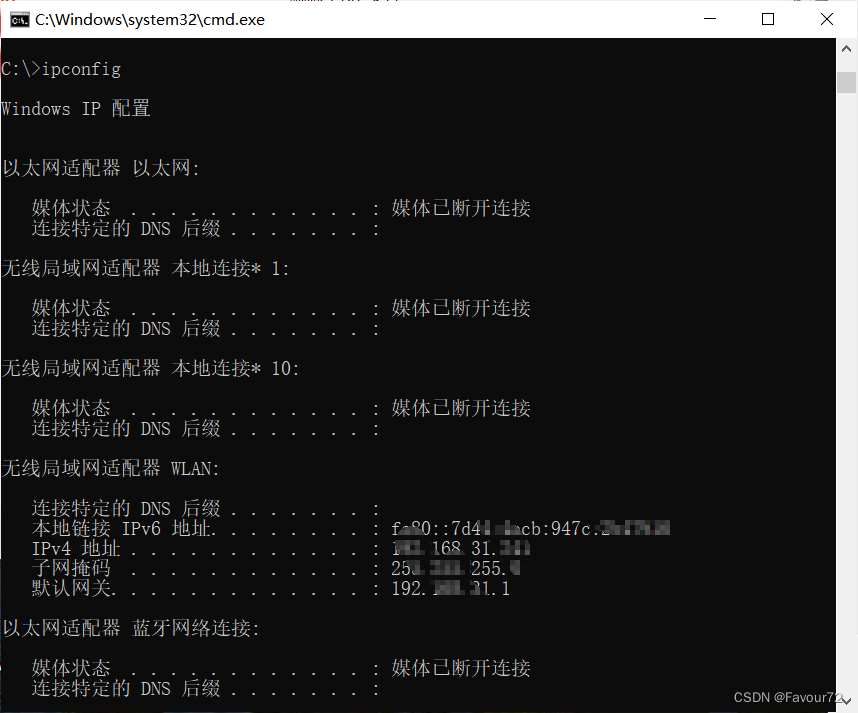
View Unicom
ping + The name of the plane
ping www,baidu.com
Used to test whether the network is unblocked ping ip( Host name )
calc Turn on the calculator

边栏推荐
猜你喜欢
![[untitled] reprint](/img/6c/df2ebb3e39d1e47b8dd74cfdddbb06.gif)
[untitled] reprint

How to use Hyper-V in win10 Home Edition
How does the national standard gb28181 protocol easygbs platform realize device video recording and set streaming IP?
常用的cmd指令
![[graduation season _ advanced technology Er] farewell to yourself who has been confused for the past two years. Regroup, junior I'm coming](/img/04/3121514fcd8fcf1c939cbca7f4c67a.jpg)
[graduation season _ advanced technology Er] farewell to yourself who has been confused for the past two years. Regroup, junior I'm coming

浅谈eval与assert一句话木马执行区别

LeetCode刷题1:题目分类
XSS labs (1-10) break through details

Queue assistant | product update log in June 2022

“蔚来杯“2022牛客暑期多校训练营1补题记录(ACDGIJ)
随机推荐
buuReserve(4)
Ruby on rails Code Execution Vulnerability (cve-2020-8163) technical analysis, research, judgment and protection
Display Chinese characters in uitoolkit
MySQL table write lock
树莓派连接天猫精灵音箱通过蓝牙播放音乐的方法
On the difference between Eval and assert
微信小程序 - 从入门到入土
【QT】详解 *.pro、*.pri、*.prf、*.prl文件
Drools(3):Drools基础语法(1)
[Star Project] small hat aircraft War (III)
日志轮转logrotate
源代码加密技术发展阶段
Benefits of the builder model
Esxi 7.0 installation supports mellanox technologies mt26448 [connectx en 10gige, PCIe 2.0 5gt/s] driver, and supports the cheapest 10GB dual fiber network card
Queue assistant | product update log in June 2022
【无标题】转载
20220725 compensator in automatic control principle
IDEA——使用@Slf4j打印日志
Function of hot air pad
【Star项目】小帽飞机大战(四)