当前位置:网站首页>06 Maui, WPF uses MVVM toolkit framework to build MVVM program
06 Maui, WPF uses MVVM toolkit framework to build MVVM program
2022-07-19 04:12:00 【Little girl】
I talked about it before. ,MVVM Architecture is a design idea , Not just for WPF,MAUI, And others C# Development also applies . and MVVM Frame besides MVVM Toolkit, also MVV MLight ( Stop maintenance ),Prism wait , This chapter mainly studies Toolkit.
1. MVVM Toolkit Frame features
- Is a lightweight and open source free MVVM frame
- Developed and maintained by Microsoft
2. MVVM Toolkit Common basic types
- ObservableObject All object properties must inherit from this type , And it provides SetProperty Method , Use SetProperty Method automatically notifies the front end that the properties have changed . Be careful , When the attribute value remains unchanged , The method SetProperty Not trigger , Only when the attribute value changes .
- RelayCommand Click event of front-end page binding command
- AsyncRelayCommand Asynchronous click event of front-end page binding command , The return value is Task
- WeakReferenceMessenger News subscription
- ObservableRecipient News subscription
- IRecipient News subscription
3. Next, let's introduce in WPF How to use
3.1 Create a new one WPF project ,Nuget Search for installation Microsoft.Toolkit.Mvvm

4. Implement a function , When you click the button on the page , hold TextBox The value of is sent to the background page , And bind the value back to the front page .

4.1 First build a class , Inherited from ObservableObject class

1. The shortcut to creating a complete attribute is to enter propfull Press two times. Tab
2. You have to set SetProperty Method . When the attribute value changes , Inform the front .
The original way of writing

The third party MVVM In the frame ObservableObject Is to implement the INotifyPropertyChanged and INotifyPropertyChanging Interface base class . So the principle of native writing and third-party writing is not much different .
4.2 stay S71200ViewModel Class , Add a command , And instantiate .

Synchronization method , You can also change the asynchronous way

4.3 Front end component page

- Use Binding Is a fixed grammar , Bind the properties of the background
- Binding mode ,model It's a (mode) Is the type of enumeration , Altogether 5 A species
2.1 OneWay( Update the target attribute when the source changes )
2.2 TwoWay( Source change updates target and target change updates source )
2.3 OneTime( Set the target only according to the source , It won't change in the future )
2.4 OneWayToSource( And OneWay contrary )
2.5 Default Default ( It can be one-way or two-way , It depends on whether the valued source or target has get or set Designated )- UpdateSourceTrigger attribute , because WPF in , about TextBox, except Text All attribute sources other than attributes will be updated immediately as the attributes change ; however Text Properties are different , It is updated only after the target element is out of focus . So if you want to make TextBox Changes in are immediately transmitted to the source , You need to set UpdateSourceTrigger To control . If this property is not set , The value obtained in the background is null .
Reference resources : The literature 1, The literature 2
4.4 hold S71200ViewModel Associate with the page

4.5 Test verification , When you click the page button , Trigger the command .

4.6 Another way to get the front page value , But this way is different from MVVM irrelevant , You can also get TextBox The value of the input ,
 4.7 Native implementation of button events

4.8 How to get the value in the background , open .cs Class file

4.9 Address yes TextBox Defined Name, A random name . Go to the background to get the value entered by the foreground .

5. Message subscription WeakReferenceMessenger
5.1 How to publish messages
// string  The type of message published
WeakReferenceMessenger.Default.Sen<string>(" It's me who posted it ");
5.2 How to subscribe to publish messages
5.2.1 Subscribe to published messages through anonymous methods
// subscribe
WeakReferenceMessenger.Default.Register<string>(this,method);
//string  It is the data type passed during subscription
// this  Point to the currently used class

// Subscription method
public void method(object obj,string msg){

// msg  Data received
}
Be careful : Among the published message types , If the release is string type , All subscribed string Type of message , Can receive all published string Type of message .
5.2.2 By designation token To publish the specified message
WeakReferenceMessenger.Default.Send<string,string>(" Message sent ", "token");5.2.3 And only receive fixed when subscribing token Published messages
// subscribe , the second  string  Namely  token
WeakReferenceMessenger.Default.Register<string,string>(this,"token",method);
//string  It is the data type passed during subscription
// this  Point to the currently used class

// Subscription method
public void method(object obj,string msg){

// msg  Data received
}
6. Message subscription ObservableRecipient,IRecipient
6.1 In the class to implement message subscription or publishing , Realization ObservableRecipient The type and IRecipient Interface

6.2 Currently, I have released a string Type of message
WeakReferenceMessenger.Default.Sen<string>(" Release the news ");6.3 Then the implementation method can get the published string Type of message
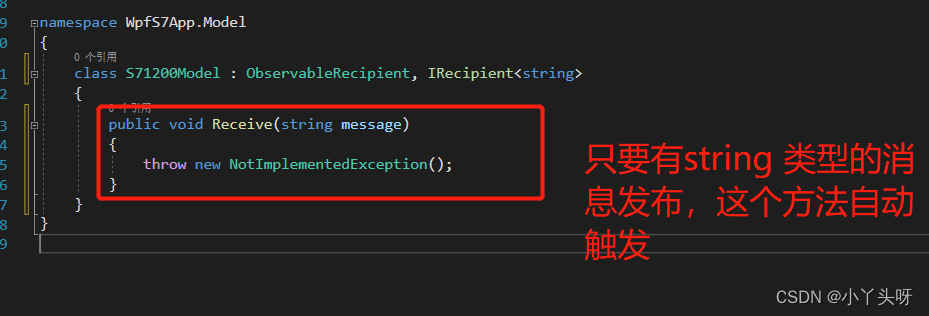
Be careful , Want messages to be subscribed , To put IsActive assignment by true Talent

6.4 News subscription and release , You can also publish and subscribe through different objects .
for example , Currently, I subscribe to this message , Just want to subscribe to a certain class , Don't want it to subscribe to all string Type of message
The release can be written like this
WeakReferenceMessenger.Default.Send< Object class >();
Subscriptions can be specified in this way

In this way, you can subscribe to the specified object to publish the message content , Not all of them will subscribe to .
7. IOC Inject , At present, this framework does not provide , But it can be done in other ways ico Handle
1. Why use ioc, For example, at present, we need to write a data interface for the page to adjust data , Anyway, some interface data services , Data operation, etc
7.1 for example , Currently, establish an interface service class , Used for data operation 
7.2 Then inside the class , By injection , Use this interface for data operation

7.3 If you want to be the same as above , stay wpf Use ioc Inject , That should be handled like this .
First of all Nuget Install a library , This library can support ioc Injected Library

7.4 After installation , Initialization required . Mainly this kind of treatment ioc The library of , Its life cycle must be synchronized with our application , So you need to initialize the application , This ioc Containers should also be initialized
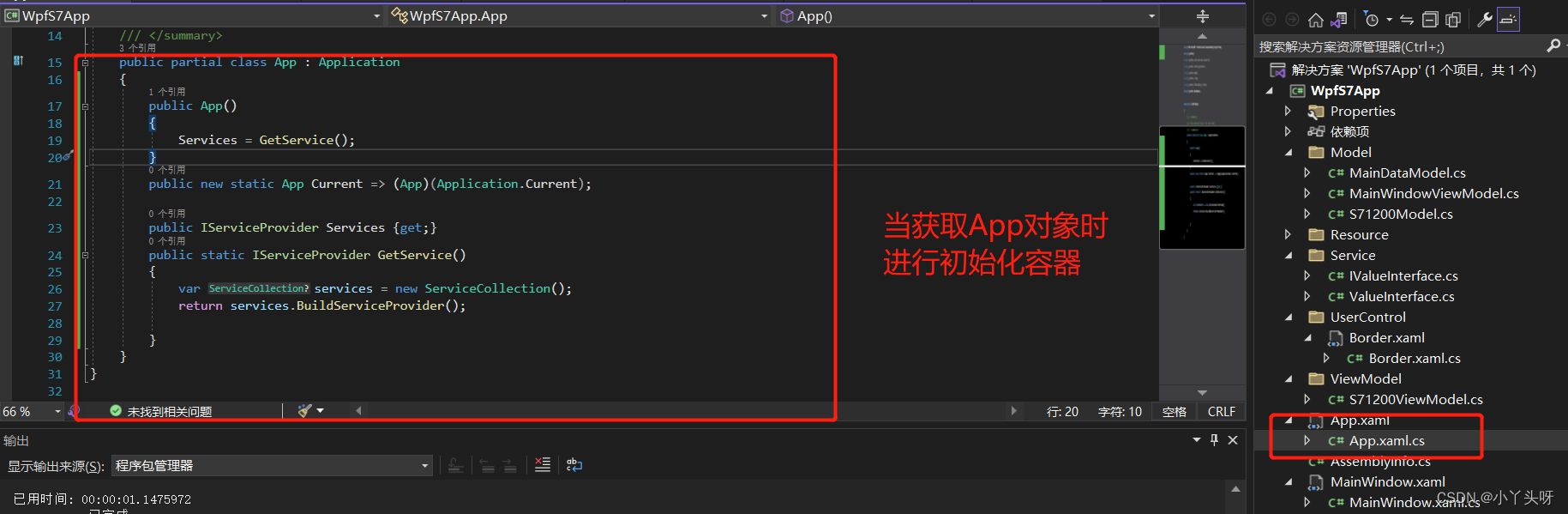
7.5 In the initialization method , For interface registration

7.6 After writing this way , Due to the previous use of mvvm When initializing binding in , It was written like this before
this.DataContext=new MainWindowViewModel();But now it needs to be changed to this , You need to put this MainWindowViewModel Sign up to ioc In the container

Then it will look like this when initializing the binding , adopt Services To get
this.DataContext=App.Current.Services.GetService(typeof(MainWindowViewModel));Container initialization code
  public partial class App : Application
    {
        public App()
        {
            Services = GetService();
        }
        public new static App Current => (App)(Application.Current);

        public IServiceProvider Services {get;}
        public static IServiceProvider GetService()
        {
            var services = new ServiceCollection();
            services.AddSingleton<IValueInterface, ValueInterface>();
            services.AddScoped<MainWindowViewModel>();
            return services.BuildServiceProvider();

        }
}I suggest you watch the video directly , After all, I just record the learning process .
边栏推荐
- windows10:vscode下go语言的适配
- Xdc 2022 Intel technology special session: Intel Software and hardware technology builds the cornerstone of cloud computing architecture
- IDEA配置SFTP,SSH非常方便的部署以及定位错误日志
- To build agile teams, these methods are indispensable
- Matlab drawing activation function sigmoid, relu
- hello world驱动
- EAS(能量感知调度)绿色节能调度器
- 1. PostgreSQL queries the data of nearly 24 hours according to the dynamic table name
- minimum spanning tree
- 高性能与经济性兼备:傲腾 持久内存助力移动云应对严苛内存挑战
猜你喜欢

Chapter 5 performance platform godeye source code analysis - third party module

Small program completion work wechat online education video on demand learning small program graduation design (2) small program function
小程序毕设作品之微信在线教育视频点播学习小程序毕业设计(2)小程序功能

Openresty 做静态资源服务器

Graphic verification code verification

ASP.NET1==visual studio创建asp.net demo

Wechat online education video on demand learning applet graduation design (3) background function

Chapter 1 performance platform godeye source code analysis - overall architecture

基于OpenVINO Model Server打造人像抠图服务器

Intel helps open medical service and promote the intellectualization of ultrasonic prenatal examination
随机推荐
Dapr series (I)
Find the central subscript of the array
Chapter 2 - create and maintain MySQL database
C# 详解out输出参数
小程序毕设作品之微信电子书阅读小程序毕业设计(6)开题答辩PPT
小程序畢設作品之微信在線教育視頻點播學習小程序畢業設計(3)後臺功能
A Tutorial on Learned Multi-dimensional Indexes
Understand │ what is cross domain? How to solve cross domain problems?
小程序毕设作品之微信电子书阅读小程序毕业设计(5)任务书
【超能云终端创领先机】本地计算云端管理,英特尔助力教育数字化
项目套价是什么意思?
无心剑汉英双语诗005.《抒怀》
小程序毕设作品之微信在线教育视频点播学习小程序毕业设计(4)开题报告
让程序员早点下班的《技术写作指南》
微信附近的人小程序怎么开(开通附近小程序的方法)
XDC 2022 Intel 技术专场:英特尔软硬件技术构筑云计算架构基石
机器学习10:集成学习
Typescript数组/对象/字符串/函数参数的解构使用
7.16 simulation summary
小程序毕设作品之微信电子书阅读小程序毕业设计(8)毕业设计论文模板