当前位置:网站首页>OSPF comprehensive experiment
OSPF comprehensive experiment
2022-07-19 15:28:00 【Word_ Smith_】
One 、 Experimental topics
The topology and topic requirements of the experiment are shown in the figure below :

Two 、 The experimental steps
1、 open ensp, Build network topology

2、 Divide network segments and allocate them reasonably IP

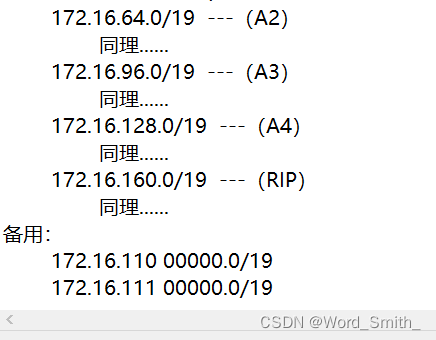
Public network address
R3

R5
[r5]int Serial 4/0/0
[r5-Serial4/0/0]ip add 45.0.0.1 24
R6
[r6]int Serial 4/0/0
[r6-Serial4/0/0]ip add 46.0.0.1 24
R7
[r7]int g 0/0/0
[r7-GigabitEthernet0/0/0]ip add 47.0.0.1 24
R4
[isp]int Serial 4/0/0
[isp-Serial4/0/0]ip add 34.0.0.2 24
[isp-Serial4/0/0]int s 4/0/1
[isp-Serial4/0/1]ip add 45.0.0.2 24
[isp-Serial4/0/1]int s 3/0/0
[isp-Serial3/0/0]ip add 46.0.0.2 24
[isp-Serial3/0/0]int g 0/0/0
[isp-GigabitEthernet0/0/0]ip add 47.0.0.2 24
[isp-GigabitEthernet0/0/0]int l0
[isp-LoopBack0]ip add 4.4.4.4 24
Configure default
R3
[r3]ip route-static 0.0.0.0 0 34.0.0.2
R5
[r5]ip route-static 0.0.0.0 0 45.0.0.2
R6
[r6]ip route-static 0.0.0.0 0 46.0.0.2
R7
[r7]ip route-static 0.0.0.0 0 47.0.0.2
Be careful :
In order to find problems in time , At this stage, we can check whether there is a problem with the previous configuration , In the public network environment, two people interact with each other ping once

3、 To configure MGRE Environmental Science
R3 For example :
[r3]int Tunnel 0/0/0
[r3-Tunnel0/0/0]ip add 172.16.1.1 29
[r3-Tunnel0/0/0]tunnel-protocol gre p2mp
[r3-Tunnel0/0/0]source 34.0.0.1
[r3-Tunnel0/0/0]nhrp network-id 100
[r3-Tunnel0/0/0]nhrp entry multicast dynamic
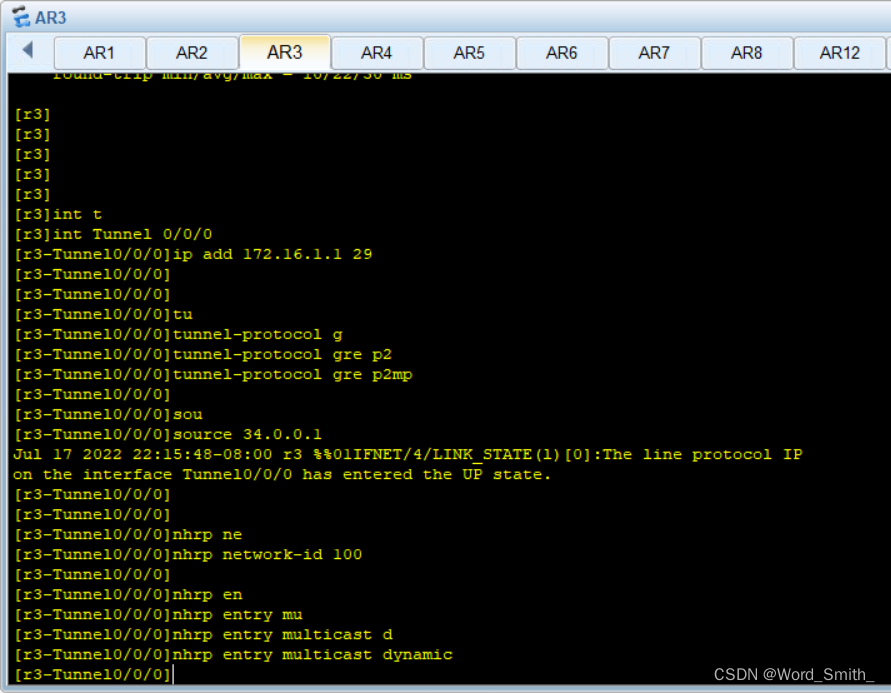
R5/6/7 Same operation , And so on
see R3 Neighborhood watch

At the same time, both ping Let's test

4、 To configure OSPF
R1
[r1]ospf 1 router-id 1.1.1.1
[r1-ospf-1]a 1
[r1-ospf-1-area-0.0.0.1]network 172.16.0.0 0.0.255.255
R2
[r2]ospf 1 router-id 2.2.2.2
[r2-ospf-1]a 1
[r2-ospf-1-area-0.0.0.1]network 172.16.0.0 0.0.255.255
R3
[r3]ospf 1 router-id 3.3.3.3
[r3-ospf-1]a 1
[r3-ospf-1-area-0.0.0.1]network 172.16.32.0 0.0.7.255
[r3-ospf-1-area-0.0.0.1]a 0
[r3-ospf-1-area-0.0.0.0]net
[r3-ospf-1-area-0.0.0.0]network 172.16.1.1 0.0.0.0
R5
[r5]ospf 1 rout
[r5]ospf 1 router-id 5.5.5.5
[r5-ospf-1]a 0
[r5-ospf-1-area-0.0.0.0]network 172.16.0.0 0.0.255.255
R6
[r6]ospf 1 router-id 6.6.6.6
[r6-ospf-1]a 0
[r6-ospf-1-area-0.0.0.0]network 172.16.0.0 0.0.3.255
[r6-ospf-1-area-0.0.0.0]a 2
[r6-ospf-1-area-0.0.0.2]network 172.16.64.1 0.0.0.0
R7
[r7]ospf 1 router-id 7.7.7.7
[r7-ospf-1]a 0
[r7-ospf-1-area-0.0.0.0]network 172.16.0.0 0.0.7.255
[r7-ospf-1-area-0.0.0.0]a 3
[r7-ospf-1-area-0.0.0.3]network 172.16.96.1 0.0.0.0
Empathy R8/9/10/11/12 And so on ......
5、 Route summary and anti ring
R3
[r3-ospf-1-area-0.0.0.1]abr-summary 172.16.32.0 255.255.224.0
[r3]ip route-static 172.16.32.0 19 NULL 0
Empathy R6/7/9/12 And so on ......
6、R3/6/7 To configure NET, Be able to access R4 Loopback
R3
[r3]acl 2000
[r3-acl-basic-2000]rule permit source 172.16.0.0 0.0.255.255
[r3-Serial4/0/0]nat outbound 2000
Empathy R6/7 And so on ......
7、 Manual certification
R1
[r1]ospf 1
[r1-ospf-1]area 1
[r1-ospf-1-area-0.0.0.1]authentication-mode md5 1 123
R2...R3...
边栏推荐
- 2022/7/17
- LeetCode 912. sort
- 【Renesas RA6M4开发板之I2C读取mpu6050】
- 天天基金上买基金是安全的吗?在线等答案
- 1.3.1 全排列问题
- Code compliance: five reasons why developers use helix QAC
- Arkui FAQ summary [Series 2]
- What should I pay special attention to when opening an account? Is it safe to open a stock account by mobile phone?
- C# wpf 使用ListBox实现尺子控件
- ARM系统调用异常 汇编
猜你喜欢






随机推荐
Pbootcms search SQL injection vulnerability
postman调用接口返回404的几种原因
测试图片
[dynamic memory management]
Cloudbees CI uses velero for disaster recovery (DR) proof of concept
我应该怎么设计我的博客?如何搭建一个体验好的博客?
[user article] examples of P4 consolidation practice guide disassemble resolve
idea 插件推荐
ARM未定义指令异常 汇编
02-线性结构3 Reversing Linked List
队列的实现(循序存储,链式存储)
N皇后问题(回溯法,排列树)
FMC sub card: 4-channel 12bit 3.2g, 2-channel 12bit, 6.4g AD acquisition / 5G acquisition card /6g acquisition card
重庆的哪个银行网点可以买到瑞兹基金产品?
Li Hongyi machine learning introduction -2022.07.11
马走斜日(回溯法)
Selenium三种等待方式以及Alert弹窗的三种处理方式
I'm new here, so please take care of me. (actually, it's not new here ^ ^, hello CSDN, I'm here.)
1.3.1 全排列问题
C# wpf 使用ListBox实现尺子控件