当前位置:网站首页>Use redis - Zset to make Leaderboard
Use redis - Zset to make Leaderboard
2022-07-19 01:37:00 【NNwanzi】
Use redis - zset Achieve leaderboards
extraction
Recently I made a request uri The function of leaderboard , The effect is as shown in the picture , Statistics issue uri Up to ten applications and each application sends uri The most 3 Users , Due to the statistics of all received uri, There is a large amount of data , And sql difficult to write , Written before the test sql The query time is up to ten minutes , Obviously, this does not meet the demand , Finally, it is determined to pass redis zset Structure to make the ranking .
Implementation process
One 、 receive uri Time statistics system and users
1. The main method
/** * <p/> Record audit information  * <p/> Desensitization state  0 No desensitization ,1 Desensitization succeeded ,2 Desensitization failed  {@link AgentAuditMaskStatusEnum} * * @param appName  Application system name  * @param account  Login account name  * @param url  visit URL Address  * @param ip  User source IP * @param maskStatus  Desensitization state  * @param detail  Audit details  */
public void log(String appName, String account, String url, String ip, int maskStatus, String detail, int length, long exeTime) {


    try {

        // Record app The leaderboard and account Ranking List
        String redisKey = RedisKeyConstant.RANKING_KEY + appName;
        RScoredSortedSet<Object> accountRanking = RedissonConfig.redissonClient.getScoredSortedSet(redisKey);
        //key =  Application name ,member =  Account name , Number of requests +1
        accountRanking.addScore(account,1);
        RScoredSortedSet<Object> appRanking = RedissonConfig.redissonClient.getScoredSortedSet(RedisKeyConstant.APP_RANKING);
        appRanking.addScore(appName, 1);

    } catch (Exception e){

        log.error(" Abnormal recording of audit information ", e);
    }
}
2. remarks
RedisKeyConstant :redisKey Constant enumeration class , Used to store redisKey
RScoredSortedSet: From org.redisson.api; Of Ordered set
redissonClient: you 're right , That thief is difficult to use redis Tools
RScoredSortedSet.addScore(): Add... To the element score1 value , If the element already exists , This method will add , amount to redis ZINCRBY
3. Code instructions
This method is used every time uri Record information , Here we get appName,account after , Generate two corresponding redisKey, Each represents the total Application ranking and User leaderboard under this application ,redisKey The effect is as follows :
Ranking list of users under Zen Application :
Application ranking :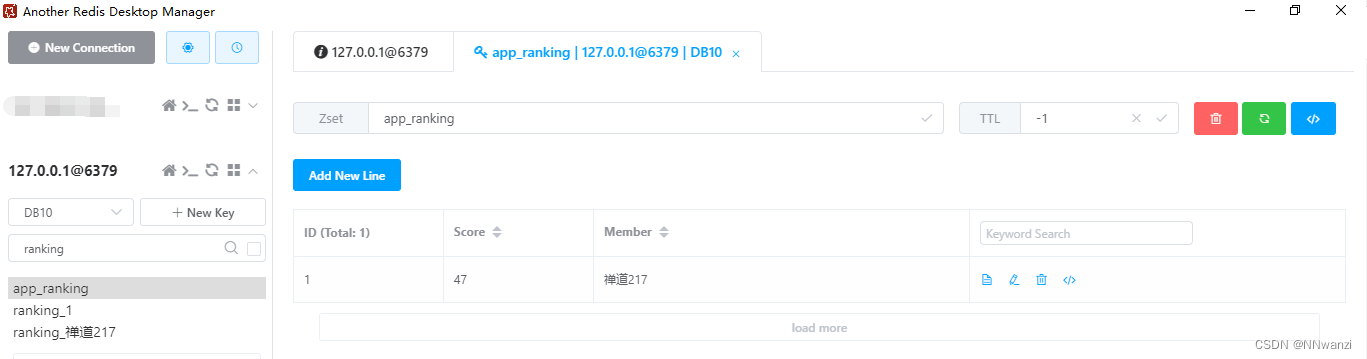
Two 、 from reids Get leaderboard information on
1. The main method
/** -  Refresh the cached in the agent monitoring page  -  Number of desensitization requests , Amount of desensitization data requested , Number of visits today , Latest user audit information  -  Refresh the agent monitoring record and insert the scheduled task ,20s once  -  Number of desensitization requests , Request desensitization data volume chart ,200w Table test speed :1.266s -  User behavior audit ,200w Table test speed :0.950s,mask_time Index improvement speed  =>0.1s -  Application side system daily visits top10 - ... */
@Scheduled(cron="*/20 * * * * ? ")
public void reportStatisticsRedisInfo() {

	{
    // Daily visits top10
	    List<MonitorAgentNumberTopVO> topVoList = new ArrayList<>();

	    // from app Get  MonitorVO.TOP_APP_NUM  A maximum of , take key and value Deposit in topVoList in
	    RScoredSortedSet<Object> appRankingRedisSet = redissonClient.getScoredSortedSet(RedisKeyConstant.APP_RANKING);
	    Collection<ScoredEntry<Object>> appRanking = appRankingRedisSet.entryRangeReversed(0, MonitorVO.TOP_APP_NUM);
	    topVoList = appRanking.stream().map(ScoredEntry -> new MonitorAgentNumberTopVO(ScoredEntry.getScore().intValue(), (String) ScoredEntry.getValue())).collect(Collectors.toList());

	    // From each account Get  MonitorVO.TOP_ACCOUNT_NUM  A maximum of , Deposit in topVoList in
	    for (MonitorAgentNumberTopVO topVo : topVoList) {

	        RScoredSortedSet<Object> accountRankingRedisSet = redissonClient.getScoredSortedSet(RedisKeyConstant.RANKING_KEY + topVo.getName());
	        // Every app Request the most account
	        Collection<ScoredEntry<Object>> accountRanking = accountRankingRedisSet.entryRangeReversed(0, MonitorVO.TOP_ACCOUNT_NUM);
	        List<String> topAccount = accountRanking
	                .stream()
	                .map(
	                        ScoredEntry ->(String)ScoredEntry.getValue()
	                )
	                .collect(Collectors.toList());
	        topVo.setAccountTop(topAccount);
	    }

	    map.put(MonitorVO.AGENT_NUMBER_TOP, JSONObject.toJSONString(topVoList));
	}
}
2. remarks
@Scheduled:spring Timer , Because this method also involves the monitoring of other attribute charts of the monitoring page , Because the query speed is slow , Take timer , Every once in a while, save a copy of the latest monitoring data to redis On , The monitoring page is constantly changing from redis Obtain monitoring data on
RScoredSortedSet.entryRangeReversed(0, MonitorVO.TOP_APP_NUM): from zset Score on ranking The first 0 to The first n Data
stream().map():java stream flow
3. Code instructions
- You can see that there is a redundant {}, This is because this method is relatively long , Here, different logic is divided by code blocks , There is no split into different methods .
- The code logic here is mainly , from redis Get the app ranking first Key, Read the top ten apps from it and save them to java Object, and then use the ranking prefix Splicing User ranking of each application , And then get such an application ranking object ( Of course , It is composed of ten such objects list Deposit in redis On ):
@Data
@NoArgsConstructor
public class MonitorAgentNumberTopVO {

    /** *  Traffic volume  */
    private Integer value;
    /** *  apply name  */
    private String name;
    /** *  User access displayed when mouse over top */
    private List<String> accountTop;

    public MonitorAgentNumberTopVO(Integer value, String name) {

        this.value = value;
        this.name = name;
    }
}
Four 、 from redis Get monitoring chart data on
1. The main method
/** *  Agent monitors page data  * @return */
public Result<MonitorVO> getMonitorData() {

    RMap<String, String> map = redissonClient.getMap(RedisKeyConstant.REPORT_STATISTICS);
    RMap<String, String> agentSystemMap = redissonClient.getMap(RedisKeyConstant.AGENT_SYSTEM_RESOURCE);
    MonitorVO vo = new MonitorVO(map,agentSystemMap);

    return Result.success(" Successful acquisition of monitoring data ", vo);
}
public MonitorVO(Map<String,String> map,Map<String,String> agentSystemMap) {

    // Application side system access top10
    setAppUserAccessTopList(map.get(MonitorVO.AGENT_NUMBER_TOP));
}

/** *  System visits top10  Data in chart  * @param agentNumberTopStr  from redis I took it off the table ,List<MonitorAgentNumberTopVO>  Format json */
public void setAppUserAccessTopList(String agentNumberTopStr) {

    if (StringUtils.isEmpty(agentNumberTopStr)) {

        appUserAccessTopList = new ArrayList<>();
        return;
    }
    JSONArray agentNumberTopJson = JSONObject.parseArray(agentNumberTopStr);
    List<MonitorAgentNumberTopVO> agentNumberTopList = JSONObject.parseArray(agentNumberTopJson.toJSONString(), MonitorAgentNumberTopVO.class);
    appUserAccessTopList = agentNumberTopList;
}
2. remarks
public MonitorVO(): This is a construction method , Of course, there are other chart data of the monitoring page in this object
RedisKeyConstant.AGENT_SYSTEM_RESOURCE: This is a redisKey, Of course it and put Time is the same key
MonitorVO.AGENT_NUMBER_TOP: This is a constant value , It represents monitoring information redisKey Monitoring information in mapKey Medium Leaderboard chart , Of course it and put Time is the same key
3. Code instructions
There's nothing to say about this part , It's simple , In fact, it is to save the previous to redis The data on the , adopt redissonClient.getMap() Get java Method, and then into list, Back to the front end
5、 ... and 、 The front end uses ranking data , Display as a chart
<!--     Application user access top A list of   -->

<template>
<div>
    <div id="appUserAccessTOP" style="height: 260px; width: 100%"/>
</div>
</template>

<script>
//  introduce echarts Components
import * as echarts from "echarts";

export default {

    name: "hs_app_user_ranking_graph",
    props: {

        appUserAccessTopList: {

            type: Array,
            require: true
        }
    },
    data() {

        return {

            // echarts Required value
            appChart: null,
            appChartOption: null,
        }
    },
    watch: {

        appUserAccessTopList(newV,oldV) {

            if (JSON.stringify(newV) === JSON.stringify(oldV)) {

                return
            }
            this.initOption();
            this.appChart.setOption(this.appChartOption);
        }
    },
    created() {

        this.initOption();
    },
    mounted() {

        this.$nextTick(() => {

            this.initChart()
        })
    },
    beforeDestroy() {

        if (!this.appChart) {

            return
        }
        this.appChart.dispose()
        this.appChart = null
    },
    methods: {

        initChart() {

            this.appChart = echarts.init(document.getElementById('appUserAccessTOP'))
            this.appChart.setOption(this.appChartOption);
        },
        initOption() {

            let _this = this;
            /*this.appUserAccessTopList = [ {accountTop: ["NNwanzi","whjiang"],'name':" ZenTao 217",'value':47}, {accountTop: ["NNwanzi","whjiang"],'name':" ZenTao 214",'value':46}, {accountTop: ["NNwanzi","whjiang"],'name':" ZenTao 213",'value':31}, {accountTop: ["NNwanzi","whjiang"],'name':" ZenTao 215",'value':57}, {accountTop: ["NNwanzi","whjiang"],'name':" ZenTao 216",'value':68}, {accountTop: ["NNwanzi","whjiang"],'name':" ZenTao 219",'value':99} ];*/
            this.appChartOption = {

                tooltip: {

                    show: true,
                    formatter: function (x) {

                        let showValue = x.data.name +"</br>";
                        showValue += " visit TOP3: </br>";
                        showValue += x.data.accountTop.join("</br>");
                        return showValue;
                    }
                },
                xAxis: {

                    max: 'dataMax'
                },
                yAxis: {

                    type: 'category',
                    inverse: true,
                    axisLabel: {

                        interval : 0,
                        formatter:function (x) {

                            if (_this.$StringUtils.isNotEmpty(_this.appUserAccessTopList[x])) {

                                return _this.appUserAccessTopList[x].name;
                            }
                        }
                    },
                    animationDuration: 300,
                    animationDurationUpdate: 300,
                    max: 9 //  Only the biggest 10 The bar will be displayed
                },
                series: [
                    {

                        realtimeSort: true,
                        type: 'bar',
                        label: {

                            show: true,
                            position: 'right',
                            valueAnimation: true
                        },
                        data: this.appUserAccessTopList,
                        colorBy: "data"
                    },
                ],
                legend: {

                    show: true
                },
                animationDuration: 0,
                animationDurationUpdate: 3000,
                animationEasing: 'linear',
                animationEasingUpdate: 'linear'
            };
        }
    }
}
</script>

<style scoped>

</style>
2. Code instructions
- Here we mainly use one echarts Components , The most important thing in the code initOption() It can be assembled through his official website
- initOption() Method for appUserAccessTopList Assignment To show the data structure , Of course , You can also refer to echarts Official website yAxis.data Take the place of yAxis.axisLabel.formatter, This will be more conducive to clear logic
- Among them watch monitor props Also slightly young
- It is worth noting that ,echarts The earliest initialization of must be mounted() In the implementation of ,created() Initialization cannot be performed in
zset score ,zset Will be sorted according to this value ︎
边栏推荐
- [elementui El date picker date selector, the end time must not be earlier than the start time, and only the date of the specified number of days from the start time can be selected]
- 缤纷彩色文字广告代码,文字广告代码美化版,给网站添加文字广告教程
- Self encapsulated stylized switch card assembly
- mmap的 Bus error问题及解决
- Summary of Applied Cryptography
- Replace special characters in URL (%e2%80%8b)
- Record once easy_ SQL Stack Injection
- Record buuctf [netding Cup 2018] unfinish1 problem solving ideas
- extern和static的区别
- markdown编辑器语法——文字颜色、大小、字体与背景色的设置(转载)
猜你喜欢

Express中间件的分类及使用

Self encapsulated stylized switch card assembly

JS intercepts the first few digits of the string or the last few digits of the string

uniapp中text-indent不起作用,uniapp首行缩进不管用如何解决?

红日安全靶场3

Use bat to automatically execute CMD commands (multiple commands or a single command)
![[elementui El date picker date selector, the end time must not be earlier than the start time, and only the date of the specified number of days from the start time can be selected]](/img/73/af7ca3f670ffee18081b9ca6a9ccf6.png)
[elementui El date picker date selector, the end time must not be earlier than the start time, and only the date of the specified number of days from the start time can be selected]

Uni app wechat applet - Mall (4) - merchants
紅日安全靶場3

2022年暑假ACM热身练习2(总结)
随机推荐
记一次用canvas做出腾讯云首页banner流光效果的经历
mock平台的使用说明
页面布局——三栏布局解决方式
router和keep-alive
Yii2反序列化漏洞复现
Raw Socket抓包,某些端口的数据包抓不到
Redis简单使用
(六)test命令
(八)Shell函数
(七)流程控制
Understand PHP from [Fifth space 2021] easycleanup_ session
extern和static的区别
单页面应用 SPA 和多页面应用 MPA
elemtnui 表格如何修改某行文字颜色(elemtnui table 修改某行文字颜色)
uni 阻止按钮多次点击 按钮多次点击
v-on的修饰符
PCRE bypasses regular
wget 警告: 无法验证
win10解压文件时,出错:不能创建符号链接 你可能需要以管理员权限运行Winrar 客户端没有所需的特权
How does the website count the number of visitors? How to install and use 51la?