当前位置:网站首页>Nodejs2day (modularization of nodejs, NPM download package, module loading mechanism)
Nodejs2day (modularization of nodejs, NPM download package, module loading mechanism)
2022-07-26 08:25:00 【By the Difeng River】
List of articles
Node.js Module classification :
- Built-in module ( The built-in module is made up of Node.js Official , for example fs、path、http etc. )
- Custom module ( Each user created .js file , Are custom modules )
- Third-party module ( Modules developed by third parties , Not an official built-in module , Nor is it a user created custom module , You need to download it before using it )
Load module
Each module has its own Scope , Prevent global variables from being contaminated .
Loading user-defined modules can also be omitted js suffix .
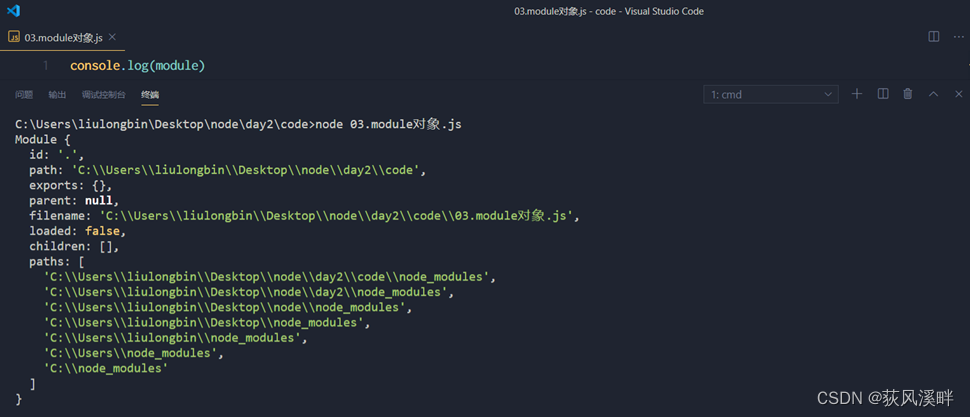
module object
console.log(module)
module.exports object
In the custom module , have access to module.exports object , Share the members in the module , For external use .(export It means export , adopt export Method to expose the objects in the module for external use )
For the outside world require() Method to import a custom module , What you get is module.exports The object that is pointed to .
exports object
because module.exports Words are complicated to write , To simplify the code for sharing members out ,Node Provides exports object . By default ,exports and module.exports Point to the same object . The final shared result , Or to module.exports The object pointed to shall prevail .
exports and module.exports The use of mistakes
require() When the module , What you get is always module.exports Object to point to :
Be careful : To prevent chaos , Don't use... In the same module at the same time exports and module.exports
Node.js Followed CommonJS Modular specification
CommonJS Regulations :
- Inside each module ,module Variable Represents the current module .
- module Variable is an object , its exports attribute ( namely module.exports) It's an external interface .
- Load a module , In fact, the module is loaded module.exports attribute .require() Method for loading modules .
npm With bag
- The world's largest package sharing platform : https://www.npmjs.com/ , You can search this website for any package you need , As long as you have enough patience !
- Share the platform through this package , Over time , You can also publish and share packages .
- npm, Inc. company Provided an address of https://registry.npmjs.org/ Server for , To share all the packages , We can download the packages we need from this server .( Direct access is useless )
Use moment Package example
Command line download script ( route : Project folder )
npm i moment
Code
// 1.  Import required packages
const moment = require('moment')
const dt = moment().format('YYYY-MM-DD HH:mm:ss')
console.log(dt)
Command line run :
moment Official documents :
https://momentjs.com/docs/#/use-it/
What documents are added after the initial packaging
- node_modules Folder : Used to store all packages installed in the project .
require()When importing third party packages , Is to find and load packages from this directory . - package-lock.json The configuration file : Used to record node_modules Download information of each package in the directory , For example, the name of the bag 、 Version number 、 Download address, etc .
Be careful : Programmers should not manually modify node_modules or package-lock.json Any code in the file ,npm Package management tools maintain them automatically . - package.json( Current version npm Automatically created ): It is used to record some configuration information related to the project
package.json The contents are as follows :
{

  "dependencies": {

    "moment": "^2.29.4"
  }
}
dependencies node
You can see :package.json In file , There is one dependencies node , Specifically used to record your use of npm install Command which packages are installed .
npm install One time download dependecies All packages in

devDependencies node
If some packages are only used in the project development phase , stay It will not be used after the project goes online , It is recommended that these packages be recorded in devDependencies In nodes .
Corresponding , If Some packages need to be used after development and project launch , It is recommended that these packages be recorded in dependencies In nodes .
You can use the following command , Record the package to devDependencies In nodes :


Package management profile
npm Regulations , stay Project root in , A must be provided called package.json Package management profile for . It is used to record some configuration information related to the project . for example :
Project name 、 Version number 、 describe etc.
What packages are used in the project
What kind of package Only during development use
Those bags are in Development and deployment You need to use 
- In the project root directory , Create a package.json Configuration file for , It can be used to record which packages are installed in the project . thus Convenient elimination node_modules After the catalog , Share the source code of the project among team members .
Be careful : In the future, in the project development , Must put node_modules Folder , Add to .gitignore Ignore files .
Switch npm The next package image source

nrm
In order to switch the image source of the next package more conveniently , We can install nrm This gadget , utilize nrm Terminal commands provided , You can quickly view and switch the image source of the next package .
Module loading mechanism
Modules are cached after the first load . This also means multiple calls require() It will not cause the code of the module to be executed multiple times .
Be careful : Whether it's a built-in module 、 User defined module 、 Third party modules , They are all preferentially loaded from the cache , thus Improve the loading efficiency of the module .
- Built-in module By Node.js Official module , Built in modules have the highest priority to load .
Custom module loading mechanism
Use require() When loading a custom module , Must be specified to ./ or …/ The path identifier at the beginning .
When loading custom modules , If not specified ./ or …/ Such a path identifier , be node It will be loaded as a built-in module or a third-party module .
meanwhile , In the use of require() When importing custom modules , If the file extension is omitted , be Node.js The following files will be tried to load in order :
1. Load according to the exact file name
2. completion .js Extension to load
3. completion .json Extension to load
4. completion .node Extension to load
5. Loading failed , The terminal reported an error
Loading mechanism of third-party modules
If passed to require() The module identifier of is not a built-in module , And it didn't ‘./’ or ‘…/’ start , be Node.js Will start from the parent directory of the current module , Try from /node_modules Load third party modules in the folder .
If the corresponding third-party module is not found , Then move to the next parent directory , Loading , Up to the root of the file system .
for example , Suppose that 'C:\Users\itheima\project\foo.js' The file calls require(‘tools’), be Node.js It will be searched in the following order :
C:\Users\ithei\project\node_modules\toolsC:\Users\ithei\node_modules\toolsC:\Users\node_modules\toolsC:\node_modules\tools
Directory as module identifier
When the directory is used as the module identifier , Pass to require() When loading , There are three ways to load :
- Find a directory called... Under the loaded directory
package.jsonThe file of , And look for main attribute , Asrequire()Loaded entry
main Property example :
{

"main":"./a.js"    // Need to have a.js This document and package.json In the peer Directory
}
- If it's not in the catalog
package.jsonfile , perhaps main The entry does not exist or cannot be resolved , beNode.jsWill try to load... In the directoryindex.jsfile . - If both steps fail , be Node.js Error messages will be printed on the terminal , Missing report module :
Error: Cannot find module 'xxx'
require('./testm') // Access the same level directory testm This folder example
There is no package.json, But there are index.js The running results of the file are as follows 
边栏推荐
- [endnote] compilation of document types and abbreviations of document types
- [time complexity, space complexity]
- Dev gridcontrol captures key events
- OSPF总结
- I am 35 years old.
- C # get the information of the selected file
- Dev gridcontrol 捕获按键事件
- Two ways to monitor the change of user points
- General Dao interface design
- 【EndNote】文献类型与文献类型缩写汇编
猜你喜欢

Burp suite Chapter 4 advanced options for SSL and proxy
Recurrence of strtus2 historical vulnerability

Bee guitar score high octave and low octave

日常一记(11)--word公式输入任意矩阵

Dev gridcontrol 捕获按键事件
![[endnote] detailed explanation of document template layout syntax](/img/fd/2caf4ff846626411fe8468f870e66a.png)
[endnote] detailed explanation of document template layout syntax

Take out brother is the biggest support in this society

Super nice navigation page (static page)

Guitar staff link Jasmine

Add in the registry right click to open in vscode
随机推荐
OSPF summary
2022/7/17 exam summary
Storage of drawings (refined version)
Spotty music data client_ ID account
2022/7/18 exam summary
吉他五线谱联系 茉莉花
The second lesson is the construction of development environment
Random distribution learning notes
matplotlib学习笔记
2022年全国职业院校技能大赛“网络安全”竞赛试题文件上传渗透测试答案Flag
请问flink sql client 在sink表,有什么办法增大写出速率吗。通过sink表的同步时
Summary of common skills
Burp suite Chapter 9 how to use burp repeater
Prefix infix suffix expression (written conversion)
2022-024arts: Longest valid bracket
2022/7/7 exam summary
Software engineering -- dental clinic -- demand analysis
Burp Suite-第七章 如何使用Burp Scanner
Regular expression job
我,35岁了。