当前位置:网站首页>OpenGL es learning (6) -- recognizing textures
OpenGL es learning (6) -- recognizing textures
2022-07-18 20:15:00 【Unlimited exchange】
1. Texture mapping
Want to achieve more colorful objects , Texture mapping is required .
1.1 The basic principle
Assign appropriate texture coordinates to each vertex in the primitive , The selected texture region can be determined in the texture map by texture coordinates , Finally, the content of the selected texture area is mapped to the specified entity according to the texture coordinates .

- texture , Simply can be understood as stickers , But in OpenGL ES Of 3D The lower texture is a collection of complex data
- Primitives , It can be understood as basic graphics ;OpenGL ES The element is a little 、 Line 、 triangle
- Texture coordinates ,S Is the horizontal axis (0,1),T For the vertical axis (0,1), Floating point number means
The process of texture mapping is actually coloring each slice element in the triangle on the right in the figure , The color used for coloring needs to be extracted from the texture image on the left :
- Each vertex in the primitive passes through the vertex shader varying Variable passes texture coordinates into the slice shader ;
- Variables are not passed directly into subsequent slice shaders ,OpenGL ES The rendering pipeline is based on the vertex shader pairs corresponding to each vertex of the primitive to which the slice belongs varying Interpolation calculation , Generate a corresponding to each slice, which is responsible for recording texture coordinates varying value ;
- Each slice is recorded in the slice shader according to the received texture coordinates varying Extract the color of the corresponding position in the texture map .
1.2 Related codes
    private void initTexture() {
        int[] textures = new int[1];
        GLES20.glGenTextures(
                1, // Resulting texture id Number
                textures,// texture id Array of
                0);// Offset
        // Get the resulting texture id
        textureId = textures[0];
        // Bind texture id
        GLES20.glBindTexture(GLES20.GL_TEXTURE_2D, textureId);
        // Set up MIN Sampling methods
        GLES20.glTexParameterf(GLES20.GL_TEXTURE_2D, GLES20.GL_TEXTURE_MIN_FILTER, GLES20.GL_NEAREST);
        // Set up MAG Sampling methods
        GLES20.glTexParameterf(GLES20.GL_TEXTURE_2D, GLES20.GL_TEXTURE_MAG_FILTER, GLES20.GL_LINEAR);
        // Set up S Axis stretch method
        GLES20.glTexParameterf(GLES20.GL_TEXTURE_2D, GLES20.GL_TEXTURE_WRAP_S, GLES20.GL_CLAMP_TO_EDGE);
        // Set up T Axis stretch method
        GLES20.glTexParameterf(GLES20.GL_TEXTURE_2D, GLES20.GL_TEXTURE_WRAP_T, GLES20.GL_CLAMP_TO_EDGE);
        // Load pictures through input stream
        InputStream is = getResources().openRawResource(R.drawable.wall);
        Bitmap bitmapTemp = null;
        try {
            bitmapTemp = BitmapFactory.decodeStream(is);
        } catch (Exception e) {
            e.printStackTrace();
        } finally {
            try {
                is.close();
            } catch (IOException e) {
                e.printStackTrace();
            }
        }
        // Actually load texture into video memory
        GLUtils.texImage2D(GLES20.GL_TEXTURE_2D, 0, bitmapTemp, 0);
        // Release the texture map in memory after the texture is loaded successfully
        bitmapTemp.recycle();
    }
Chip shader code
precision mediump float;
varying vec2 vTextureCoord;
uniform sampler2D sTexture;

void main(){
   gl_FragColor=texture2D(sTexture,vTextureCoord);
}
design sketch

2. Texture stretch
Texture coordinates in the above illustration S、T The axes are all here (0,1) Within the scope of , But when the texture coordinates are set to be greater than 1 When , Texture stretching will work .
OpenGL ES Texture stretching of : Repeated stretching and Intercept the stretch .
2.1 Repeated stretching
Repeat stretching , When the vertex texture coordinates are greater than 1 The texture coordinates that actually work are the fractional part of the texture coordinates . If the texture coordinate is 3.3, What works is 0.3.
Code example
 GLES20.glTexParameterf(GLES20.GL_TEXTURE_2D, GLES20.GL_TEXTURE_WRAP_S, GLES20.GL_REPEAT);// Set up S The axis is stretched repeatedly
 GLES20.glTexParameterf(GLES20.GL_TEXTURE_2D, GLES20.GL_TEXTURE_WRAP_T, GLES20.GL_REPEAT);// Set up T The axis is stretched repeatedly
2.2 Intercept the stretch
Cut and stretch , When the texture coordinate is greater than 1 It is always regarded as 1, This will cause the edges to be stretched .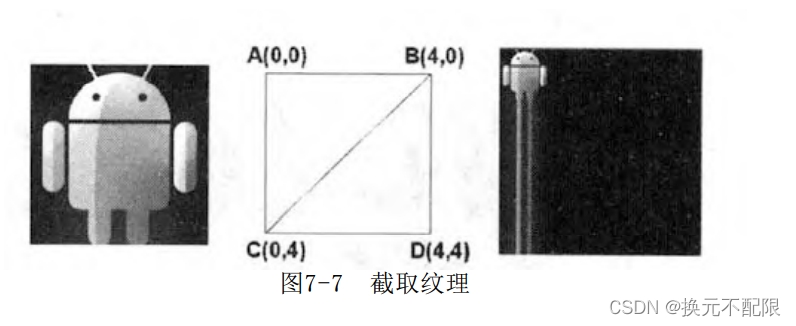
Code example
 // Set up S The axis stretching method is interception
GLES20.glTexParameterf(GLES20.GL_TEXTURE_2D, GLES20.GL_TEXTURE_WRAP_S, GLES20.GL_CLAMP_TO_EDGE);
 // Set up T The axis stretching method is interception
GLES20.glTexParameterf(GLES20.GL_TEXTURE_2D, GLES20.GL_TEXTURE_WRAP_T, GLES20.GL_CLAMP_TO_EDGE);
3. Texture sampling
Introduce two different texture sampling : Nearest point sampling and Linear sampling .
Texture sampling , The process of extracting the corresponding position color from the texture map according to the texture coordinates of the slice .
3.1 Nearest point sampling

According to the texture coordinates, we can calculate which pixel the texture coordinate point corresponding to the slice is located in the texture map ( Little squares ) in , The nearest point sampling directly takes the color value of this pixel as the sampling value .
Nearest point sampling is simple , The amount of calculation is also small , But it is easy to produce sawtooth .
Code example
// Set up MIN The sampling method is the latest sampling
 GLES20.glTexParameterf(GLES20.GL_TEXTURE_2D, GLES20.GL_TEXTURE_MIN_FILTER, GLES20.GL_NEAREST);
// Set up MAG The sampling method is the latest sampling
GLES20.glTexParameterf(GLES20.GL_TEXTURE_2D, GLES20.GL_TEXTURE_MAG_FILTER, GLES20.GL_NEAREST);
3.2 Linear sampling

The result color of linear sampling does not come from one pixel , When sampling, it will take into account several pixels near the texture coordinate point corresponding to the slice . The final result is calculated by weighting the area proportion of the pixels involved in the sampling range .
Linear sampling solves the sawtooth phenomenon well , But the edges of the lines are sometimes blurred .
Code example
 // Set up MIN The sampling method is linear sampling
 GLES20.glTexParameterf(GLES20.GL_TEXTURE_2D, GLES20.GL_TEXTURE_MIN_FILTER, GLES20.GL_LINEAR);
 // Set up MAG The sampling method is linear sampling
GLES20.glTexParameterf(GLES20.GL_TEXTURE_2D, GLES20.GL_TEXTURE_MAG_FILTER, GLES20.GL_LINEAR);
3.3 MIN and MAG sampling
MIN(GLES20.GL_TEXTURE_MIN_FILTER): Use when mapping a larger texture image to a smaller entity displayed on the screen ;
MAG(GLES20.GL_TEXTURE_MAG_FILTER): Use when mapping a smaller texture image to a larger entity displayed on the screen ;
In development ,MIN Generally, it is set as the nearest point sampling ,MAG It is generally set to linear sampling .
3.4 mipmap texture
OpenGL ES Perspective projection has near large and far small effects , There will be problems when texture mapping shows scenes such as mountains . This is because the whole mountain adopts a texture map , The mountain texture in the distance is reduced and mapped .mipmap The idea of texture is to use a texture with a smaller resolution in the distance , Use a higher resolution texture near .
OpenGL ES The rendering pipeline takes responsibility for dealing with this problem . You only need to provide an original texture map , The system will automatically generate a series of large to small texture maps when the texture is loaded . Each picture is from the previous one 1/2, Until it shrinks to 1x1.
GLES20.glTexParameterf(GLES20.GL_TEXTURE_2D, GLES20.GL_TEXTURE_MIN_FILTER, GLES20.GL_LINEAR_MIPMAP_LINEAR);
GLES20.glTexParameterf(GLES20.GL_TEXTURE_2D, GLES20.GL_TEXTURE_MIN_FILTER, GLES20.GL_LINEAR_MIPMAP_NEAREST);
GLES20.glGenerateMipmap(GLES20.GL_TEXTURE_2D);// Automatic generation mipmap Series texture
4. First understand multi texture and process texture
OpenGL ES 2.x Start to support two advanced features of multi texture and process texture .
- Use multiple texture maps for the same primitive , Called multi texture .
- Smooth transition on the boundary of multi texture changes according to some rules , It is called process texture .
# 【 Reference resources 】
- https://www.khronos.org/opengles/
- 《OpenGL ES Application development practice guide Android volume Kevin Brothaler》
- https://en.wikipedia.org/wiki/OpenGL_ES
- https://developer.android.google.cn/guide/topics/graphics/opengl
- https://developer.android.google.cn/training/graphics/opengl
- Android3D Game development technology dictionary OpenGL ES 2.0
边栏推荐
猜你喜欢

12.单调栈——解决接雨水和柱状图中的最大矩形等问题

Foreigners still stayed 20 years ago

2. Create a thread
![[C language] in depth understanding of conditional compilation](/img/5e/721d35938179ff59c5eb91c9a31794.jpg)
[C language] in depth understanding of conditional compilation
2.创建线程

Horizon 8 测试环境部署(8): App Volumes Managers 负载均衡配置
12. Monotonic stack - solve the problems of rainwater connection and the largest rectangle in the histogram

Horizon 8 测试环境部署(6): UAG 负载均衡配置-2

MySQL 66 questions, 20000 words + 50 pictures in detail! A little six!

【Word】插入公式显示灰色,失效解决
随机推荐
Codeforces Round #805 (Div. 3)(A,B,C,D)
Eureka Series : High-Speed Web Download Client
3.终止线程
虚拟化架构
Activity--startActivityForResult()-返回数据给上一个活动方法记录
[GNN] graph neural network in cross domain recommendation system
Mina中的支付交易snark
低代码三部曲之起因
1.线程与进程
【读书会第13期】+FFmpeg项目组成
OpenGL ES学习(6)——认识纹理
Realize all weekly buttons of a year
Horizon 8 测试环境部署(7): App Volumes 部署
电力系统经济调度(Matlab完整代码实现)
【剑指 Offer II 041. 滑动窗口的平均值】
Green install MySQL version 5.7 - configure my INI file considerations
Kernel management of Jupiter notebook
7.9 hash table (hash table)
6. Violent recursion to dynamic planning
1.4.2-SQL注入防御绕过-二次编码注入