当前位置:网站首页>Nifi cluster construction and necessary related configurations
Nifi cluster construction and necessary related configurations
2022-07-18 05:17:00 【Qingdong】
NiFi Cluster construction and necessary related configurations
Preface
Whatever Please search the official website first , Try to build the official website doc Address : nifi doc
Source code github Address : github Address
end 2020 year 12 month 14 Japan 21:45:20 until ,nifi The latest version is 1.12
The preparation environment is external zk3.5 Above version ( Although the official website only mentioned the use keyboard need zk3.5 above , But after testing, I found , If the outside zk Less than 3.5, Then each node will report an error that it cannot create and find nodes )
Need environment
java 1.8 above
zk 3.5 above
Maybe you need hdfs/hive/core/ And other related configuration files , It can be extracted in advance ..
nifi Download address : nifi Official website down
Use nifi-1.12.1-bin.tar.gz demonstrate .
Start stand-alone test
- Please use the corresponding user when installing , Don't do anything root
- Look for an installation directory
such as /data1/app/nifi
mkdir -p /data1/app/nifi
cd /data1/app/nifi
- Unzip the installation package
tar -zxvf nifi-1.12.1-bin.tar.gz
- Check the included instructions
cd /data1/app/nifi/nifi-1.12.1; cat README
If you just learned to translate this article by yourself , There are some dependencies / to grant authorization / Startup and use / The related documents . This is a notice to users , Very important .
- Single node startup
bash /data1/app/nifi/nifi-1.12.1/bin/nifi.sh start
- Check the website and log
cd  /data1/app/nifi/nifi-1.12.1/logs ;
#  Three log files  nifi-app.log nifi-user.log nifi-bootstrap.log
#  The most important of these is nifi-app.log  Detailed add ons are recorded above   And the various processor and queued Information  logger
tail -f nifi-app.log
Visit local url see nifi Interface .

Cluster building
To set up a cluster, you need to change two configuration files ( External use zookeeper,3.5 Above version )
- nifi.properties
vi /data1/app/nifi/nifi-1.12.1/conf/nifi.properties;
Change configuration
####################
# State Management #
####################
nifi.state.management.configuration.file=./conf/state-management.xml
# The ID of the local state provider
nifi.state.management.provider.local=local-provider   #  Use your own provider
# The ID of the cluster-wide state provider. This will be ignored if NiFi is not clustered but must be populated if running in a cluster.
nifi.state.management.provider.cluster=zk-provider    #  Use zk Conduct cluster control ( You can also use redis etc. )
# Specifies whether or not this instance of NiFi should run an embedded ZooKeeper server
nifi.state.management.embedded.zookeeper.start=false   #  Use the inside zk(nifi Bring their own zk, But this time we use external )
# Properties file that provides the ZooKeeper properties to use if <nifi.state.management.embedded.zookeeper.start> is set to true
nifi.state.management.embedded.zookeeper.properties=./conf/zookeeper.properties   #( If you use internal zk  Change attribute invalidation )

# web properties #
nifi.web.war.directory=./lib
nifi.web.http.host=10.10.10.AA   #  It's very important ,nifi Interface control ip Address , Fill in the corresponding node IP
nifi.web.http.port=10111    #  control ip Port of address
nifi.web.http.network.interface.default=
nifi.web.https.host=    # if necessary https service , You can fill in here
nifi.web.https.port=
nifi.web.https.network.interface.default=

# cluster node properties (only configure for cluster nodes) #
nifi.cluster.is.node=true     #  Specify this nifi Whether the node is a member of the cluster ,  Such as false Then single node operation
nifi.cluster.node.address=10.10.10.AA   #  Communicating with other nodes ip Address and port , Fill in the corresponding node IP
nifi.cluster.node.protocol.port=10112 #  Communicating ip The port of
nifi.cluster.node.protocol.threads=10   #  How many threads are used for communication , Recommended number of nodes *2
nifi.cluster.node.protocol.max.threads=50    # How many threads are used for communication , Recommended number of nodes *10
nifi.cluster.node.event.history.size=25
nifi.cluster.node.connection.timeout=5 sec
nifi.cluster.node.read.timeout=5 sec
nifi.cluster.node.max.concurrent.requests=100
nifi.cluster.firewall.file=
nifi.cluster.flow.election.max.wait.time=20 sec #  Election waiting time
nifi.cluster.flow.election.max.candidates=1  # nifi There are electors and bosses , When the election is to be held, the voter counts the votes , This value sets how many people are needed to find a boss , To configure 1 Give Way nifi A quick election

# cluster load balancing properties #
nifi.cluster.load.balance.host=10.10.10.AA    #  Balanced communication ip port , Fill in the corresponding node IP
nifi.cluster.load.balance.port=10113    #  port
nifi.cluster.load.balance.connections.per.node=5   #  This parameter is in the data volume / When there are many files, the configuration should be larger ,
nifi.cluster.load.balance.max.thread.count=20
nifi.cluster.load.balance.comms.timeout=30 sec

# zookeeper properties, used for cluster management #
nifi.zookeeper.connect.string=10.10.10.zk1:2181,10.10.10.zk2:2181,10.10.10.zk3:2181,10.10.10.zk4:2181,10.10.10.zk5:2181    #  To configure zk Connection string of , nifi Used at the bottom java,java Connect zk Should be ok
nifi.zookeeper.connect.timeout=3 secs
nifi.zookeeper.session.timeout=3 secs
nifi.zookeeper.root.node=/nifi    # zk Registered nodes on    The same zk The same node of the cluster is set to the same nifi colony
The above three are important ip:port Configuration and nifi.zookeeper.connect.string Configuration of . After confirmation, configure the second configuration file .
- state-management.xml
Remember what we configured zk-provider Well , come from state-management.xml, So change it inside zookeeper.connect.string
vi /data1/app/nifi/nifi-1.12.1/conf/state-management.xml;
Change the configuration to ( Root node and zk colony ip The same as in the previous configuration file )
    <cluster-provider>
        <id>zk-provider</id>
        <class>org.apache.nifi.controller.state.providers.zookeeper.ZooKeeperStateProvider</class>
        <property name="Connect String">10.10.10.zk1:2181,10.10.10.zk2:2181,10.10.10.zk3:2181,10.10.10.zk4:2181,10.10.10.zk5:2181</property>
        <property name="Root Node">/nifi</property>
        <property name="Session Timeout">10 seconds</property>
        <property name="Access Control">Open</property>
    </cluster-provider>
If this configuration file does not change , stay nifi Cluster connection and other related contents will still be seen on the page , But for some can only run in master, Need to register at zk nodes processor Can't run .
- Expand to other nodes BB CC DD etc. .
Put three in the configuration file ip Make changes , Then go to each NiFi In nodes , After configuration Each node needs to be started separately
bash /data1/app/nifi/nifi-1.12.1/bin/nifi.sh start
- View clusters and tests
No abnormal display results

error
NiFi I've been circling perhaps The display is initializing For a few minutes

Check the log for nifi-app.log
If you find that a thread cannot be connected zk Node , Please log in zk Check on the node .
zk Directly unable to connect , Please check out nifi.zookeeper.connect.string Whether the configuration is correct , Whether the port number is added , Whether the network is connected .
If zk The node has been created /nifi node , but component There is no processor, It may be zk-provider Configuration error .Please leave a message for other errors , I will reply in time after checking .
Necessary settings
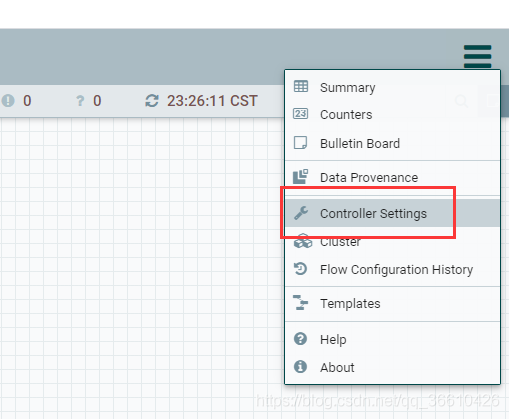
- Set the values of each node max thread Number , So far, ,nifi Occupy the cpu Not much , But the memory consumption is a little larger ,( My configuration is very big , prevent full GC)

- bootstrap.conf
NiFi yes JVM Composed of , So you need to configure heap memory and other related properties , Can be in bootstrap.conf To configure .
# JVM memory settings
java.arg.2=-Xms6g
java.arg.3=-Xmx18g
In this document , Some alarm configurations are also involved , Such as nifi Suspended operation , Mail retry times, etc , Make up after digging .
边栏推荐
- How to create threads
- 零基础学lua第十五天---最后归纳下
- E-commerce platform background management system --- > system detailed design (user login, commodity management module)
- 动态规划 | 0-1背包问题
- 信息系统项目管理师必背核心考点(十)信息系统规划
- Do you know the debugging skills of the most commonly used Chrome browser console.
- 关于安全细节 Timing Attack
- Considérations relatives à la mise en œuvre du modèle d'influence de la campagne dans Salesforce
- E-commerce platform background management system --- > system detailed design (order management module)
- Matlab_调试中figure置顶显示
猜你喜欢

Core examination site for information system project managers (XI) two key technologies and architectures of the Internet of things

Dynamic programming | matrix multiplication

信息系统项目管理师考前10天极限冲刺+答案(十):综合知识总结

Information system project manager 10 days before the exam limit sprint + answer (7)

STM32F103 串口 +DMA中断实现数据收发

LSM存储模型

STM32F103 串口DMA + 空闲中断 实现不定长数据收发

Super Ping tool

在Salesforce中基于SAML 2.0搭建SSO并启用JIT User Provisioning(SF Orgs间 / SF Org与Experience Cloud间 / 其他IdP)

Salesforce中實施Campaign Influence模型注意事項
随机推荐
最常用的chrome浏览器控制台的调试技巧,你看你知道不。
12306抢票工具震撼来袭
象棋一本通
Salesforce发布的振奋人心的新功能集锦
Dynamic programming | longest common subsequence
uni-app 标签跳转
Precautions for implementing the campaign influence model in salesforce
Efficient learning tools and plug-ins sharing
电商平台后台管理系统--->操作方法说明
Information system project manager 10 days before the exam limit sprint + answer (6): project procurement management and contract management
信息系统项目管理师考前10天极限冲刺+答案(十):综合知识总结
Salesforce Dynamic Forms
STM32F103 串口DMA + 空闲中断 实现不定长数据收发
xstream解析xml的时候报错AbstractReflectionConverter$UnknownFieldException
1 start.s分析
C leetcode question brushing notes 2- children with the most candy
Information system project managers must recite the core examination points (I) six elements of the national information system
JMM内存模型
Wechat applet from the beginning to the tenth day of learning ----- other operations of the applet
Xiaobai challenges the first day of learning C language - the construction of the operating environment