当前位置:网站首页>Tasking new aurix tc37x demo project
Tasking new aurix tc37x demo project
2022-07-19 04:46:00 【Big orange madness】
Preface
AURIX TriCore Developed IDE More software , There are Tasking and HighTec, This article introduces through Tasking newly build AURIX TC37X demo engineering , It also tells how to compile 、 Commissioning, etc .
from HighTec Engineering transplantation can also refer to this article .
Use steps
First, plan the path relationship between the project and the source code , Try to ensure the independence of engineering and source code , Convenient for subsequent use of different IDE, Transplant .

Create a project
1、 open Tasking after , Right click to create Tasking engineering ( choice ).

2、 Project naming , At the same time choose Tasking Project path .

3、 Choose chip model TC37x, At the same time, uncheck add startup file and link file ( There is... In the source code )
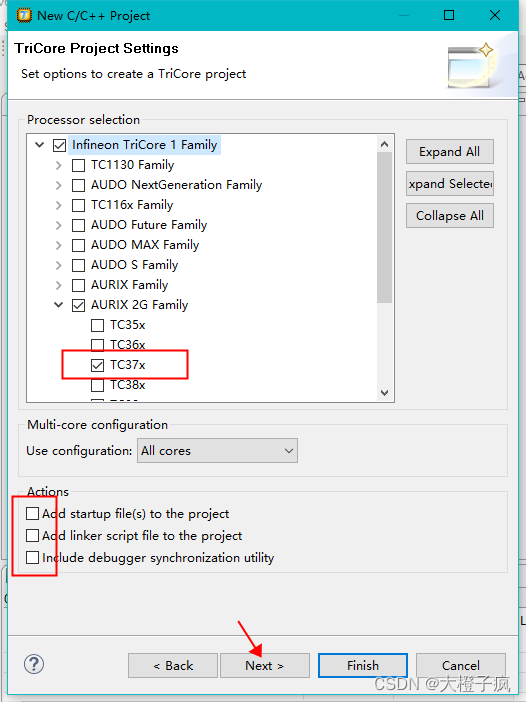
4、 There is no need to import onboard settings , Complete the creation of the project .

The code to compile
After the project is created, only “Includes” Wait for a few papers , At this point, we need to add the source code .
1、 First, copy the source code to the directory we created in the file manager src Next .

2、 Add code path to the project .

3、 Click Advanced , Add by path linking ( The relative path is adopted here, so that the change of the project path will not be affected ).

4、 Ready to add header file : Right click Project , Click on "Properties".

5、 Click Select after the pop-up box “Workspace...”, Click the header file project to be added in the newly popped project , Press key “Alt+*” an , Then press the key combination “Ctrl+A” Future generations ( No response, press more times ), Add all at once ( Applicable to the first creation of select all , Add it separately later ).

6、 When I'm done , Save and close .

7、 Uncheck exclude “.sfr” file ( The source code is defined , Otherwise, the compilation will repeat the definition ).

8、 Add link file path ( Relative paths , The linked file selection is applicable to Tasking Engineering documents :src\ToolEnv\0_Build\1_Config\Config_Tricore_Tasking\Lcf_Tasking_Tricore_Tc.lsl).

9、 Right click the project and select compile , Or the compilation icon of the toolbar .

Download debugging
1、 Use Tasking Integrated debugger download debugging .

2、 After connecting the device and downloading successfully , A pop-up box will prompt , Click on “yes” that will do .

3、 Click on core0( Sometimes in other nuclei ), Click start debugging .

边栏推荐
- Simple UI funny text conversion Emoji expression wechat applet supports sentence word conversion_ Source code
- 【FPGA教程案例27】通过Verilog实现双口RAM乒乓结构
- [论文精读]BERT
- 超链接实现post方式提交
- 2022 latest version of campus errand applet source code
- 删除文件 unable to find or create trash dirctory
- nodejs-uuid
- TiDB 性能优化概述
- 2022最新版校园跑腿小程序源码
- 数据库学习笔记(一)检索数据
猜你喜欢





![[论文精读]BERT](/img/7f/7202f79ab22ddff5f477299d2cd3d5)

随机推荐
As a result, all system modifications of the company will be upgraded
Project structure of wechat applet
[fuel cell] simulation of fuel cell system control strategy based on Simulink
对于每一个 Provider 实例都会维护多个连接
golang反转reverse切片slice代码示例
使用小丸工具箱进行极限视频压缩
CKS 核心知识点概述
Mysql8.026-- view (bottom)
PHP array_filter去空保留0,false
[vuforia] simple logic of image recognition
谷歌浏览器截全图小技巧
Eureka,拿捏日千万级访问量妥妥的!
Golang reverse slice code example
New network security architecture: Zero trust security
‘ionic‘ 不是内部或外部命令,也不是可运行的程序或批处理文件。
MySQL表的约束(基础篇)
Demo analysis of sliding conflict external interception method
JS中Class类的静态属性和静态方法
Extreme video compression using the pellet toolbox
服务端接口测试-接口测试的测试点【杭州多测师】【杭州多测师_王sir】