当前位置:网站首页>PowerDesigner displays comment comments
PowerDesigner displays comment comments
2022-07-19 04:36:00 【shibushi114】
PowerDesigner The default displayed column is Name And type , As shown in the figure below :

Now you need to display the comment column , In order to make ER The picture is clearer . however PowerDesigner Check Comment The display has no effect , So deal with it through the following steps :
Double click on the table , The table properties dialog box pops up , Cut to Columns, The default is not displayed Comment Of , Show Comment Column , The operation is as follows :
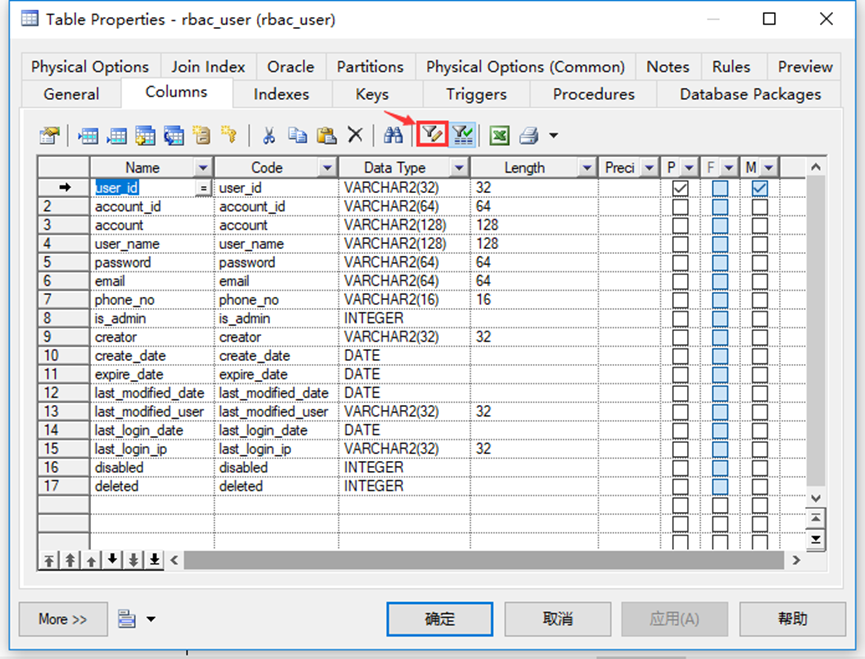
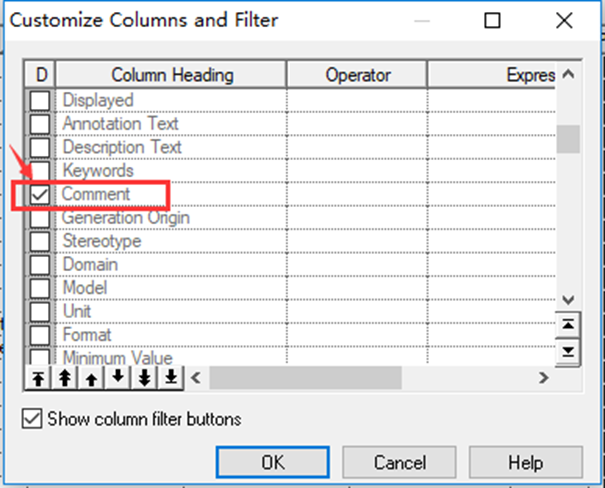

Sure to save , open a menu Tools>Display Perferences

Check name, adjustment code

after , as follows

open a menu Tools>Execute Commands>Edit/Run Script.. Or use the shortcut key Ctrl+Shift+X, Execute the following code :
Option   Explicit
ValidationMode   =   True
InteractiveMode   =   im_Batch
Dim blankStr
blankStr   =   Space(1)
Dim   mdl   '   the   current   model

'   get   the   current   active   model
Set   mdl   =   ActiveModel
If   (mdl   Is   Nothing)   Then
      MsgBox   "There   is   no   current   Model "
ElseIf   Not   mdl.IsKindOf(PdPDM.cls_Model)   Then
      MsgBox   "The   current   model   is   not   an   Physical   Data   model. "
Else
      ProcessFolder   mdl
End   If

Private   sub   ProcessFolder(folder)
On Error Resume Next
      Dim   Tab   'running     table
      for   each   Tab   in   folder.tables
            if   not   tab.isShortcut   then
                  tab.name   =   tab.comment
                  Dim   col   '   running   column
                  for   each   col   in   tab.columns
                  if col.comment = "" or replace(col.comment," ", "")="" Then
                        col.name = blankStr
                        blankStr = blankStr & Space(1)
                  else
                        col.name = col.comment
                  end if
                  next
            end   if
      next

      Dim   view   'running   view
      for   each   view   in   folder.Views
            if   not   view.isShortcut   then
                  view.name   =   view.comment
            end   if
      next

      '   go   into   the   sub-packages
      Dim   f   '   running   folder
      For   Each   f   In   folder.Packages
            if   not   f.IsShortcut   then
                  ProcessFolder   f
            end   if
      Next
end   sub
after , as follows :

The principle is to display name The value of the column , Replace with the value of the comment , So next time if you adjust comment, And re execute the script , So it's best to put it at the end .
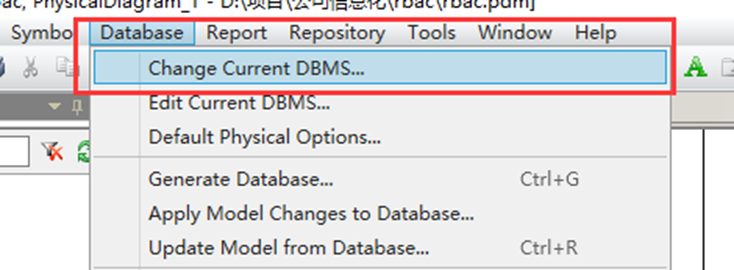
Switch database type

The solution to the problem that the database table script contains double quotation marks
stay PowerDesigner Medium Database -> Edit Currnet DBMS -> Script -> Sql -> Format -> CaseSensitivityUsingQuote Choose from No, that will do :


边栏推荐
猜你喜欢

一款好用的网络骗子举报系统无加密版本源码
![[Unity] Input.gettouch[index]的index](/img/9d/ec0e4c9e6b1bb25976357469fe037f.png)
[Unity] Input.gettouch[index]的index

OSPF basic optimization

Gin framework principle

Distributed notes (02) - redis of distributed cache (brief description of uses, features, high availability solutions redis cluster, tweetproxy, CODIS)

mysql中的视图、触发器和存储过程

如何进行mysql下的严格模式修改,使得使用插入用户表方式添加新用户成功

Rk1126 realizes picture in picture function picture in picture for rk 1126

iptables防止nmap扫描以及binlog详解

Codeforces Round #807 (Div 2.) AB
随机推荐
如何进行mysql下的严格模式修改,使得使用插入用户表方式添加新用户成功
T+0变T+1!快赎金额降至1万!又有银行调整现金理财产品申赎规则
Rk1126 realizes picture in picture function picture in picture for rk 1126
Eureka,拿捏日千万级访问量妥妥的!
万文多图之Word高效插入参考文献
Cabasicanimation pause \ enterprise action
删除文件 unable to find or create trash dirctory
Thesis research NLP
B+ tree stored procedures, triggers, substring and substr, and truncate and delete
安全第三天iptables防止nmap扫描以及binlog
MySQL表的约束(基础篇)
MySQL中判断和向下取整的使用场景和用法
Distributed notes (02) - redis of distributed cache (brief description of uses, features, high availability solutions redis cluster, tweetproxy, CODIS)
64. Minimum path sum: given an M x n grid containing non negative integers, please find a path from the upper left corner to the lower right corner, so that the sum of the numbers on the path is the m
Software testing - Advanced
Sg90 actuator experiment based on STM32, including code (HAL Library)
Challenges and Countermeasures of deep forgery to national security
Impersonate the server for requests
OpenLDAP自定义schema
sql中的substr与substring函数用法