当前位置:网站首页>Installation and use of Doxygen and annotation syntax
Installation and use of Doxygen and annotation syntax
2022-07-18 05:16:00 【Summer night breeze_】
List of articles
- 1. Doxygen Installation and use
- 1.1 Select the configuration source directory and target file directory
- 1.2 Mode To configure
- 1.3 Choose to generate chm Help file
- 1.4 Call graph configuration
- 1.5 Configuration of engineering document coding format
- 1.6 Set the extraction range
- 1.7 Input To configure
- 1.8 chm File settings
- 1.9 Generated call graph configuration
- 1.10 Generate chm Help file
- 2. Doxygen Annotation syntax
- 3. Effect display
Doxygen Is a program file generation tool , You can convert a specific annotation in a program into a description file . It provides a set of annotation methods to facilitate the generation of explanatory documents from the annotations in the code .
1. Doxygen Installation and use
Need to install doxygen,graphviz. htmlhelp, Be careful : The installation directory should not contain Chinese characters or other strange characters .Doxygen The download link of the suite is Doxygen Download link of the suite
1.1 Select the configuration source directory and target file directory


1.2 Mode To configure

1.3 Choose to generate chm Help file

1.4 Call graph configuration
Need to install graphviz
1.5 Configuration of engineering document coding format

1.6 Set the extraction range
![[ Failed to transfer the external chain picture , The origin station may have anti-theft chain mechanism , It is suggested to save the pictures and upload them directly (img-b3IkZofr-1606375344325)(https://s3-us-west-2.amazonaws.com/secure.notion-static.com/d49e5e25-975b-40f4-91af-55f4bd604d37/Untitled.png)]](/img/e8/3d5491eb2fe8fff65e69bde97e1f98.png)
Build page , This page is the key configuration page in generating help information :
| -------- | ----- |
|---|---|
| EXTRACT_ALL | Output all the functions , however private and static Function does not belong to its control . |
| EXTRACT_PRIVATE | Output private function . |
| EXTRACT_STATIC | Output static function . There are also a few EXTRACT, Check the document accordingly . |
| HIDE_UNDOC_MEMBERS | Those don't use doxygen Format description document ( A function or class, etc ) I won't show it . Of course , If EXTRACT_ALL Be enabled , So this sign is actually ignored . |
| INTERNAL_DOCS | Whether to output @internal part . If not started , So all of the @internal Some will not be visible in the target help . |
| CASE_SENSE_NAMES | Pay attention to case names or not , Be careful , If it's on , Then all names will be lowercase . about C/C++ In this alphabetic language , Never open . |
| HIDE_SCOPE_NAMES | Domain hiding , Never open . |
| SHOW_INCLUDE_FILES | Show include files or not , If open , A special page will be generated in help , It contains a list of all included files . |
| INLINE_INFO | If open , Then in the help document ,inline There will be a inline Modifier to indicate . |
| SORT_MEMBER_DOCS | If open , When the list of help documents is displayed , Function names are sorted , Otherwise, display in the order of interpretation . |
| GENERATE_TODOLIST | Whether to generate TODOLIST page , If open , Then included in @todo The content of the annotation will be generated separately and displayed on a single page , Other GENERATE Same option . |
| SHOW_USED_FILES | In the help of function or class, etc , The source file of the function or class is shown at the bottom . |
| SHOW_FILES | Show file list page or not , If open , Then there will be a file list index page in the help . |
1.7 Input To configure

1.8 chm File settings

1.9 Generated call graph configuration
![[ Failed to transfer the external chain picture , The origin station may have anti-theft chain mechanism , It is suggested to save the pictures and upload them directly (img-exqFydhg-1606375344326)(https://s3-us-west-2.amazonaws.com/secure.notion-static.com/8e0dd92f-9b80-4ef7-a068-1130f1bfad54/Untitled.png)]](/img/b4/441804287a4340e411247d20c40a57.png)
1.10 Generate chm Help file
After configuration , Click on RUN->tun doxygen Start generating files . Finally, generate a CHM file
![[ Failed to transfer the external chain picture , The origin station may have anti-theft chain mechanism , It is suggested to save the pictures and upload them directly (img-Q4eSn150-1606375344327)(https://s3-us-west-2.amazonaws.com/secure.notion-static.com/12d5f25e-b7e1-4bf8-a827-599aea2f1f9a/Untitled.png)]](/img/88/d2f320a8d06eb48e5597c3d9054ef9.png)
2. Doxygen Annotation syntax
Doxygen Is a program file generation tool , You can convert a specific annotation in a program into a description file . It provides a set of annotation methods to facilitate the generation of explanatory documents from the annotations in the code .
2.1 Simple notes
     Single-line comments :///  perhaps  //!

     Multiline comment :/**  perhaps  /*!
2.2 File Comments
File comments are usually placed at the beginning of the entire file .
/** * @file file name * @brief brief introduction * @details details * @mainpage Project overview * @author author * @email mailbox * @version Version number * @date year - month - Japan * @license Copyright */
for example :
/** * @file Test.h * @brief Test header file * @details This is the test Doxygen * @mainpage Project overview * @author zhangsan * @email zhangsan @126.com * @version 1.0.0 * @date 2017-11-17 */
2.3 Class definition comments
The annotation method of class definition is very simple , Use @brief Fill in the overview of the class later , Fill in the details of the class on a new line . Namespace 、 Structure 、 Consortium 、 Enumeration definitions are annotated in the same way as class definitions .
/** * @brief A brief overview of classes * A detailed overview of classes */
for example :
/** * @brief  Test class  *  Mainly used to demonstrate Doxygen Class annotation  */

class Test{


};
Generate document effects ![[ Failed to transfer the external chain picture , The origin station may have anti-theft chain mechanism , It is suggested to save the pictures and upload them directly (img-3mZzpEfm-1606375344327)(https://s3-us-west-2.amazonaws.com/secure.notion-static.com/e69d6063-361e-48ec-a40c-0efc136db492/Untitled.png)]](/img/88/00889f6dbdae998c514a64937a6c4c.png)
2.4 Constant / Comments on variables
Constant / Variables include the following types
- Global constant variable
- Macro definition
- class / Structure / Member variables of the consortium
- Enum members of type
There are two ways to annotate , You can choose according to the specific situation
- Comment before code
///  notes
 Constant / Variable
for example :
///  Cache size
#define BUFSIZ 1024*4
2. Post code comments
Constant / Variable ///< notes
for example :
#define BUFSIZ 1024*4 ///< Cache size
Generate document effects
![[ Failed to transfer the external chain picture , The origin station may have anti-theft chain mechanism , It is suggested to save the pictures and upload them directly (img-2YID6h5c-1606375344327)(https://s3-us-west-2.amazonaws.com/secure.notion-static.com/675e5470-be6a-44f4-ac49-de892371c326/Untitled.png)]](/img/27/f36e9680e0ea56070df417e2372507.png)
2.5 Function Comments
Concise notes , Function comments mainly include return value descriptions (@retval) In the third part of . You can add detailed instructions as needed (@detail)、 annotation (@note)、 Be careful (@attention)、 Warning (@warning) Or abnormal (@exception) etc. . Example :
/** * @brief Get the status of serial port interrupt * @param obj The serial port object to operate * @param intStatus The type of serial port interrupt to obtain * @retval RESET = 0, SET = !RESET */
Generate document effects ![[ Failed to transfer the external chain picture , The origin station may have anti-theft chain mechanism , It is suggested to save the pictures and upload them directly (img-WZkOh9Ic-1606375344328)(https://s3-us-west-2.amazonaws.com/secure.notion-static.com/1c01e901-78cb-46df-b4d6-320e878d1dae/Untitled.png)]](/img/79/6acdce9d70bcd72cf488457e6dae3c.png)
3. Effect display
Generated .chm The help document is shown in the figure below , You can see the list of generated files , An example of function call relationship is shown in the following figure .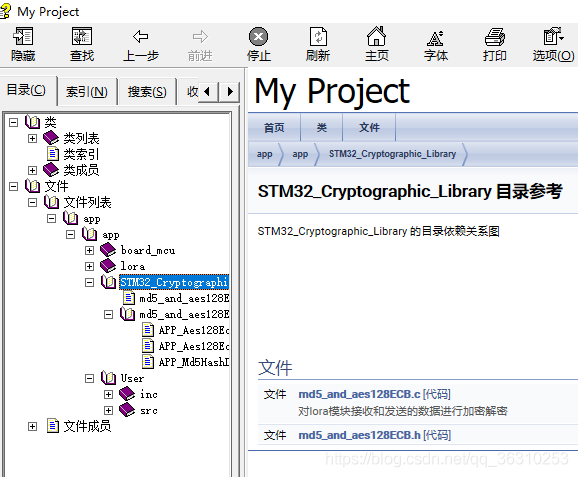
You can clearly see the calling relationship between functions .
边栏推荐
- CRMEB Pro v1.4,让用户体验更出彩!
- 信息系统项目管理师核心考点(八)软件集成技术
- Wechat applet from the beginning to the tenth day of learning ----- other operations of the applet
- 12306 ticket grabbing tools shock and attack
- Core examination points for information system project managers (VII) software architecture style
- 动态规划 | 最长公共子序列
- 信息系统项目管理师核心考点(七)软件架构风格
- 电商平台后台管理系统--->系统详细设计(用户管理模块)
- Mobile Robotics (I) fundamentals of Mathematics
- Uni app request to get data
猜你喜欢
hbuilder提交代码

uni-app打电话功能

Salesforce中使用LWC本地开发

The 15th day of zero basic Lua --- finally, I'll summarize it

Do you know the debugging skills of the most commonly used Chrome browser console.

FreeModbus 在 STM32F1 平台的移植和解析

Core examination points for information system project managers (VII) software architecture style

Information system project manager core examination site (VIII) software integration technology

Redis05:Redis的事务

Redis01: introduction to NoSQL and redis
随机推荐
Salesforce Dynamic Forms
virtual box挂载共享文件夹
uni-app表单数据不复现
实现两个元素并排显示 (含flex一些属性的讲解)
设置圆弧形按钮 设置在正中间居中显示
H5 cloud image background reading and writing CAD files - Online CAD, web CAD, web browsing and editing CAD
Redis04:Redis的3种特殊的数据类型
The seventh day of learning C language with small Bai challenge -- Enumeration, structure, community
Kekeguo information management] information management paper writing requirements - unqualified papers
Salesforce中實施Campaign Influence模型注意事項
Matlab first learning
电商平台后台管理系统--->系统详细设计(用户登录、商品管理模块)
Precautions for implementing the campaign influence model in salesforce
Huawei cloud stack opens its framework to the south to help ecological partners enter the cloud efficiently
Redis02: install redis in Linux Environment
Uni app call function
Core examination sites for information system project managers (VI) layering of OSI protocol, mapping + real questions
Wechat applet from getting started to learning the ninth day -- system operation of applet
Uni app form data does not reappear
Redis03: five common data types of redis