当前位置:网站首页>[QT introduction] Introduction to three window classes
[QT introduction] Introduction to three window classes
2022-07-18 12:59:00 【Curly monster】
One 、QT File analysis
1. Project documents (.pro)
In the created Qt The project will automatically generate a .pro Project files for , This file records some attribute information of the project . Generally used to add other modules , Or add an external library (OpenCV) File path .
2.mian.cpp file
The entry function of the program mian() The function is implemented here , It controls the operation of the program and the display of the window interface .
#include "mainwindow.h"  // Generated window class header file

#include <QApplication>  // Header file of application class

int main(int argc, char *argv[])
{
    // Create application objects , And there can only be one instantiated object
    // The role of this class : Detect trigger events , Loop events and handle
    QApplication a(argc, argv);

    // Create a window class object
    MainWindow w;
    // Display window
    w.show();
    // The application object starts the event loop , Ensure that the application does not exit
    return a.exec();
}
3.mainwindow.ui Design documents
stay Qt Each window in the corresponds to an editable visual interface , This interface corresponds to a xml File format , Generally, it is not necessary to xml Edit this file in the format , Just know about the file structure . It can be done by Qt Creator Design .
4.mainwindow.h The header file
This file is the header file corresponding to the window interface . Mainly to achieve MainWindow The definition of a class
//Qt Standard window class header file
#include <QMainWindow>

QT_BEGIN_NAMESPACE
//mainwindow.ui There is also a class called  MainWindow,  Put this class into the namespace  Ui  in
namespace Ui { class MainWindow; }
QT_END_NAMESPACE

class MainWindow : public QMainWindow
{
    // Macro definition : Use Qt Signal slot mechanism
    Q_OBJECT

public:
    MainWindow(QWidget *parent = nullptr);
    ~MainWindow();

private:
    // Define that the pointer points to the window UI object
    Ui::MainWindow *ui;
};
5.mainwindow.cpp Source file
Implementation class MainWindow The implementation of class member functions and will Ui Interface design mainwindow And the window mainwindow Make correlation .
MainWindow::MainWindow(QWidget *parent)
    : QMainWindow(parent)
    , ui(new Ui::MainWindow) // establish ui::MainWindow An instantiated object of
{
    // take mainwindow.ui The instantiated object of is associated with the object of the current class
    // Make two classes with the same name one
    ui->setupUi(this);
}
Two 、 Basic window class
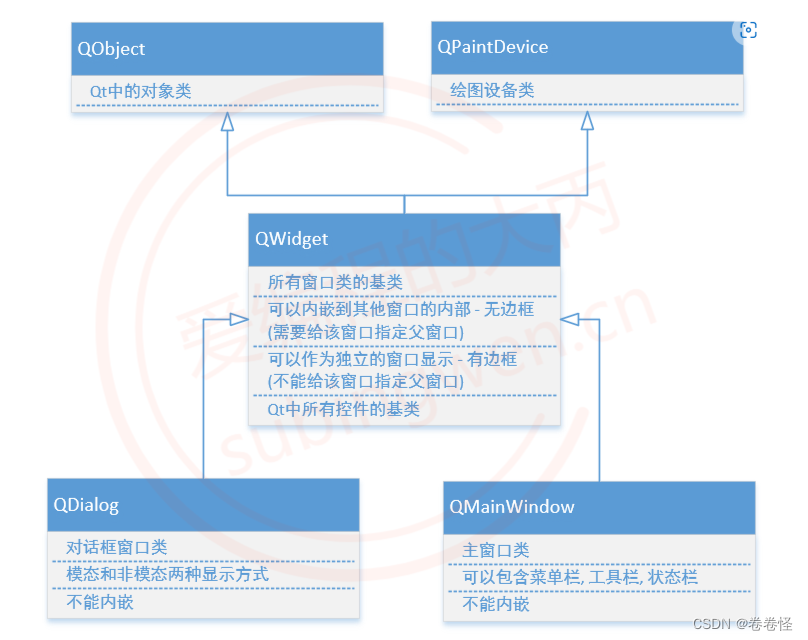
Qt Common window classes are 3 individual QMainWindow,QDialog,QWidget, When creating a window class , You need to make your own window class continue one of the three window classes .
1.QWidget
① The base class of all window classes
②Qt Control in ( Button , Input box , Radio buttons …) Also belongs to window , Base classes are all QWidget
③ It can be embedded in other windows : No borders ( When instantiating a window, you need to specify the parent window )
④ It can be displayed separately without embedding : Independent window , There's a border ( There is no need to specify the parent window when instantiating the window )
Therefore, the display methods of corresponding embedded windows and non embedded windows are different .
Do not embed windows : You need to call a function to display ,QWidget Is the base class for all window classes , Call this provided show() Method can display any window
    //QWidget Class instantiation ( Do not embed windows )
    //explicit testwidget(QWidget *parent = nullptr);
    // Don't specify wid The parent of the object , Do not embed windows
    testwidget* wid = new testwidget;
    //  Display window : A window independent of the main window
    wid->show();
Embedded window : Attached to a large window , As part of the big window , The large window is the parent window of the embedded window , When the parent window is displayed , The embedded window is also displayed .
// Specify the parent object when creating the window class , Embedded window ,
// When the parent window is displayed , The sub window is also displayed , Child windows have no borders
testwidget* wid = new testwidget(this);
2.QDialog
Dialog class , Cannot be embedded in other windows .
Non modal display :
    // Create dialog window
    testDialog* dig = new testDialog(this);
    // Non model display
    dig->show();
Modal display :
    // Create dialog window
    testDialog* dig = new testDialog(this);
    // Model display , call exec Show
    // Block the execution of the program
    dig->exec();
Modal display only after closing the dialog box can the program perform the next operation .
void QWidget::show(); // Displays the current window and its child windows
QWidget Is the base class for all window classes , call show() Method can display any window ( Non modal display )
[virtual slot] int QDialog::exec();
Modal display of dialog window
3.QMainWindow
① There is a toolbar , status bar , menu bar , Later chapters will introduce this window in detail
② Cannot be embedded in other windows

Summary :
边栏推荐
- [performance test] performance test question and answer
- 2022.07.06 group a summary
- Makefile 编译多个目标文件
- 如何系统、高效地学习入门软件测试,并能找到软件测试的工作?
- Nc20566 [scoi2010] games
- [matlab] extract the data in TXT file (comma interval), and draw a two-dimensional line chart
- 开源数据集——花分类数据集
- What happened to tiger talisman? Insiders say so
- Viewing binlog and relay log information
- Principle of MySQL master-slave replication
猜你喜欢

【Golang | gRPC】gRPC-Bidirectional Streaming双向流实战

奠定Web3基础的去中心化存储

From application to bottom: 36 pictures take you into redis world (Part 1)

数字藏品系统开发,助力企业元宇宙场景营销

MySQL error 1142 - select command denied to user 'dev' @ 'localhost' for table 'user' (resolved)

虎符发生了什么?内部人员这样说

【Golang | gRPC】使用TLS/SSL认证的gRPC服务

Py chapter Dictionary Series

In depth interpretation of the investment logic of the consortium's participation in the privatization of Twitter
ES6浏览器支持及运行环境支持检测及ES6转码ES5
随机推荐
Disillusionment of the eternal bull market
【Golang | gRPC】gRPC-Client Streaming客户端流实战
6000 Digital Collections Online seconds empty! "National treasure" digital collections look like this
做测试/开发程序员的动力来自哪里?怎样坚持下去呢......
zip/enumerate/map函数的使用
Comment systématiser gratuitement l'introduction à la science des données?
Source Insight4 中文乱码怎么办?
Record root file system image img production
Data table design and API data construction of three-level classification
How did the unsecured loan agreement on the chain perform in the encryption storm?
Programming old driver takes you to play with completable future asynchronous programming
Rust opencv drawing and display
DINO&PAWS
Maximum return alternative method
Do you need to find a platform to do VR panorama? What help can panoramic platform bring?
大二学科不挂科 速冲方法推荐(数据结构+计组+操作系统+算法+数据库+计网)
PX4模塊設計之九:PX4飛行模式簡介
[performance test] performance test question and answer
【性能测试】性能测试问答篇
How to make encrypted PDF files editable