当前位置:网站首页>[pyGame learning notes] 6 Cursor mouse cursor
[pyGame learning notes] 6 Cursor mouse cursor
2022-07-19 13:04:00 【Leleprogrammer】
Pygame Provide control of system hardware cursor .Pygame Support black and white cursor ( Bitmap cursor ), And system variant cursor and color cursor .
This cursor module contains functions for loading and decoding various cursor formats . These allow the cursor to be easily stored in an external file or directly as encoded Python character string .
This module includes several standard cursors , The parameters of these cursors are stored in a tuple .
This time, , Let's learn Pygame Cursor operation in pygame.cursor
stay Pygame In the official documents of , We can see that there are three ways to import the cursor :
pygame.cursors.compile # Create binary cursor data from simple strings
pygame.cursors.load_xbm # from XBM File loading cursor data
pygame.cursors.Cursor # Represents the cursor pygame object
We still give the initial framework first :
import pygame
from pygame.locals import *
import sys

class Game:
    def __init__(self):
        pygame.init()
        self.W,self.H=800,800
        self.screen=pygame.display.set_mode((self.W,self.H))
        pygame.display.set_caption("【Pygame  Learning notes 】")

    def listen(self):
        for event in pygame.event.get():
            if event.type==QUIT:
                sys.exit()

    def draw(self):
        self.screen.fill((255,255,255))

    def run(self):
        while True:
            self.listen()
            self.draw()
            pygame.display.update()

if __name__ == '__main__':
    game=Game()
    game.run()
pygame.cursors There are several standard cursors below :
pygame.cursors.arrow
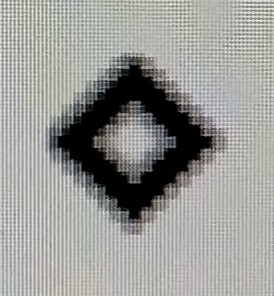
pygame.cursors.diamond
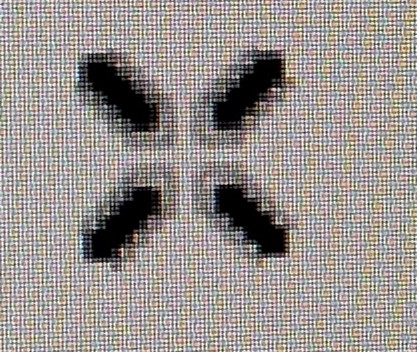
pygame.cursors.broken_x
pygame.cursors.tri_left
pygame.cursors.tri_right
Examples are as follows :
pygame.mouse.set_cursor(pygame.cursors.arrow)

pygame.mouse.set_cursor(pygame.cursors.diamond)
pygame.mouse.set_cursor(pygame.cursors.broken_x)
pygame.mouse.set_cursor(pygame.cursors.tri_left)

pygame.mouse.set_cursor(pygame.cursors.tri_right)

The module also contains some cursors as formatted strings . They need to be passed to pygame.cursors.compile() function , Then we can use them .
pygame.cursors.textmarker_strings
pygame.cursors.textmarker_strings
pygame.cursors.sizer_x_strings
pygame.cursors.sizer_y_strings
pygame.cursors.sizer_xy_strings
One when typing “I” cursor
        cursor=pygame.cursors.compile(pygame.cursors.textmarker_strings)
        pygame.mouse.set_cursor((8,16),(0,0),*cursor)
Along x Coordinate the cursor when dragging the window
        cursor=pygame.cursors.compile(pygame.cursors.sizer_x_strings)
        pygame.mouse.set_cursor((24,16),(0,0),*cursor)
Along y Coordinate the cursor when dragging the window
        cursor=pygame.cursors.compile(pygame.cursors.sizer_y_strings)
        pygame.mouse.set_cursor((16,24),(0,0),*cursor)
Along xy Coordinate the cursor when dragging the window ( Cursor at the corner of the window )
        cursor=pygame.cursors.compile(pygame.cursors.sizer_xy_strings)
        pygame.mouse.set_cursor((24,16),(0,0),*cursor)
Be careful , These four cursors are all composed of a tuple , There are several strings in the tuple , If we treat strings as arrays , It's just a two-dimensional array , therefore set_cursor The first tuple passed in later is this “ Two dimensional array ” Size , It can be used len Method and index , View these tuples directly , You can also be like it , Create your own cursor
The explanation of this tuple in the official document is as follows :
thickarrow_strings = (               #sized 24x24
  "XX                      ",
  "XXX                     ",
  "XXXX                    ",
  "XX.XX                   ",
  "XX..XX                  ",
  "XX...XX                 ",
  "XX....XX                ",
  "XX.....XX               ",
  "XX......XX              ",
  "XX.......XX             ",
  "XX........XX            ",
  "XX........XXX           ",
  "XX......XXXXX           ",
  "XX.XXX..XX              ",
  "XXXX XX..XX             ",
  "XX   XX..XX             ",
  "     XX..XX             ",
  "      XX..XX            ",
  "      XX..XX            ",
  "       XXXX             ",
  "       XX               ",
  "                        ",
  "                        ",
  "                        ")
The reference code of this learning note is as follows :
import pygame
from pygame.locals import *
import sys

class Game:
    def __init__(self):
        pygame.init()
        self.W,self.H=800,800
        self.screen=pygame.display.set_mode((self.W,self.H))
        pygame.display.set_caption("【Pygame  Learning notes 】")

    def listen(self):
        for event in pygame.event.get():
            if event.type==QUIT:
                sys.exit()

    def draw(self):
        self.screen.fill((255,255,255))
        # pygame.mouse.set_cursor(pygame.cursors.arrow)
        # cursor=pygame.cursors.compile(pygame.cursors.textmarker_strings)
        # pygame.mouse.set_cursor((8,16),(0,0),*cursor)
        # cursor=pygame.cursors.compile(pygame.cursors.sizer_x_strings)
        # pygame.mouse.set_cursor((24,16),(0,0),*cursor)
        # cursor=pygame.cursors.compile(pygame.cursors.sizer_y_strings)
        # pygame.mouse.set_cursor((16,24),(0,0),*cursor)
        cursor=pygame.cursors.compile(pygame.cursors.sizer_xy_strings)
        pygame.mouse.set_cursor((24,16),(0,0),*cursor)

    def run(self):
        while True:
            self.listen()
            self.draw()
            pygame.display.update()

if __name__ == '__main__':
    game=Game()
    game.run()
It's not easy to make , If you like, just like the collection + Pay attention ~
Thank you for your support ~
边栏推荐
- Cadmium sulfide supported mil-125 (TI) | streptavidin (SA) - zirconium porphyrin MOF composite (PCN- [email protected] )|Shell core
- 逻辑运算符1(阁瑞钛伦特软件-九耶实训)
- Ossimport migration path
- 回顾2008年金融危机,做长期主义投资者 2020-03-19
- Acwing786. The kth number
- C语言进阶——字符函数和字符串函数
- CMOS switch learning (I)
- 备赛笔记:matplotlib学习笔记a
- 運維小白成長記—架構第6周
- JVM self study summary
猜你喜欢

Audio common terminal anatomy - never make a mistake again
 [email protected] )|Shell core"/>
Cadmium sulfide supported mil-125 (TI) | streptavidin (SA) - zirconium porphyrin MOF composite (PCN- [email protected] )|Shell core

XML file parsing

可视化ETL工具Kettle概念、安装及实战案例

LeetCode 0118. Yanghui triangle

Reg of sequential logic and combinatorial logic

全球金融危机来袭,如何科学理性投资?2020-03-17

逻辑运算符1(阁瑞钛伦特软件-九耶实训)

Uio-66 - (COOH) 2 modified polyamide nanofiltration membrane | zif-8/pvp composite nanofiber membrane | uio-66-nh2 modified polyamide nanofiltration membrane

Opencv:06 morphology
随机推荐
GO 单元测试
When will the moon appear
稳超胜算,历9弥新 | 2022金仓创新产品发布会顺利召开
Committer identity unknown *** Please tell me who you are...
O & M LITTLE WHITE Growth record - architecture week 6
Cobalt iron bimetallic organic skeleton cox/mil-100 (FE) | [email protected]
Three minutes to understand the primary key, foreign key, non empty, unique and default constraints in mysql, and how to create a table
S32K148_ Can drive (bare metal development)
收益风险比:投资机会最重要指标 2020-03-14
R语言--Cox模型校准曲线原理(一)数据来源
Is the career direction of test / development programmers over 35 a turning point in the workplace?
运维小白成长记—架构第6周
LeetCode 0565.数组嵌套:转换为图 + 原地修改の优化
Useeffect summary
Cloud health management system based on STM32 (using Alibaba cloud Internet of things platform)
关于TCP/IP协议漏洞的安全措施
ASP. Net collaborative OA office service management platform source code
Impulse function, step function, ramp function and impulse response
go web
光大期货网上开户安全吗?有没有开户指引?