当前位置:网站首页>3 minutes to understand the three waiting methods of Web Automation
3 minutes to understand the three waiting methods of Web Automation
2022-07-18 12:51:00 【Two black】
Preface
Nowadays, many web pages are dynamically loaded , If the content of the page changes , It takes time to render .
Before we do web When automating tests , Because the code is automatically executed , When the code is executing , It is possible that the element loaded in the previous operation has not been loaded , You're going to report a mistake NoSuchElementException, If you report this mistake , It is likely that the positioning expression is incorrect , Or the page elements have not been loaded .
To solve this problem We can improve the stability of the script by setting some waiting mechanisms . do web Automation uses the following three waiting methods :
- 1, Mandatory waiting :time.sleep()
- 2, An implicit wait : driver.implicitly_wait(10)
- 3, Explicit waiting :( Wait for the element to be listed in a certain state : There is 、 so 、 Click and so on )
WebDriverWait(driver, 30, 0.2).until(
    EC.visibility_of_element_located(
        (By.XPATH, '//input[@id="u"]')
    )
)
Next, we will introduce the use of three waiting methods in detail .
1、 Mandatory waiting
Mandatory waiting , That is to say python Medium time.sleep(), When the program is executed to time.sleep() The program will go to sleep ( That is what we call forced waiting ), When the sleep time has passed, continue to execute .
Disadvantages of using forced waiting , The program is in the process of execution , No matter whether the element to be operated appears , As long as the implementation of the time.sleep Will wait , To a certain extent, it increases the execution time of the program .
Case study :
import time
from selenium import webdriver
driver = webdriver.Chrome()
driver.get("http://www.baidu.com")
#  Mandatory waiting 5 second
time.sleep(5)
driver.find_element_by_xpath('//div[@id="u1"]/a[@name="tj_login"]').click()
2 、 An implicit wait
An implicit wait : to driver Object to set a global waiting time , stay driver The object is valid throughout its life cycle . Whether it's through driver Look for the element , Or do some other operations on the element , If the element does not exist , Implicit waiting will make driver Wait for a certain amount of time before finding an element . Go and have a look every once in a while , Did it show up , No, just keep waiting , When the element appears, the wait ends , So let's keep going . If the waiting time exceeds the set maximum time , Then the error of waiting timeout will be thrown !
Case study :
import time
from selenium import webdriver
driver = webdriver.Chrome()
#  Set the maximum implicit wait time to 10 second
driver.implicitly_wait(10)

driver.get("http://www.baidu.com")
( One )、 The basic use of explicit waiting
from selenium.webdriver.common.by import By
from selenium.webdriver.support.wait import WebDriverWait
from selenium.webdriver.support import expected_conditions as EC


# ============= Step unwrapping ================
#  First step : Create a waiting object
wait = WebDriverWait(driver, 30, 0.2)
#  The second step : Define elements to find objects
# located = (" Positioning mode ",' Positioning expression ')
#  Such as through xpath
located = (By.XPATH, '//input[@id="u"]')
#  The third step : Waiting conditions for positioning
conditions = EC.visibility_of_element_located(located)
#  Step four : Find by waiting for the timer object
wait.until(conditions)


# ============ One line of code ==================
WebDriverWait(driver, 30, 0.2).until(
    EC.visibility_of_element_located(
        (By.XPATH, '//input[@id="u"]')
    )
)
( Two )、 Show common conditions for waiting
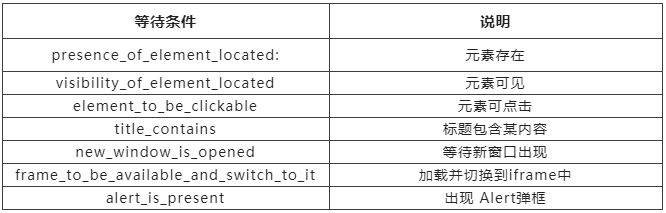
summary
Mandatory waiting : Fool Waiting , Not intelligent
An implicit wait : The global general , Just set it up once , Very smart ( Wait and go , Don't waste time ), Deficiencies can only be used to find elements , Wait for the element to be found .
Explicit waiting : Wait for the element to be in a specific condition , Very smart ( Wait and go , Don't waste time )
problem : When to use implicit waiting at work , When to use explicit wait ?
Implicit is general , Create good driver Then set it , If the implicit wait code goes wrong , According to the wrong conditions , Add the corresponding explicit wait .problem : Why wait ?
Improve the stability of the program ( Not because of the network and other reasons , Page loading elements is slow , Element not found , Code execution error )
Learning resource sharing
Finally, thank everyone who reads my article carefully , Watching the rise and attention of fans all the way , Reciprocity is always necessary , Although it's not very valuable , If you can use it, you can take it 
These materials , For those who want to learn by themselves 【 software test 】 For our friends, it should be the most comprehensive and complete war preparation warehouse , This warehouse also accompanied me through the most difficult journey , I hope it can help you ! Everything should be done as soon as possible , Especially in the technology industry , We must improve our technical skills . I hope that's helpful …….
Join my communication group below for free !
边栏推荐
- Airiot Q & A issue 4 | how to use data analysis engine?
- 【后疫情时代的慢直播:镜头之下的美好时光】
- 编写PostEffect后期的shader
- Ubuntu 离线安装Mysql
- Maximum return alternative method
- 023.static与final使用陷阱
- MySQL one-stop learning, read and learn
- Targeting R+ (version 30 and above) requires the resources. arsc of installed APKs to be stored uncom
- Linux -- connecting to MySQL database and basic operations
- Resume of sleeper - is there a boss who needs to recruit? Your success is just as bad as mine
猜你喜欢

DINO&PAWS

021. Polymorphism explanation continued 2

023.static与final使用陷阱
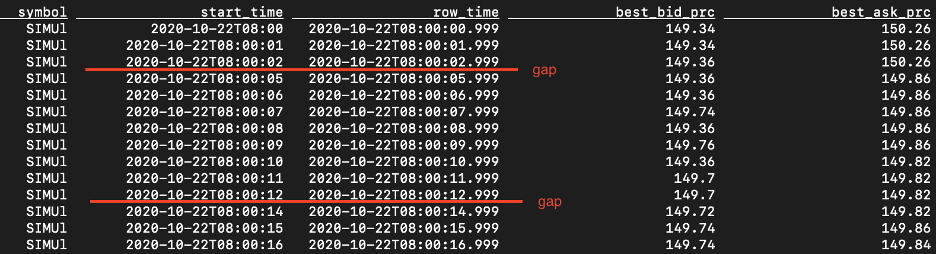
用Flink SQL流化市场数据2:盘中风险价值
![[Vulnhub] Raven-1](/img/df/c51033bcfdd76ad399ffad418a650b.png)
[Vulnhub] Raven-1

Cute image classification - conv network finally breathed a sigh: it blew up swin's convnext
![[matlab] extract the data in TXT file (comma interval), and draw a two-dimensional line chart](/img/2a/a2b05561accd4e1d146625c4b5471e.png)
[matlab] extract the data in TXT file (comma interval), and draw a two-dimensional line chart

FreeRTOS个人笔记-列表与列表项
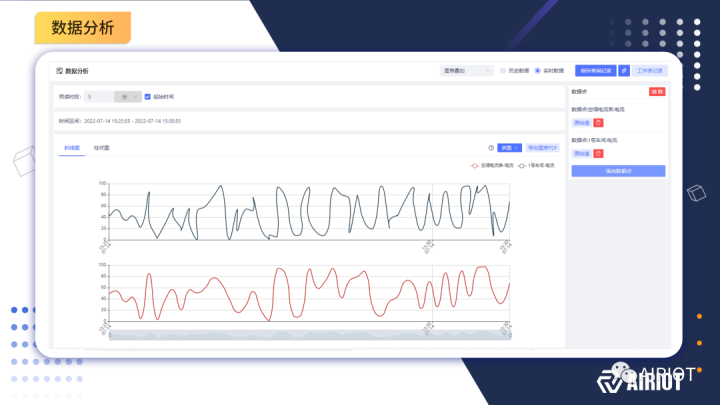
AIRIOT答疑第4期|如何使用数据分析引擎?

Py chapter Dictionary Series
随机推荐
使用Flink SQL传输市场数据1:传输VWAP
FreeRTOS个人笔记-初谈CM3内核
Redis的安装(Windows)及常用的使用方法
FreeRTOS personal notes - task definition and task switching
网络安全--Kali使用mdk3攻击wifi(详细教程)
9. Conception du module Px4: introduction au mode de vol Px4
0x22, 0x2e services of UDS
expdp导出
Nc20566 [scoi2010] games
Flume data collection
虎符发生了什么?内部人员这样说
C语言经典实例:11-20例:求二维数组最大最小值、数组求素数、编制万年历、数组元素排序、进制数的转换进制数的转换、验证哥德巴赫猜想找出次大值、使用结构体输出学生成绩、重组数组
Maximum return alternative method
ThreadX内核源码分析(SMP) - 线程执行核remap
Recommend the most popular flow chart and chart tool draw IO, old tools are no longer used
编程老司机带你玩转 CompletableFuture 异步编程
[unity technology accumulation] simulated FPS shooting function & radiographic testing
线代初等变换,矩阵的秩
离婚损害赔偿的主体、条件、时间问题
企业如何选择合适的 Time Series Database?