当前位置:网站首页>Officially released vs Code 1.69
Officially released vs Code 1.69
2022-07-18 01:43:00 【Microsoft technology stack】
Welcome to Visual Studio Code 6 Monthly update ! The main highlights of this update are as follows :
▌3 way merge editor
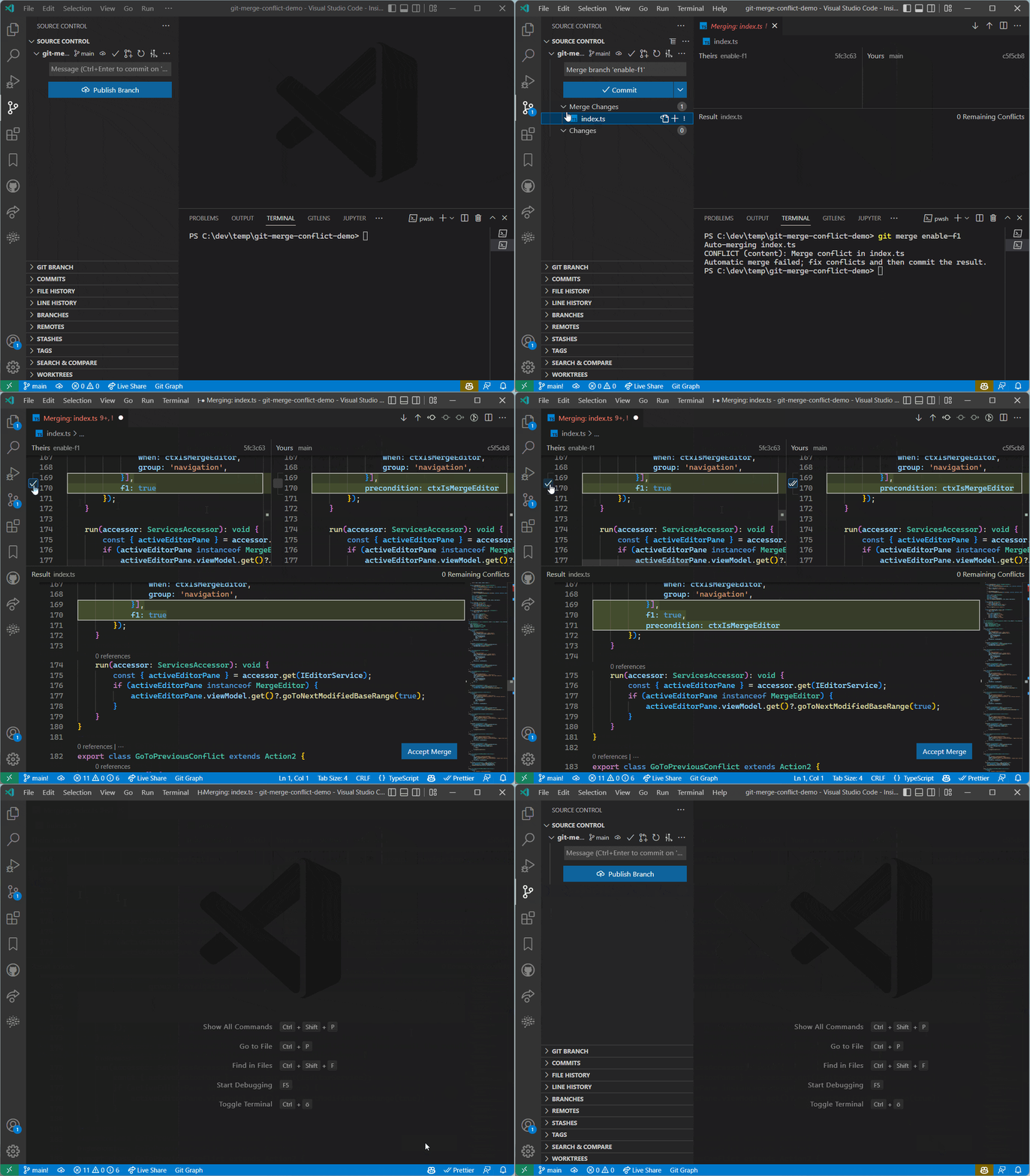
In this version , We continue to develop 3 way merge editor. It can be done by putting git.mergeEditor Set to true To enable this feature , And will be enabled by default in future versions . The merge editor allows you to quickly resolve Git Merger conflict . When enabled , You can open the merge editor by clicking on the conflict file in the source control view . Check boxes can be used to accept and combine Theirs or Yours Changes in :
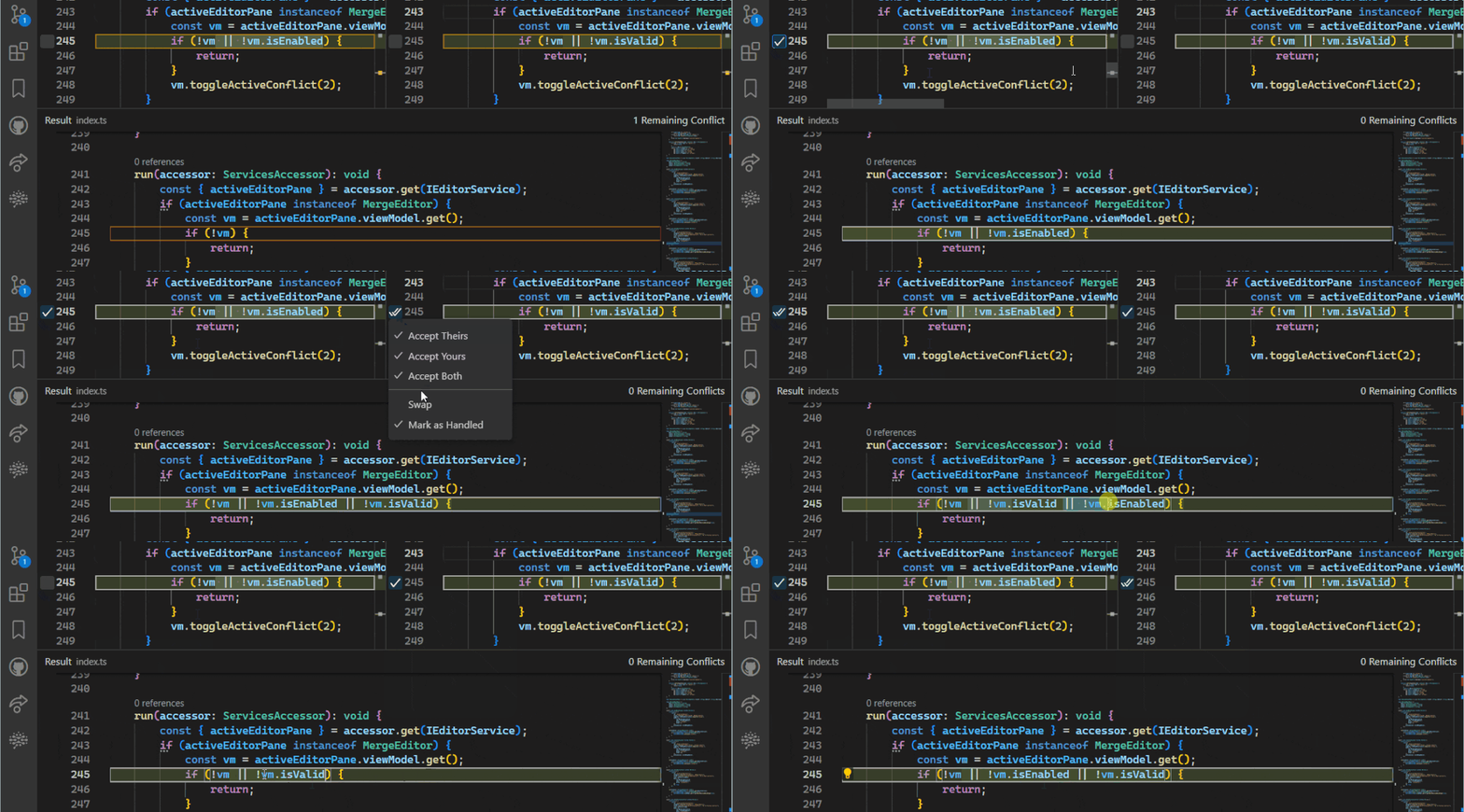
All language functions are provided in the merge editor ( Including diagnosis 、 Breakpoints and tests ), You can get immediate feedback about any problems in the merged results , The results can also be edited directly . Notice how the check box updates as expected :

When closing the merge editor or accepting a merge , If all conflicts are not resolved , Warning will be displayed . The merge editor supports word level merge . No matter when , You can also resolve conflicts manually .
▌Command Center
Command Center Now you can try . adopt window.commandCenter Set enable it . The command center replaces the normal title bar , You can quickly search the files in the project . single click main section To display a quick open drop-down menu with your recent files and search box .

There is also a button on the right , It can be done by “?” Show quick access options . On the left is Go Back and Go Forward Button , For browsing your editor history .
▌“ Do not disturb. ” Pattern
new “ Do not disturb. ” Mode hides all non error notification pop ups when enabled . The progress notification will be automatically displayed in the status bar . Hidden notifications can still be viewed in the notification Center .
You can open the notification Center ( Select the bell icon on the right side of the status bar ) And click the slash bell icon to switch “ Do not disturb. ” Pattern .

▌Shell integration
since 1 It has been in preview status since its release in August PowerShell、bash and zsh Of Shell Integration has now stopped previewing ! We plan to 1.70 It is enabled by default in version . To enable the shell Integration features , Please check Terminal > Integrated > Shell Integration : Enable in the settings editor or settings.json Set the value of :
"terminal.integrated.shellIntegration.enabled": trueShell Integration allowed VS Code To learn more about Shell What happened inside , To enable more functions .Shell One of the goals of integration is to enable it to work with zero configuration . This is achieved by using shell Parameters and / Or the environment variable will automatically shell Integration script “ Inject ” To shell In conversation . In some cases this does not work , for example : stay sub-shells Or some complicated shell Setting up , But we also provide manual installation routes for those more advanced situations .
▌Decorations
Before several iterations , We added decorations, This is due to Shell integration function , To improve terminal navigation .Decorations Now also mark the task points of interest, You can use the command navigation function (Ctrl/Cmd+Up、Ctrl/Cmd+Down) Jump to . To start the / Stop task , Next to the start of the task, a decoration, And according to the running exit code ( If there is ) Make style settings .


▌ by Git Repository add Commit " Operate the button "
stay 1.61 In the version , by Git The repository adds publishing and synchronizing changes “ Operate the button ”. In this milestone , We added a Commit Button , This button has a main operation and a set of auxiliary operations . have access to git.postCommitCommand Set control auxiliary operation , It also allows you to push or synchronize after submission .
add to Commit“ Operate the button ” after , There is a new setting git.showActionButton, You can use it to control the Git Operate the button . You can still use general scm.showActionButton Set the visibility of any action button to be disabled globally .

▌Step Into Target UI Optimize
Some debuggers allow direct access to specific function calls when a line is paused . In this iteration , We have improved UI:
Right click the target area on the source row and select Step Into Target Will automatically enter the target area ( If any )
Command Palette There is a new command in Debug: Step Into Target You can use , Shortcut keys are Ctrl+F11
This update also has a blockbuster release
VS Code Server (private preview)
stay VS Code in , We hope you can seamlessly use the environment that makes your work more efficient .VS Code Remote development extension (VS Code Remote Development extensions) Allows you to Windows Subsystem for Linux (WSL)、 adopt SSH The remote computer , And directly from VS Code Work in the development container . These extensions install servers in remote environments , Allow local VS Code Interact smoothly with remote source code and runtime .
We now offer independent “VS Code Server” Of private preview , It is a service built on the same underlying server used by remote extensions , And some additional functions , for example : Interactive CLI And promote and vscode.dev Security connection for , No need SSH Connect .

Our ultimate goal is no matter where your project is stored , Can enhance the code you use CLI, To open VS Code The desktop and Web example . We are working hard for this ,VS Code Server Is a great milestone , We hope to get your feedback !
Focus on Microsoft China MSDN Learn more about
Click on Read the original blog ~
边栏推荐
- [practice C] xiaolele walks up the steps
- Node connects to the database for addition, deletion, modification and query
- Codeforces Round #806 (Div. 4)
- 计算方法工程数学第一节课Doolittle
- Cloud native: docker practical experience (III) deploy MySQL 8 master-slave replication on docker
- [exercise C] drink soda
- C. K-beautiful Strings
- 【C 练习】序列中删除指定的数字
- 【C】 Creation and destruction of function stack frames
- 【HCIA】OSI 模型
猜你喜欢






随机推荐
[C exercise] print all "Narcissus numbers" from 0 to 100000
input仅允许输入英文、中文及其他各种符号文字
百度搜索基础信息设置规范,有哪些我们需要注意的问题呢?
Realizing Halcon scale with MATLAB low-level source code_ image_ Max operator effect
Restore of data encryption returned by a website
善良的人都晚熟
Play with Nacos! Replace Eureka as configuration center and Registration Center
2020CCPC秦皇岛 Exam Results(尺取)
C. K-beautiful Strings
在线综艺冷场:“爱优腾芒”放不开,“抖快B”拿不下
Realizing Halcon scale with MATLAB low-level source code_ image_ Range (can be used for background segmentation)
[C exercise] input the month and year, and calculate the number of days in the month
[exercise C] drink soda
【HCIA】数通网络基础
蜘蛛抓取频率提高,可以快速增加网站收录吗?
企业站,有排名,没有流量,怎么办?
C语言指针相关问题解析
Reasons for persisting in writing
[latex Chinese and English style & Bold] freely choose Chinese and English font styles, and set the bold and black degree of Chinese and English fonts
Matrix fast power