当前位置:网站首页>上传七牛云的方法
上传七牛云的方法
2022-07-17 05:03:00 【du fei】
七牛云的地址:https://portal.qiniu.com/home
注册一个用户
保存密钥

新建空间默认为华南必须认证身份才行
把空间名记录下来
点击开发者中心
点击对象存储
保存地址
获取域名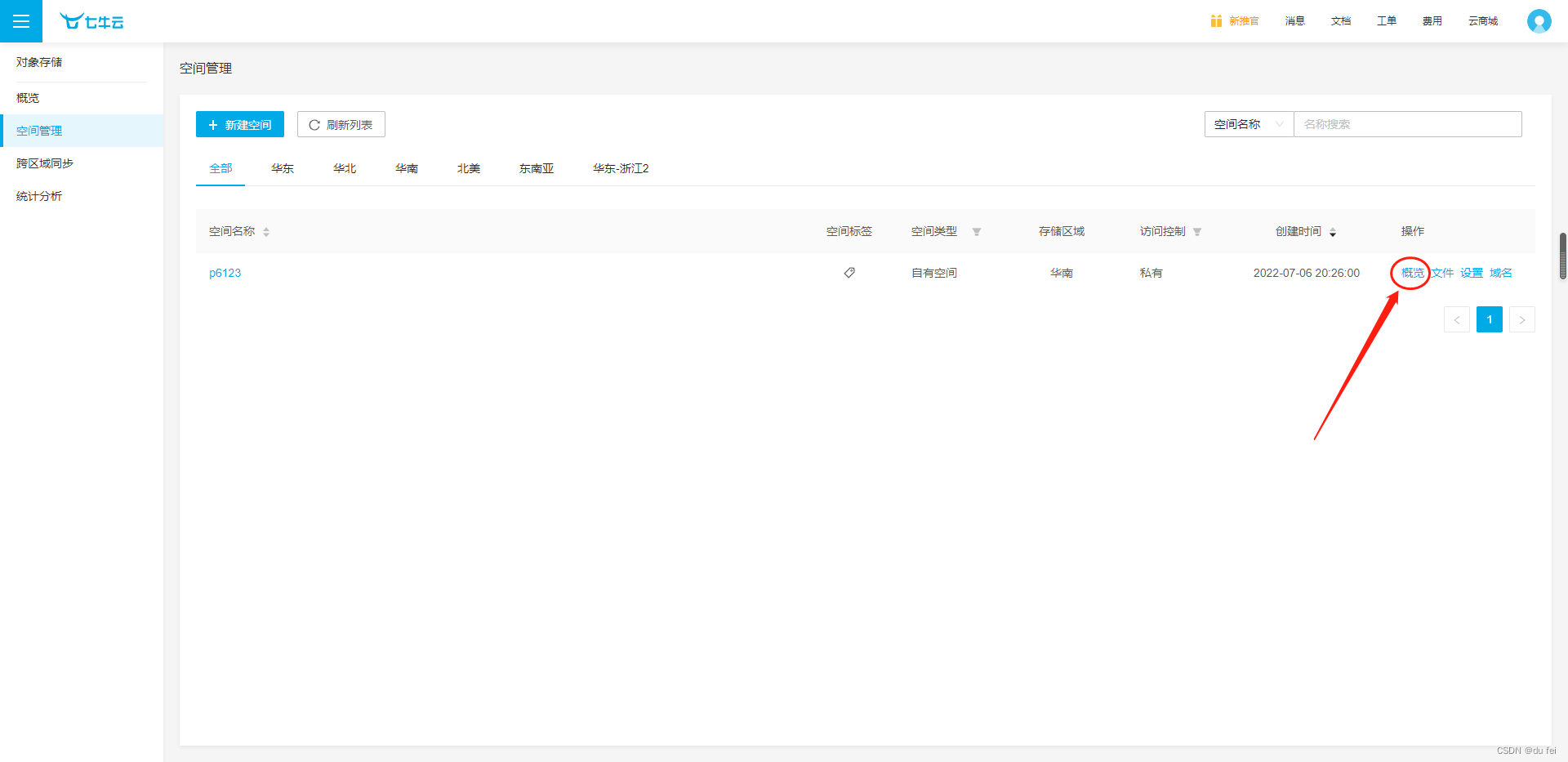

后端逻辑
from qiniu import Auth

# 七牛云的密钥
ak = 'qIpsogKsnioK63SvhCDMpIxE9-GHbZknWdOGOW4_'
sk = 'Gmg0YLb5QKzQYxAH2DspibMEsVloRmjfxjHU43L5'

def gen_token():
    q = Auth(ak, sk)

    # 生成七牛的token
    token = q.upload_token(bucket='p6123', expires=3600)

    return token


# 七牛token的视图
class QiniuTokenView(APIView):
    def get(self, request):
        # 成功七牛token
        token = gen_token()
        return Response({

            'code': 200,
            'msg': '七牛云token生成成功',
            'token': token
        })
前端逻辑
<el-form-item label="商品图片" prop="image">
	<!-- :action="保存的地址,把(s)取掉" -->
  <el-upload :action="'http://up-z2.qiniup.com'" :on-success="uploadSuccess" :data="upload_data" :on-error="uploadError" >
    <el-button size="small" type="primary">点击选择图片</el-button>
  </el-upload>
</el-form-item>
mounted() {

	this.axios
        .get("v1/goods/qiniuToken/", {

          headers: {

            Authorization: "JWT " + token,
          },
          responseType: "json",
        })
        .then((dat) => {

          // console.log("token>>>",dat.data);
          this.upload_data.token = dat.data.token;
        })
        .catch((err) => {

          console.log(err.response);
        });
  },
上传成功后保存七牛云图片地址
uploadSuccess(res, files) {

      console.log("上传的图片响应:", res);
      this.PicturesForm.image = 'http://' + '自己的域名' + '/' + res.key

      console.log("'上传成功',>>>", this.PicturesForm.image);
    },
边栏推荐
猜你喜欢


随机推荐
NPM installation tutorial
DSL查询文档
邮箱发送邮件(包含附件,网易、QQ)
摄像头切换
Masm32 writer
接口的参数返回封装类Result
OLTP 负载性能优化实践
DSL search results processing, including sorting, paging, highlighting
负载均衡器ribbon实战
负载均衡添加ssl证书
Pingcap clinic data acquisition instructions
拥抱声明式UI
Bank link No. cnasp & Query (II)
redis 安装
异步数据-短信验证码
CVE-2019-14234 Django JSONField SQL注入漏洞
使用循环语句制作登录程序
MySQL必知必会!!!看这一篇就足够了!!!
es的一些概念
Database and the future of open source