当前位置:网站首页>The best way to practice Animation: cover transition
The best way to practice Animation: cover transition
2022-07-18 22:52:00 【Immortal Jiang】
First let's take a look at a scene , This shot shows several transition effects , One of them is what I said " Cover transition ", A black cover hides some content in the form of animation , Then the new content appears on the cover ( Its color is different from that before ).
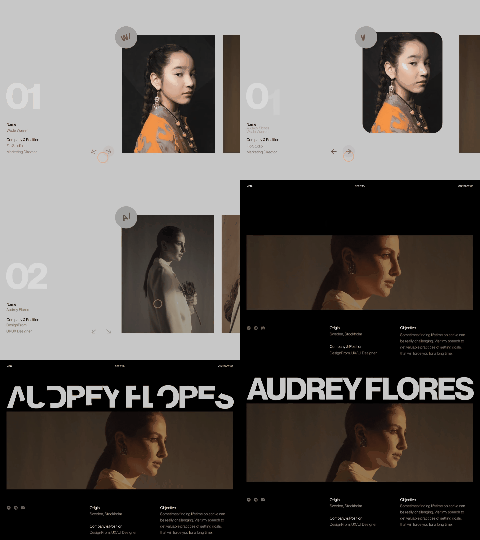
I like that we can use a lot of different animations in web pages to show the content of new content . So we will take a look at some highlights of his structure and animation in a short tutorial today .
I will use GreenSock Of GSAP As an animation library of effects .
Marks and patterns
I will use the following website to achieve this effect

First , Our entire page will be a grid layout
html Code
<div class="content">
 <div class="item">
  <span class="item__meta">2020</span>
  <h2 class="item__title">Alex Moulder</h2>
  <div class="item__img"><div class="item__img-inner" style="background-image:url(img/1.jpg)"></div></div>
  <p class="item__desc">I am only waiting for love to give myself up at last into his hands. That is why it is so late and why I have been guilty of such omissions.</p>
  <a class="item__link">view</a>
 </div>
 <div class="item">
  <span class="item__meta">2021</span>
  <h2 class="item__title">Aria Bennett</h2>
  <div class="item__img"><div class="item__img-inner" style="background-image:url(img/2.jpg)"></div></div>
  <p class="item__desc">They come with their laws and their codes to bind me fast; but I evade them ever, for I am only waiting for love to give myself up at last into his hands.</p>
  <a class="item__link">view</a>
 </div>
 <div class="item">
  <span class="item__meta">2022</span>
  <h2 class="item__title">Jimmy Hughes</h2>
  <div class="item__img"><div class="item__img-inner" style="background-image:url(img/3.jpg)"></div></div>
  <p class="item__desc">Clouds heap upon clouds and it darkens. Ah, love, why dost thou let me wait outside at the door all alone?</p>
  <a class="item__link">view</a>
 </div>
</div>
CSS Code
main {
 padding: 1.5rem 2.5rem 3rem;
 height: 100vh;
 display: grid;
 grid-template-columns: 100%;
 grid-template-areas: 'frame' 'content';
 grid-template-rows: min-content 1fr;
 grid-row-gap: 8vh;
}
「 The content division will have the following styles , To display items in the grid 」
.content {
 grid-area: content;
 max-width: 400px;
}

@media screen and (min-width: 53em) {
 .content {
  max-width: none;
  display: grid;
  grid-template-columns: repeat(3,1fr);
  grid-template-rows: 100%;
  grid-column-gap: 5vw;
 }
}
We just want to display items side by side on the big screen . So we added a media query .
For the internal elements of the project , We will have the following styles :
.item {
 margin-bottom: 5rem;
 display: grid;
 grid-template-columns: 100%;
 grid-template-rows: 1rem auto auto 1fr auto;
}

.item__title {
 font-family: kudryashev-d-excontrast-sans, sans-serif;
 font-weight: 300;
 font-size: 2rem;
 margin-bottom: 0.5rem;
}

.item__img {
 position: relative;
 overflow: hidden;
 width: 100%;
 aspect-ratio: 500/333;
}

.item__img-inner {
 background-position: 50% 45%;
 background-size: cover;
 width: 100%;
 height: 100%;
}

.item__desc {
 margin-top: 2.5rem;
 line-height: 1.1;
}

.item__link {
 cursor: pointer;
 text-transform: lowercase;
 width: 100%;
 padding: 1rem;
 color: var(--color-text);
 border: 1px solid var(--color-border);
 border-radius: 2rem;
 text-align: center;
}

.item__link:hover {
 background: var(--color-text);
 border-color: var(--color-text);
 color: var(--color-text-alt);
}

@media screen and (min-width: 53em) {
 .item {
  margin-bottom: 0;
 }
 .item__title {
  font-size: clamp(1.25rem,3vw,2rem);
 }
}
Image elements have a nested structure , Let's make a little zoom effect . An interesting thing here is the aspect ratio property , It allows us to set the responsive image size according to its actual size when using the background image attribute .
When we click the item button , We will show a cover animation . This will be the animation whose scale changes to cover the two elements of the entire page :
<div class="overlay">
 <div class="overlay__row"></div>
 <div class="overlay__row"></div>
</div>
Let's add the following styles :
.overlay {
 position: fixed;
 top: 0;
 left: 0;
 width: 100%;
 height: 100%;
 display: grid;
 grid-template-columns: 100%;
 pointer-events: none;
 grid-template-rows: repeat(2,1fr);
}

.overlay__row {
 background: var(--color-overlay);
 transform: scaleY(0);
 will-change: transform;
}

.overlay__row:first-child {
 transform-origin: 50% 0%;
}

.overlay__row:last-child {
 transform-origin: 50% 100%;
}
For every “ That's ok ” Setting the correct transformation origin will ensure that they are animated up and down ,“ close ” Current view and hide it .
Next , Let's take a look at the view we'll see . This part will be called “ preview ”, We will add the following :
<section class="previews">
 <div class="preview">
  <div class="preview__img"><div class="preview__img-inner" style="background-image:url(img/1_big.jpg)"></div></div>
  <h2 class="preview__title oh"><span class="oh__inner">Moulder</span></h2>
  <div class="preview__column preview__column--start">
   <span class="preview__column-title preview__column-title--main oh"><span class="oh__inner">Alex Moulder</span></span>
   <span class="oh"><span class="oh__inner">2020</span></span>
  </div>
  <div class="preview__column">
   <h3 class="preview__column-title oh"><span class="oh__inner">Location</span></h3>
   <p>And if it rains, a closed car at four. And we shall play a game of chess, pressing lidless eyes and waiting for a knock upon the door.</p>
  </div>
  <div class="preview__column">
   <h3 class="preview__column-title oh"><span class="oh__inner">Material</span></h3>
   <p>At the violet hour, when the eyes and back, turn upward from the desk, when the human engine waits.</p>
  </div>
  <button class="unbutton preview__back"><svg width="100px" height="18px" viewBox="0 0 50 9"><path vector-effect="non-scaling-stroke" d="m0 4.5 5-3m-5 3 5 3m45-3h-77"></path></svg></button>
 </div>

 <!-- preview -->

 <!-- preview -->

</section>
 Large images will use the display explained in detail in this tutorial / Cancel the animation display for animation processing . This is why we use nested structures , Just like on the project image . For us, we want to change ( And truncated by the parent ) To display the text , We will use
 .oh > .oh__inner structure . The idea behind this is to change oh__inner Element to hide it . For multiline text , We will use JavaScript Add this structure dynamically . We preview__column Paragraphs in the section will use SplitType Divide into several lines .
Let's add the following styles to make line magic work :
.oh {
 position: relative;
    overflow: hidden;
}

.oh__inner {
 will-change: transform;
    display: inline-block;
}

.line {
 transform-origin: 0 50%;
 white-space: nowrap;
 will-change: transform;
}
Now? , Let's animate this baby
The JavaScript
Let's define and instantiate something first
import { gsap } from 'gsap';
import { Item } from './item';
import { Preview } from './preview';

// body element
const body = document.body;

// .content element
const contentEl = document.querySelector('.content');

// frame element
const frameEl = document.querySelector('.frame');

//  Superimposed elements superimposed at the top and bottom
const overlayRows = [...document.querySelectorAll('.overlay__row')];

const previews = [];
[...document.querySelectorAll('.preview')].forEach(preview => previews.push(new Preview(preview)));

// Project instance list
const items = [];
[...document.querySelectorAll('.item')].forEach((item, pos) => items.push(new Item(item, previews[pos])));
Now? , When we open a project , First of all, we need to set our content so that we can no longer click . Use a class to complete .
then , After we show the preview content , Hide all the lines and elements we want to animate .preview-visible Class helps us set some color and pointer events . We also use it to hide our small frame at the top of the page , such , Once the cover hides the initial view , We can animate it again .
By translating the image elements in one direction , Put the internal elements ( It actually contains the background image ) Translate in the opposite direction , The image will not be displayed .
We also finally showed all the lines and oh__inner Elements .
const openItem = item => {

    gsap.timeline({
        defaults: {
            duration: 1,
            ease: 'power3.inOut'
        }
    })
    .add(() => {
        //  Pointer event does not point to content
        contentEl.classList.add('content--hidden');
    }, 'start')

    .addLabel('start', 0)
    .set([item.preview.DOM.innerElements, item.preview.DOM.backCtrl], {
        opacity: 0
    }, 'start')
    .to(overlayRows, {
        scaleY: 1
    }, 'start')

    .addLabel('content', 'start+=0.6')

    .add(() => {
        body.classList.add('preview-visible');

        gsap.set(frameEl, {
            opacity: 0
        }, 'start')
        item.preview.DOM.el.classList.add('preview--current');
    }, 'content')
    // Image animation (reveal animation)
    .to([item.preview.DOM.image, item.preview.DOM.imageInner], {
        startAt: {y: pos => pos ? '101%' : '-101%'},
        y: '0%'
    }, 'content')

    .add(() => {
        for (const line of item.preview.multiLines) {
            line.in();
        }
        gsap.set(item.preview.DOM.multiLineWrap, {
            opacity: 1,
            delay:0.1
        })
    }, 'content')
    //  Animation frame elements
    .to(frameEl, {
        ease: 'expo',
        startAt: {y: '-100%', opacity: 0},
        opacity: 1,
        y: '0%'
    }, 'content+=0.3')
    .to(item.preview.DOM.innerElements, {
        ease: 'expo',
        startAt: {yPercent: 101},
        yPercent: 0,
        opacity: 1
    }, 'content+=0.3')
    .to(item.preview.DOM.backCtrl, {
        opacity: 1
    }, 'content')

};
When we close the preview , We need to do some reverse animation
const closeItem = item => {

    gsap.timeline({
        defaults: {
            duration: 1,
            ease: 'power3.inOut'
        }
    })
    .addLabel('start', 0)
    .to(item.preview.DOM.innerElements, {
        yPercent: -101,
        opacity: 0,
    }, 'start')
    .add(() => {
        for (const line of item.preview.multiLines) {
            line.out();
        }
    }, 'start')

    .to(item.preview.DOM.backCtrl, {
        opacity: 0
    }, 'start')

    .to(item.preview.DOM.image, {
        y: '101%'
    }, 'start')
    .to(item.preview.DOM.imageInner, {
        y: '-101%'
    }, 'start')

    //  Animation frame elements
    .to(frameEl, {
        opacity: 0,
        y: '-100%',
        onComplete: () => {
            body.classList.remove('preview-visible');
            gsap.set(frameEl, {
                opacity: 1,
                y: '0%'
            })
        }
    }, 'start')

    .addLabel('grid', 'start+=0.6')

    .to(overlayRows, {
        //ease: 'expo',
        scaleY: 0,
        onComplete: () => {
            item.preview.DOM.el.classList.remove('preview--current');
            contentEl.classList.remove('content--hidden');
        }
    }, 'grid')
};
Don't forget the event listener
for (const item of items) {
    //  Open project preview
    item.DOM.link.addEventListener('click', () => openItem(item));
    //  Close project preview
    item.preview.DOM.backCtrl.addEventListener('click', () => closeItem(item));
}
This is the result of all this 
There should be smooth transition animation when the animation enters , And do a quick close animation , So users don't have to wait a long time to restore the original view . Explore the code and try some other animations 、 Timing and mitigation , Give it another feeling , See what works , What is invalid !
Thank you for watching here , Bye-bye ️
边栏推荐
- Contrat de solidity pour l'achat à distance de marchandises
- 数据受限条件下的多模态处理技术综述
- [UCOS III source code analysis] - mutually exclusive semaphores (mutually exclusive locks)
- Overview of multimodal processing technology under data constraints
- 5g NR notes
- Source code analysis of ArrayList
- 程序员成长第二十篇:刚晋升管理者,有哪些方面要注意?
- Byte 3 finally landed. Please keep this hot noodle Sutra "including free information"
- NPM common commands use commands to delete nodes_ Modules package
- Leetcode45. Jumping game II
猜你喜欢

BurpSuite工具响应结果中文乱码解决方法

10分钟自定义搭建行人分析系统,检测跟踪、行为识别、人体属性All-in-One
![How to deal with time series event data? [doctoral thesis of Munich University of technology] neural time series point process (ntpp): continuous time event data modeling](/img/fb/b76b94fa4973123e90743a36788595.png)
How to deal with time series event data? [doctoral thesis of Munich University of technology] neural time series point process (ntpp): continuous time event data modeling

1. Create prism project

三维点云课程(三)——聚类

Beijing Hualian BHG mall continues to make efforts, and BHG day leads the new upsurge of urban consumption

Modify server password

Dior is suspected of plagiarizing Chinese horse face skirt, and the product has been removed from the domestic official website

关于产品 | 要怎么进行产品规划?
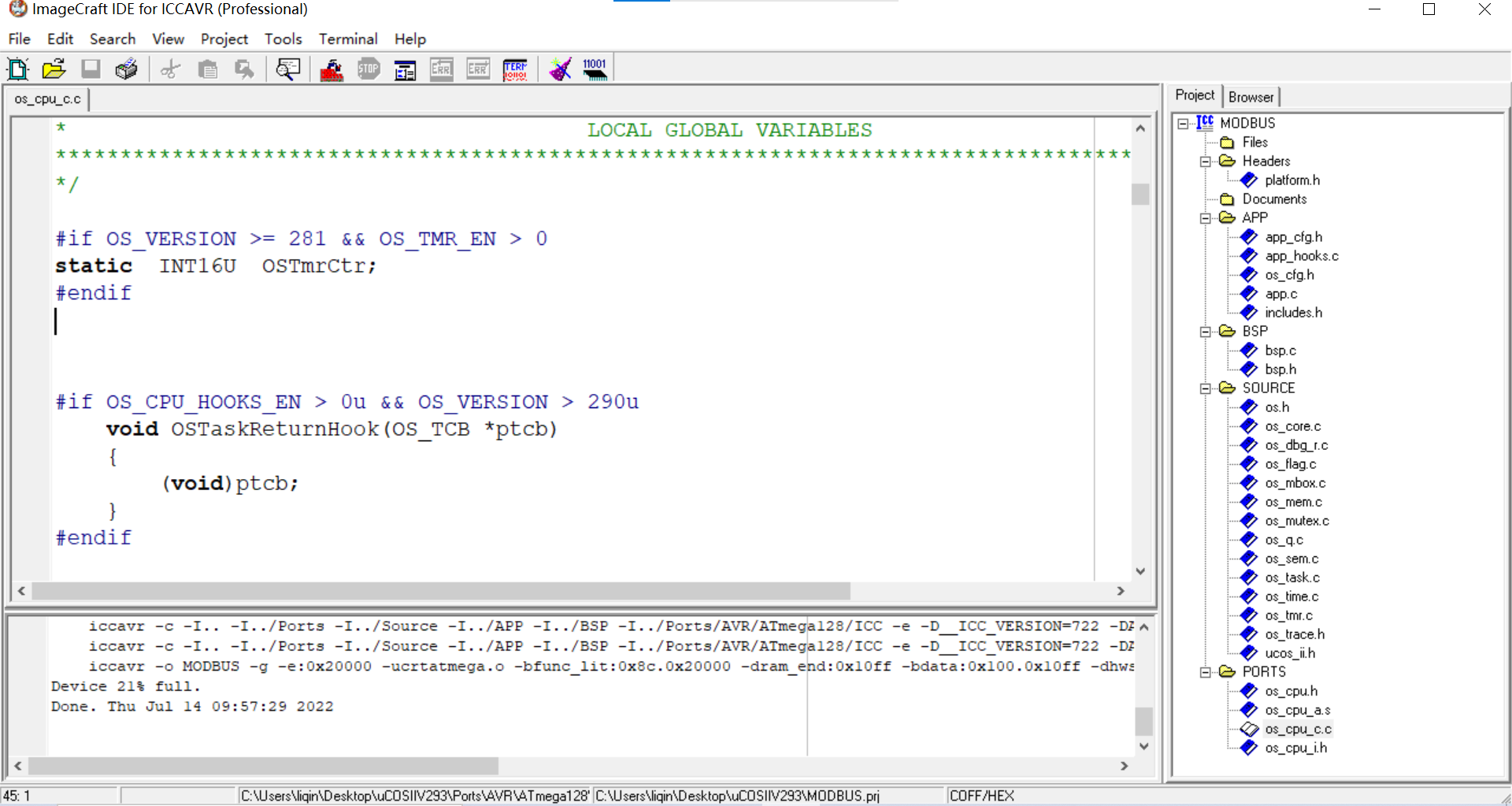
Why is there an error during ucosiiv2.93 migration? The error message is undefined symbol '_ OSTaskReturnHook‘
随机推荐
Source code analysis of ArrayList
DeepMind最新114页报告《多智能体强化学习中的新兴易货贸易行为》
Byte 3 finally landed. Please keep this hot noodle Sutra "including free information"
Error: the solution of diamond operator is not supported in -source 1.6
5g NR notes
sklearn线性回归完成多次项函数和正弦函数拟合
Two stack implementation queue and two queue implementation stack (JS)
Transfer function
[deployment] redis
Error in WordPress establishing database connection
刘小乐教授:我与生物信息学的不解之缘
【无标题】
Detailed explanation of bean's life cycle
Standard input / output stream
Leetcode46. Full arrangement
Solid contract for remote purchase of goods
416. Partition equal sum subset · knapsack problem · dynamic programming
[动态规划]DP23 不相邻取数-简单
华大110时钟校准
The author of surging issued the pressure test results