当前位置:网站首页>u-boot之顶层Makefile分析(三)
u-boot之顶层Makefile分析(三)
2022-07-15 14:32:00 【贱贱的剑】
在u-boot之顶层Makefile分析(二)中分析了config.mk的生成过程,接着继续分析顶层Makefile
导出config.mk为环境变量
# load ARCH, BOARD, and CPU configuration
include $(obj)include/config.mk
export	ARCH CPU BOARD VENDOR SOC
- 将
include/config.mk文件加载进来并将其内部的五个变量导出为环境变量
设置交叉编译工具链
ifndef CROSS_COMPILE
ifeq ($(HOSTARCH),$(ARCH))
CROSS_COMPILE =
else
ifeq ($(ARCH),ppc)
CROSS_COMPILE = ppc_8xx-
endif
ifeq ($(ARCH),arm)
CROSS_COMPILE = arm-none-linux-gnueabi-
endif
…………
endif   # HOSTARCH,ARCH
endif   # CROSS_COMPILE

export  CROSS_COMPILE
include $(TOPDIR)/config.mk
- 这是重要的工作之一---------设置交叉编译工具链
- 上述代码只列表了前几行,其余用不上的平台判断用省略号代替
- 由于我们前面设置的
ARCH变量的值是arm,因此这里找到arm所在的判断语句并修改其中的CROSS_COMPILE变量值 - 实际使用时也可以不在这里修改,而是通过
make CROSS_COMPILE=xxx来设置交叉编译工具链 - 导出
CROSS_COMPILE变量为环境变量 - 接下来分析config.mk文件的重点部分
config.mk文件重点部分分析
编译器设置
AS	= $(CROSS_COMPILE)as
LD	= $(CROSS_COMPILE)ld
CC	= $(CROSS_COMPILE)gcc
CPP	= $(CC) -E
AR	= $(CROSS_COMPILE)ar
NM	= $(CROSS_COMPILE)nm
LDR	= $(CROSS_COMPILE)ldr
STRIP	= $(CROSS_COMPILE)strip
OBJCOPY = $(CROSS_COMPILE)objcopy
OBJDUMP = $(CROSS_COMPILE)objdump
RANLIB	= $(CROSS_COMPILE)RANLIB

#########################################################################

# Load generated board configuration
sinclude $(OBJTREE)/include/autoconf.mk
- 进行了
AS,LD等各种变量的赋值,这些值与前面配置的交叉编译工具链的变量组合起来形成编译器文件对源文件进行编译 - 导入include/autoconf.mk文件,此文件现在是空的,但是Makefile使用sinclude来引入,这就造成了即使文件不存在也不会报错
- include/autoconf.mk文件是在配置过程中生成的,它里面都是一些以
CONFIG_XX开头的宏定义(可以理解为开关),用来指定uboot在编译过程中的走向,本文的最后有此文件的生成过程!
编译选项配置
ifdef	ARCH
sinclude $(TOPDIR)/$(ARCH)_config.mk	# include architecture dependend rules
endif
ifdef	CPU
sinclude $(TOPDIR)/cpu/$(CPU)/config.mk	# include CPU specific rules
endif
ifdef	SOC
sinclude $(TOPDIR)/cpu/$(CPU)/$(SOC)/config.mk	# include SoC specific rules
endif
ifdef	VENDOR
BOARDDIR = $(VENDOR)/$(BOARD)
else
BOARDDIR = $(BOARD)
endif
ifdef	BOARD
sinclude $(TOPDIR)/board/$(BOARDDIR)/config.mk	# include board specific rules
endif
- 根据不同的ARCH,CPU,SOC等添加不同的编译选择,下面是arm_config.mk中的内容
PLATFORM_CPPFLAGS += -DCONFIG_ARM -D__ARM,其他的与之类似 - 注意
BOARD下的config.mk(board/samsung/x210/config.mk)文件内容TEXT_BASE = 0xc3e00000,这与顶层Makefile中的x210_sd_config任务写入的链接地址相同
链接脚本
ifeq ($(CONFIG_NAND_U_BOOT),y)
LDSCRIPT := $(TOPDIR)/board/$(BOARDDIR)/u-boot-nand.lds
else
LDSCRIPT := $(TOPDIR)/board/$(BOARDDIR)/u-boot.lds
endif
- 这里我们没有定义
CONFIG_NAND_U_BOOT变量,因此LDSCRIPT的值是u-boot.lds,这是一个链接脚本文件,分析uboot的编译过程时就要考虑这个链接脚本文件 - 先把该文件放于下方,详细的说明请参阅u-boot之链接脚本博文,这里只说明
.text段定义了程序的运行顺序,因此cpu/s5pc11x/start.o是第一个运行的文件
OUTPUT_FORMAT("elf32-littlearm", "elf32-littlearm", "elf32-littlearm")
/*OUTPUT_FORMAT("elf32-arm", "elf32-arm", "elf32-arm")*/
OUTPUT_ARCH(arm)
ENTRY(_start)
SECTIONS
{

	. = 0x00000000;

	. = ALIGN(4);
	.text      :
	{

	  cpu/s5pc11x/start.o	(.text)
	  cpu/s5pc11x/s5pc110/cpu_init.o	(.text)
	  board/samsung/x210/lowlevel_init.o	(.text)
          cpu/s5pc11x/onenand_cp.o      (.text)
          cpu/s5pc11x/nand_cp.o (.text)
          cpu/s5pc11x/movi.o (.text)
          common/secure_boot.o (.text)
	  common/ace_sha1.o (.text)
	  cpu/s5pc11x/pmic.o (.text)
	  *(.text)
	}

	. = ALIGN(4);
	.rodata : {
     *(.rodata) }

	. = ALIGN(4);
	.data : {
     *(.data) }

	. = ALIGN(4);
	.got : {
     *(.got) }

	__u_boot_cmd_start = .;
	.u_boot_cmd : {
     *(.u_boot_cmd) }
	__u_boot_cmd_end = .;

	. = ALIGN(4);
	.mmudata : {
     *(.mmudata) }

	. = ALIGN(4);
	__bss_start = .;
	.bss : {
     *(.bss) }
	_end = .;
}
指定链接地址
ifneq ($(TEXT_BASE),)
CPPFLAGS += -DTEXT_BASE=$(TEXT_BASE)
endif

ifneq ($(TEXT_BASE),)
LDFLAGS += -Ttext $(TEXT_BASE)
endif
- 这里设置了u-boot链接时指定的链接地址
TEXT_BASE变量值在本篇中的编译选项配置小节中分析了来源
编译文件
ifndef REMOTE_BUILD

%.s:	%.S
	$(CPP) $(AFLAGS) -o [email protected] $<
%.o:	%.S
	$(CC) $(AFLAGS) -c -o [email protected] $<
%.o:	%.c
	$(CC) $(CFLAGS) -c -o [email protected] $<

else

$(obj)%.s:	%.S
	$(CPP) $(AFLAGS) -o [email protected] $<
$(obj)%.o:	%.S
	$(CC) $(AFLAGS) -c -o [email protected] $<
$(obj)%.o:	%.c
	$(CC) $(CFLAGS) -c -o [email protected] $<
endif
- 这里通过Makefile的自动推导规划编译目标文件
继续分析主Makefile
#########################################################################
# U-Boot objects....order is important (i.e. start must be first)

OBJS  = cpu/$(CPU)/start.o
ifeq ($(CPU),i386)
OBJS += cpu/$(CPU)/start16.o
OBJS += cpu/$(CPU)/reset.o
endif
ifeq ($(CPU),ppc4xx)
OBJS += cpu/$(CPU)/resetvec.o
endif
……
LIBS += drivers/mtd/nand_legacy/libnand_legacy.a
LIBS += drivers/mtd/onenand/libonenand.a
LIBS += drivers/mtd/ubi/libubi.a
LIBS += drivers/mtd/spi/libspi_flash.a
LIBS += drivers/net/libnet.a
LIBS += drivers/net/sk98lin/libsk98lin.a
LIBS += drivers/pci/libpci.a
LIBS += drivers/pcmcia/libpcmcia.a
LIBS += drivers/spi/libspi.a
- 接下来继续分析主Makefile
- 注意看注释,
order is important (i.e. start must be first),顺序很重要且start必须是第一个运行的文件。这与我们前面说的链接脚本中的.text段中定义的第一个运行文件相同。 - 接下来添加各种运行库文件
第一个目标all
all:		$(ALL)

$(obj)u-boot.srec:	$(obj)u-boot
		$(OBJCOPY) ${OBJCFLAGS} -O srec $< [email protected]

$(obj)u-boot:		depend $(SUBDIRS) $(OBJS) $(LIBBOARD) $(LIBS) $(LDSCRIPT)
		UNDEF_SYM=`$(OBJDUMP) -x $(LIBBOARD) $(LIBS) | \ sed -n -e 's/.*\($(SYM_PREFIX)__u_boot_cmd_.*\)/-u\1/p'|sort|uniq`;\
		cd $(LNDIR) && $(LD) $(LDFLAGS) $$UNDEF_SYM $(__OBJS) \
			--start-group $(__LIBS) --end-group $(PLATFORM_LIBS) \
			-Map u-boot.map -o u-boot

$(SUBDIRS):	depend $(obj)include/autoconf.mk
		#$(error SUBDIRS)
		$(MAKE) -C [email protected] all
- all是Makefile的第一个目标,因此执行
make的作用等同于执行make all - $(ALL)变量的值经过打印得到u-boot.srec u-boot.bin System.map u-boot.dis,因此分别编译完成这四个任务才算完成
- u-boot.srec依赖于u-boot,而u-boot又依赖于
$(SUBDIRS) $(OBJS) $(LIBBOARD) $(LIBS) $(LDSCRIPT),SUBDIRS又依赖于include/autoconf.mk文件。 - 这样一路依赖下去,然后倒着往回编译即可
- 我们分析一下
include/autoconf.mk文件是如何生成的,一则是许多目标都依赖于这个,二则是它是控制u-boot编译走向的开关文件
autoconf.mk文件的生成
#
# Auto-generate the autoconf.mk file (which is included by all makefiles)
#
# This target actually generates 2 files; autoconf.mk and autoconf.mk.dep.
# the dep file is only include in this top level makefile to determine when
# to regenerate the autoconf.mk file.
$(obj)include/autoconf.mk.dep: $(obj)include/config.h include/common.h
	@$(XECHO) Generating [email protected] ; \
	set -e ; \
	: Generate the dependancies ; \
	$(CC) -x c -DDO_DEPS_ONLY -M $(HOST_CFLAGS) $(CPPFLAGS) \
		-MQ $(obj)include/autoconf.mk include/common.h > [email protected]


$(obj)include/autoconf.mk: $(obj)include/config.h
	@$(XECHO) Generating [email protected] ; \
	set -e ; \
	: Extract the config macros ; \
	$(CPP) $(CFLAGS) -DDO_DEPS_ONLY -dM include/common.h | \
		sed -n -f tools/scripts/define2mk.sed > [email protected]
- 上述的规则用来生成autoconf.mk文件
(obj)include/autoconf.mk.dep规则用不到(obj)include/autoconf.mk规则用来生成autoconf.mk文件- 放开本篇
第一个目标all小段中$(SUBDIRS)目标中的注释即可看到效果(要先删除include/autoconf.mk文件)

- 此时
include/autoconf.mk文件已经生成,要想知道它的完整命令,即可以使用(先删除include/autoconf.mk文件)make --trace命令,运行两秒钟后按下Ctrl+z中断,然后往回找,下图红框中的内容就是完整的命令。
- 下图是该文件的内容示例。
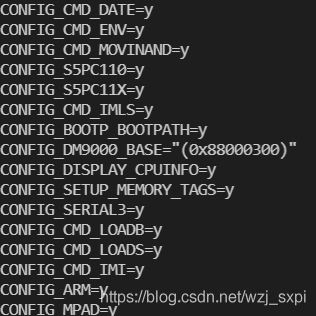
至此,主Makefile分析完成!
边栏推荐
- Pat grade a a1086 tree traversals again
- 程序员成长第十八篇:项目上线
- 盒子模型与元素定位
- 荷兰蒂尔堡大学、联邦大学 | Neural Data-to-Text Generation Based on Small Datasets: Comparing the Added Value of Two Semi-Supervised Learning Approaches on Top of a Large Language Model(基于小数据集的神经数据到文本生成)
- GPU — 分布式训练
- SSM框架+jsp实现的实验室管理系统【源码+数据库+系统论文】
- Pat grade a a1079 total sales of supply chain
- 【答疑解惑】 裁员浪潮中,N+1 到底指什么?
- 钉钉开发文档
- VMware:设置SSH
猜你喜欢




随机推荐
工业交换机的单模和多模能否互相替代?
苹果手机蓝牙联网
Properties and traversal of binary trees
解决运行Mongodb报错 Attempted to create a lock file on a read-only directory: /data/db
Socke编程简介
【第二十二题】地下城与勇士(北理工/北京理工大学/程序设计方法与实践/小学期 )
PAT 甲级 A1064 Complete Binary Search Tree
DPU - fully programmable network
Koin简单使用
Create a list, add the strings "a", "B", "C", "d" and "d" in turn, and print the contents of the set, then remove all the strings "d" in the list, and print its contents again
Pytorch分布式训练
VMware:设置SSH
如何通过开发者度量来优化开源社区体验
荷兰蒂尔堡大学、联邦大学 | Neural Data-to-Text Generation Based on Small Datasets: Comparing the Added Value of Two Semi-Supervised Learning Approaches on Top of a Large Language Model(基于小数据集的神经数据到文本生成)
XDC 2022 Intel技术专场:英特尔软硬件技术构筑云计算架构基石
CMSIS-RTOS相关的一些内容
如何通过特殊数据类型索引实现内存数据库加速
P4 programmable network card in network computing
【SQL注入】堆叠注入
RS2022/云检测:考虑域偏移问题的卫星图像半监督云检测Semi-Supervised Cloud Detection in Satellite Images by Considering the