当前位置:网站首页>JVM Lecture 5: how to deal with peak push of vertical and horizontal data
JVM Lecture 5: how to deal with peak push of vertical and horizontal data
2022-07-26 05:02:00 【Programmer jet_ qi】
JVM The first five lectures : How does the vertical and horizontal data respond to the flood peak push
This article is about JVM The first five lectures : How does the vertical and horizontal data respond to the flood peak push . The vertical and horizontal system was initially positioned as a data push platform , It is used to transfer various business data of the company's internal system ( Such as : contract 、 public 、 Procurement plan, etc ) Push to the docking external third-party platform . With the expansion of business , Gradually, there is a need to actively obtain data from third-party systems , Zongheng has slowly evolved from a data push platform to the company's business data export gateway .
List of articles
1、 Overall functional architecture

2、 The problem background
The announcement related data of Hunan website group needs to be pushed vertically and horizontally , From the development of website groups, we know that there are about 10W Pieces of data need to be pushed , It's not a problem to push this data volume evenly throughout the day , But knowing that these data may be concentrated in a short time (10 minute ) push , At this time, there will be a flood of data .
Action: How to deal with the data peak ?
- The third axe to deal with high concurrency scenarios is caching 、 Fuse ( Downgrade )、 Current limiting , The business scenario of data push is obviously that caching and fusing are not applicable , The optional is current limiting , Then what are the commonly used current limiting schemes ? Their advantages, disadvantages and applicable scenarios ?
Thread pool
- See this article for usage JUC The second is : In depth understanding of Java Thread pool in
asynchronous
- See this series for usage
Funnel algorithm and token Algorithm
3、 Data push
3.1、 Data sources
- The business party assembles and sends packets MQ
- The vertical and horizontal dynamic configuration timing task pulls data through the open platform , Self assembly and delivery MQ
3.2、 Push process
- Vertical and horizontal gateway through consumption MQ, Implement the responsibility chain to push data
- The specific process is shown in the figure below

- The specific process is shown in the figure below
- In order to prevent the push efficiency from being affected mq Number of consuming threads (zmq Default 20) Or use thread pool, but it is inconvenient to set the specific thread pool size ( The size of each message body varies greatly ), When pushing apache Of HttpAsyncClient( Internally based on reactor Model ) To perform network requests , adopt callback Callback to get push results .
The sample code is as follows :
this.getHttpAsyncClient().execute(request, new FutureCallback<HttpResponse>() {

    @Override
    public void completed(HttpResponse result) {

        //todo  Logical processing after successful request
    }

    @Override
    public void failed(Exception ex) {


    }

    @Override
    public void cancelled() {


    }
});
3.3、 Original current limiting scheme
- Limit the flow according to the number of business types in the current push queue .
- For example, the business type of announcement data is
ANNOUNCEMENT_RELEASE_LOCAL_WEB, The current limit of each business type is set to 50, When the amount of data being pushed by this business type in the memory of a single instance reaches 50 after , The data of this business type is from 51 All entries will be rejected at first , Return to MQ Later consumption status , Rejected news MQ Will consume intermittently and retry , Retry time can be dynamically configured .
- For example, the business type of announcement data is
@Component
public class BizTypeLimitHandler extends AbstractHandler<MsgInput, MsgOutput> {


    @Autowired
    FlowLimitConfig flowLimitConfig;

    @Value("${over.load.limit:50}")
    private Integer defaultLimit;

    @Override
    public void task(MsgInput input, MsgOutput output) {


        // The traffic of this business type in the current node
        Integer flowCount = BizFlowLimitUtil.get(input.getBizType());

        // The current limit corresponding to this business type
        Integer overload = this.flowLimitConfig.getBizMap().getOrDefault(input.getBizType(), this.defaultLimit);

        //overload Less than 0 Represent unlimited
        if (overload >= 0 && flowCount >= overload) {

            throw new OverloadException(ErrorCode.ERROR_CODE_NSQ_LIMIT, " Business types :" + input.getBizType() + " Overload , threshold :" + overload + ", Current load value :" + flowCount);
        }
    }
}
3.4、 The problem is
- As business demands increase , The types of business types are also increasing , and Maximum resources required = Number of business types * Current limiting number , When the resources of service instances are limited , Limit the flow only according to the data volume of the business type , The effect will gradually become unsatisfactory .
3.5、 Data indicators and tool selection
Arthas yes Alibaba Open source Java Diagnostic tools , When we encounter the following similar problems and are helpless ,Arthas Can help solve :
- Where does this class come from jar Package loaded ? Why do you report all kinds of related Exception?
- Why didn't I change the code to ? I didn't commit? The branch is wrong ?
- I can't get online when I have a problem debug, Can't we just add logs and redistribute them ?
- There is a problem with the data processing of a user online , But online also can't debug, It can't be reproduced offline !
- Is there a global perspective to see the health of the system ?
- Is there any way to monitor JVM The real-time running state of ?
- How to quickly locate the hot spot of application , Generate flame chart ?
- How to directly from JVM Find an instance of a class in ?
paas The platform provides arthas This tool is convenient for us to troubleshoot online problems , First, enter the corresponding... Of the service instance from the application publishing platform arthas Console .
arthas Provides dashboard command , You can view the service jvm The real-time running state of , If the refresh interval is not specified , Default 5s Refresh once . type dashboard The following screen appears :

The first half is mainly about current services jvm Thread situation in , You can see the pairs of threads cpu The utilization rate of is extremely low , Basically idle .
Then look at the lower part Memory Information in the box , The main data items have the following meanings :
- heap( Heap size )
- par_eden_space( The size of Eden )
- par_survivor_space(S Area size )
- cms_old_gen( Old age size )
- gc.parnew.count(young gc The total number of times )
- gc.parnew.time(young gc Total time )
- gc.concurrentmarksweep.count(full gc The total number of times )
- gc.concurrentmarksweep.time(full gc Total time )
- Each column represents the used 、 Total size 、 Maximum 、 Percentage used

5s After the following :
combination 5s Data before , We mainly focus on the following indicators :
- Thread situation : Threads cpu The usage rate has not changed significantly
- heap( Heap size ): Heap usage size increases 3M
- par_eden_space( The size of Eden ): Eden District in the young generation only increases 3M, According to Eden 426M Size , About need 710 second ( about 12 minute ) Will trigger once young gc
- par_survivor_space(S Area size ): unchanged
- cms_old_gen( Old age size ): unchanged
- gc.parnew.count(young gc The total number of times ): unchanged
- gc.parnew.time(young gc Total time ): unchanged
- gc.concurrentmarksweep.count(full gc The total number of times ): unchanged
- gc.concurrentmarksweep.time(full gc Total time ): unchanged
This is a case when the service is basically idle without traffic , Next, simulate the scenario when the backlog data is pushed , The data is delivered by the test students to MQ among .
a backlog 5000 Data
- Use arthas command
dashboard -i 1000, according to 1s Interval output of :
1S after :
Comparing the two data, it is found that :
- Thread situation :zmq default 20 Consumer threads are active and occupied cpu resources
- heap( Heap size ): Used size from 293M Rise to 478M
- par_eden_space( The size of Eden ): happen young gc Previously, Eden used 23m, The total size of Eden district is 426m, happen young gc Then Eden district used 211m, The explanation is in 1s At least more (426-23)+211 = 614 m Objects of size
- par_survivor_space(S Area size ):young gc Before s The size of the area is 31m,young gc after s The size of the area is 29m
- cms_old_gen( Old age size ): unchanged
- gc.parnew.count(young gc The total number of times ): It happened. 1 Time young gc
- gc.parnew.time(young gc Total time ): Time has increased (9018-8992)= 26 millisecond , As a young gc Duration
- gc.concurrentmarksweep.count(full gc The total number of times ): unchanged
- gc.concurrentmarksweep.time(full gc Total time ): unchanged
1s once young gc, It may be that the time interval is too short, and the data of the old age has not changed , We are in accordance with the 5s The interval of , Take another look at the old times :

5s after :
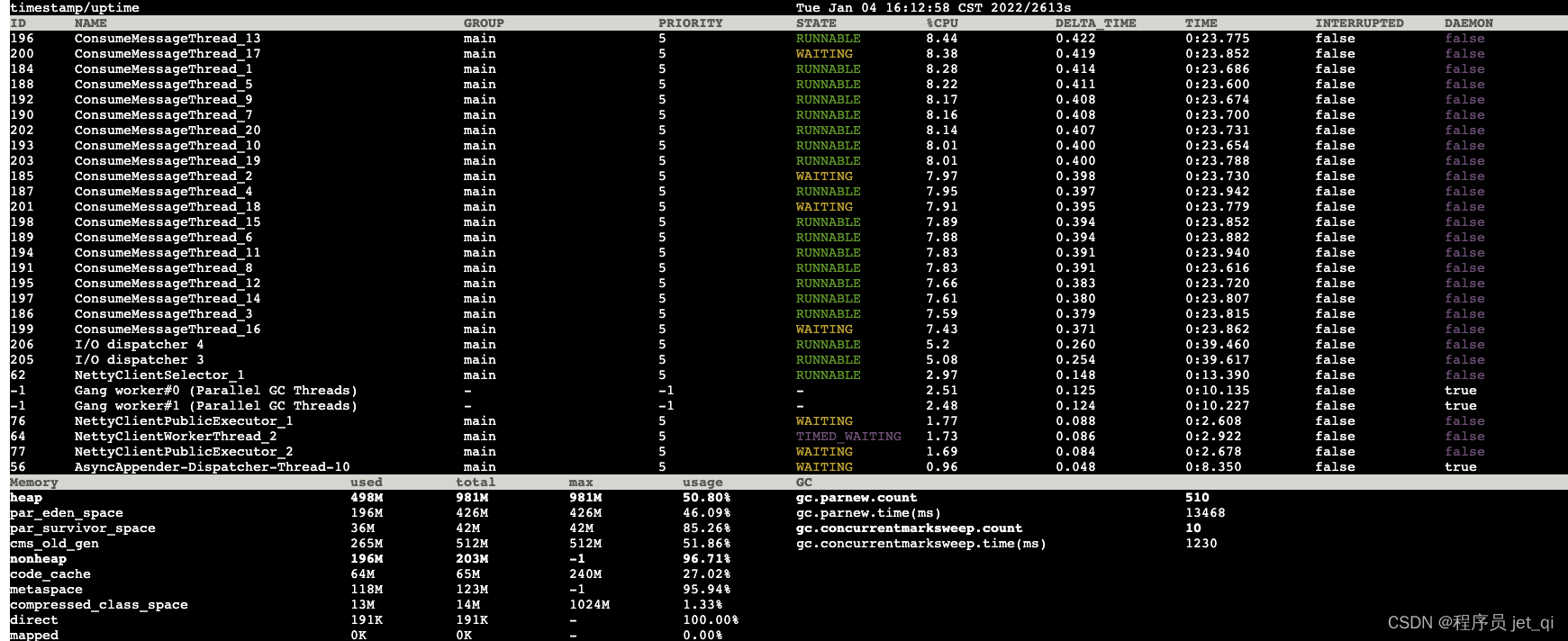
Compare the data twice , Key messages are as follows :
- 5s It happened within 7 Time young gc
- On behalf of the elderly 233m Growth to 265m, increased 32m about , According to the old generation 512m Size , about 80s It will happen once full gc
a backlog 1W Data
Start :
1S after :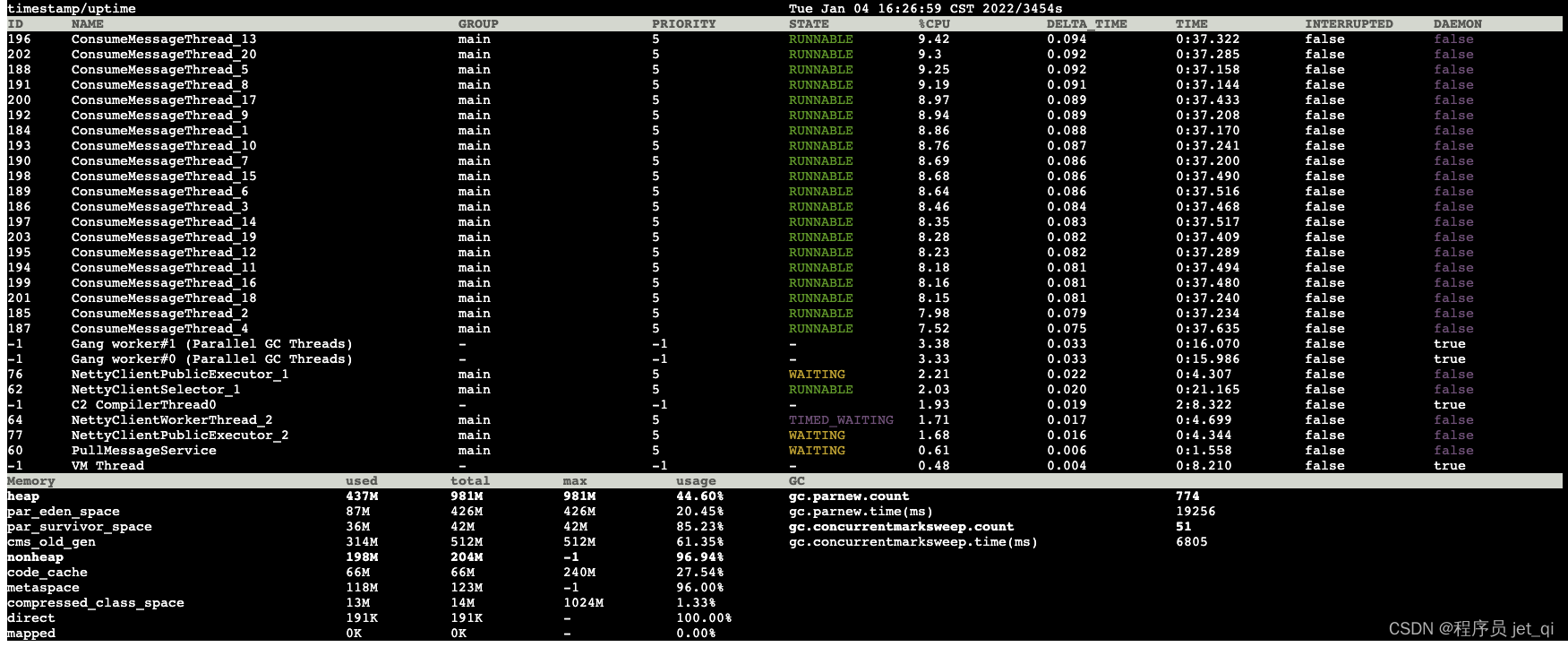
Comparing the two data, we know :
1s It happened twice within young gc
At the same time, the elderly generation follows 304m Growth to 314m,1s increased 10m, The size of the old age is 512m, At this rate , about 50s It will trigger once full gc
At this time, the downstream has not pushed the data , At the same time, the upstream is also constantly from mq China Consumer News , Continue to observe 
1s after :
Comparing the two data, it is found that :
- gc Thread cpu High utilization rate
- It happened once full gc
A second ago, the old age has used a size of 418M, Total size is 512M,1s Later, I found that it triggered once full gc, According to the above analysis, the old age 1s increase 10M The speed of , The remaining space in the old age is enough , Why do you still have full gc In this case ?
full gc When did it happen ?
Case one : The available memory in the old generation is smaller than the size of all surviving objects in the young generation , At the same time, there is no space guarantee parameter (
-XX:-HandlePromotionFailure)- from jdk6 after ,HandlePromotionFailure The parameters no longer affect the space allocation guarantee policy of the virtual machine , We all use jdk8, So the first situation is not satisfied
The second case : The available memory in the old generation is smaller than the size of all objects in the young generation , Space guarantee parameters are enabled , But the available memory is smaller than that of previous generations GC The average object size of the later age
- Based on the previous analysis ,1s The size of objects entering the old age is about 10M, At present, the remaining size of the elderly generation is about (512-418)= 94M, So the second situation is not satisfied
The third case : The younger generation Minor GC The surviving object is larger than Survivor, Will enter the old generation , But the elderly generation is short of memory
- The same as the second case , The third situation is not satisfied
The fourth situation : Set the parameters
-XX:CMSInitiatingOccupancyFaction, The available memory of the old generation is larger than that of the previous young generation GC The average size of objects in the late to old age , But the old generation has used more memory than the proportion specified by this parameter , Automatic triggering Full GC( Suggest 92%)- Find out jvm This parameter is added to the startup parameter :
-XX:CMSInitiatingOccupancyFraction = 80, This parameter indicates that the elderly generation is reaching 512 * 80% = 409m It will trigger once when it is large full gc. This parameter is mainly used to solve cmf(Concurrent Mode Failure) problem , However, this parameter will also cause full gc More frequently . - At this rate , From the current generation 305m Growth to 409m just 10s, signify 10s It will happen once full gc!
- Find out jvm This parameter is added to the startup parameter :
Now we know that it is triggered in advance full gc Because
CMSInitiatingOccupancyFractionParameter configuration , Normally, it is set to 80% There won't be any problem , But is there such an extreme situation :
happen full gc After the old age, there is not much space recycled , The used space size of the elderly generation has been above the set threshold , It leads to the constant full gc?
a backlog 1.5W Data
Start :
5S after :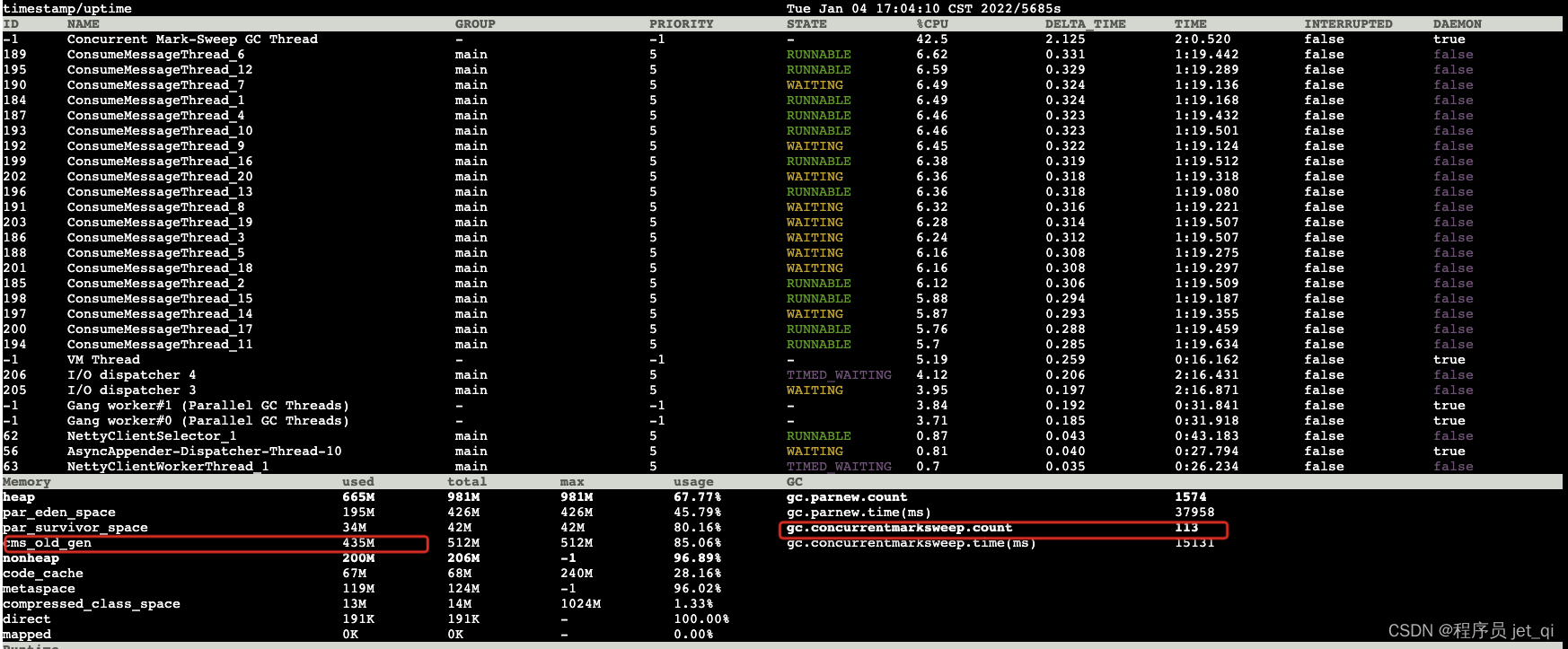
Compare the data twice , Learn the following key information :
- Thread situation :cms Garbage collection thread cpu High occupancy 42%+
- full gc frequency :5s Something happened inside 3 Time full gc
- full gc Total time : The total time spent by 14742 Increased to 15131
5s It actually happened within 3 Time full gc, Average time full gc Time consuming (15131-14742)/ 3 = 129 ms, Although it appears full gc Frequent situations , But it's not enough to make the service unavailable .
a backlog 2W Data
Start :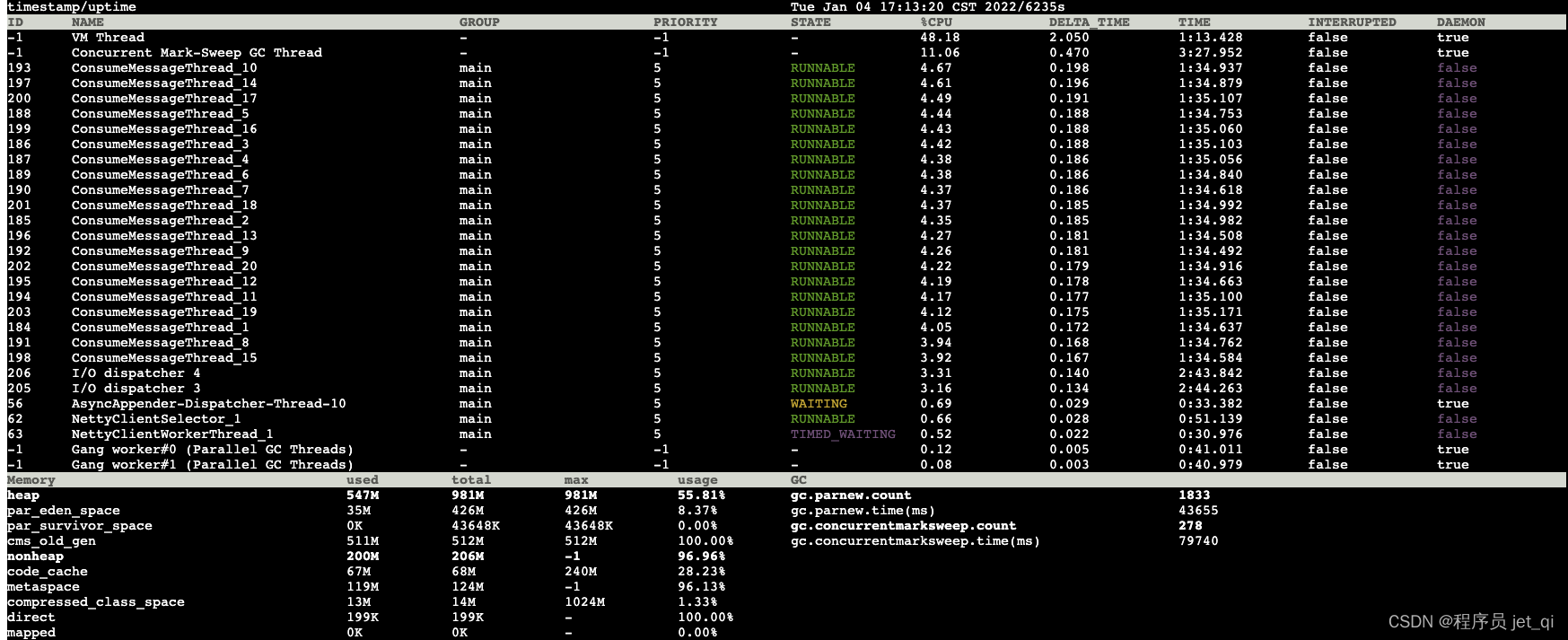
5s after :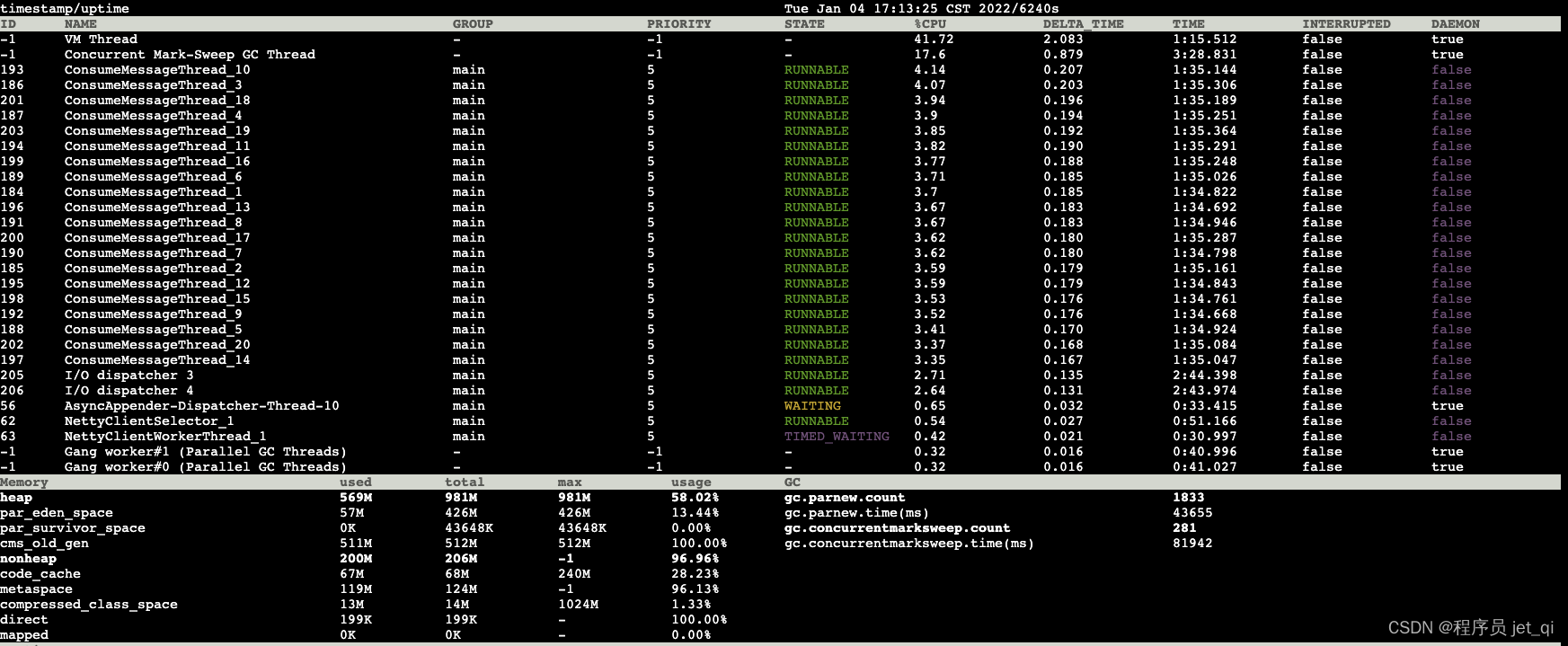
Comparing the two data, it is found that :
- Thread situation :cms Garbage collection thread cpu Very high occupancy
- Old age : Already used 511m( Total size 512m)
- full gc frequency :5s Something happened inside 3 Time full gc
- full gc Total time : The total time spent by 14742 Increased to 15131
- 5s Something happened inside 3 Time full gc, The old age is always in use 511m( Total size 512m) The situation of , Every time the full gc The average time taken (81942-79740)/3=734 ms, amount to 5s There are 2.2s All the time full gc.
At this time, a large number of socket Connection timeout :
Then check the gc journal
Use default jvm Parameters ,gc The log is placed under this path :/opt/zcy/modules/gc.log
see gc Log discovery : two full gc There is only a difference 1.4s about , from 524287k Recycle to 524275k, Only recycled 12k Of memory space , But it cost 0.71s Time , The system is running half the time full gc, Make the system unavailable .
Use to monitor the market (grafana) Check out the cpu、 The Internet io situation 
Through monitoring the market, we can see that due to full gc frequent , Lead to cpu Be filled with , Threads related to network requests cannot be effectively scheduled , Leading to the Internet io Throughput decrease .
4、 Optimization plan
4.1、 Question why
- Through the above test, it can be found that the problems of the system are mainly due to the downstream consumption rate ( Network request ) Can't keep up with the upstream delivery rate (mq consumption ), As a result, the memory is gradually filled , System frequency full gc Make the service unavailable , Until OOM Program crash .
4.2、 Optimization point
- The main bottleneck of the system in this scenario is jvm Memory size above , Avoid frequent full gc We can achieve our goal , So you can try based on jvm Heap memory usage to limit upstream flow control .
jvm Parameter optimization
- The size of the young generation was set to 1024M It is not applicable to the data push scenario of vertical and horizontal . Through observation, it is found that the permanent objects of the elderly generation 150M about , Consider floating garbage , Old age distribution 512M size , So the younger generation is adjusted to 1.5g size :
-Xmn1536M - Modify Eden district and s The proportion of the area is determined by 10:1:1 It is amended as follows 8:1:1, avoid young gc After the survival of too many objects directly into the elderly generation :
-XX:SurvivorRatio=8 - Metaspace size allocation 256m.
-XX:MaxMetaspaceSize=256M -XX:MetaspaceSize=256M - The thread stack is the largest 1m:
-Xss1M - For the younger generation ParNew Garbage collector :
-XX:+UseParNewGC
So after the final optimization jvm The parameters are as follows :
-Xmx2g -Xms2g -Xmn1536M -Xss1M -XX:MaxMetaspaceSize=256M -XX:MetaspaceSize=256M -XX:SurvivorRatio=8
-XX:+UseParNewGC -XX:+UseConcMarkSweepGC -XX:+UseCMSCompactAtFullCollection -XX:CMSMaxAbortablePrecleanTime=5000 -XX:+CMSClassUnloadingEnabled -XX:CMSInitiatingOccupancyFraction=80 -XX:+UseCMSInitiatingOccupancyOnly -XX:+ExplicitGCInvokesConcurrent -Xloggc:/opt/zcy/modules/gc.log -XX:+PrintGCDetails -XX:+PrintGCDateStamps -XX:+HeapDumpOnOutOfMemoryError -XX:HeapDumpPath=/opt/zcy/modules/java.hprof
Increase resource flow limitation
The vertical and horizontal push process is designed based on the model of responsibility chain , So just add a current limiter in the chain .
- One can be set in the current limiter jvm Heap memory usage , When more than this threshold Then block the current consumption thread , Release until the utilization rate is lower than the threshold
- When a throttling block consumer thread is triggered , In response to special circumstances , A maximum blocking time can be set , Release the consumer thread after this time
The configuration range of the threshold gives a reference formula :
- Maximum threshold percentage = ( The young generation can use the maximum + Maximum value for the elderly generation *
-XX:CMSInitiatingOccupancyFractionParameter values )/ The heap can use the maximum - Minimum threshold percentage = The young generation can use the maximum / The heap can use the maximum
Substitute relevant parameters , namely
- Maximum threshold percentage = (1381 + 512*0.8 )/ 1894 = 94%
- Minimum threshold percentage = 1381 / 1894 = 72%
The reference codes are as follows :
@Slf4j
@Component
public class ResourceLimitHandler extends AbstractHandler<MsgInput, MsgOutput> {


    /** *  Whether to enable resource throttling  */
    @Value("${flow.limit.heap.trigger:true}")
    private Boolean trigger;

    /** * jvm Heap current limiting threshold  */
    @Value("${flow.limit.heap.threshold:70}")
    private Integer threshold;

    /** *  Single sleep time ( millisecond ) */
    @Value("${flow.limit.heap.sleepTime:1000}")
    private Integer sleepTime;

    /** *  Maximum blocking time ( millisecond ),-1 Represent unlimited  */
    @Value("${flow.limit.heap.maxBlockTime:15000}")
    private Integer maxBlockTime;


    private MemoryMXBean memoryMXBean = ManagementFactory.getMemoryMXBean();

    @SneakyThrows
    @Override
    public void task(MsgInput input, MsgOutput output) {


        if (!this.trigger) {

            return;
        }

        boolean isLimit = false;

        long startTime = System.currentTimeMillis();

        double percent = this.getHeapUsedPercent();

        while (this.trigger && percent >= this.threshold ) {


            if (!isLimit) {

                isLimit = true;
                log.warn(" Resource usage is too high , Open resource flow limitation .heap:【{}】,used:【{}】,percent:【{}%】,threshold:【{}%】,msgId:【{}】,bizType:【{}】,bizId:【{}】", this.getHeapMax(), this.getHeapUsed(), percent, this.threshold, input.getMessageId(), input.getBizType(), input.getBusinessId());
            }

            if (this.maxBlockTime >= 0 && (System.currentTimeMillis() - startTime) > this.maxBlockTime) {

                log.warn(" Resource usage is too high , But the maximum blocking time is exceeded ({} millisecond ), Start release .heap:【{}】,used:【{}】,percent:【{}%】,threshold:【{}%】,msgId:【{}】,bizType:【{}】,bizId:【{}】", this.maxBlockTime, this.getHeapMax(), this.getHeapUsed(), percent, this.threshold, input.getMessageId(), input.getBizType(), input.getBusinessId());

                // The bottom line , Prevent the young generation from having no new objects due to current restriction , Fail to trigger young gc Conditions , So manually trigger once full gc
                synchronized (ResourceLimitHandler.class) {

                    if ((percent = this.getHeapUsedPercent()) >= this.threshold) {

                        System.gc();
                        log.warn(" Out of memory , Manual trigger full gc.heap:【{}】,used:【{}】,percent:【{}%】,threshold:【{}%】,msgId:【{}】,bizType:【{}】,bizId:【{}】", this.getHeapMax(), this.getHeapUsed(), percent, this.threshold, input.getMessageId(), input.getBizType(), input.getBusinessId());
                    }
                }
                return;
            }

            TimeUnit.MILLISECONDS.sleep(this.sleepTime);
            percent = this.getHeapUsedPercent();
        }

        if (isLimit) {

            log.info(" Resource utilization recovery , Start release , Current limiting duration :【{}】.heap:【{}】,used:【{}】,percent:【{}%】,threshold:【{}%】,msgId:【{}】,bizType:【{}】,bizId:【{}】", System.currentTimeMillis() - startTime, this.getHeapMax(), this.getHeapUsed(), percent, this.threshold, input.getMessageId(), input.getBizType(), input.getBusinessId());
        }

    }

    /** *  Calculate the percentage of heap used  * @return */
    private double getHeapUsedPercent() {


        long max = this.getHeapMax();
        long used = this.getHeapUsed();

        double percent = NumberUtil.div(used, max) * 100;
        return percent;
    }

    /** *  Maximum available heap  * @return */
    private long getHeapMax() {

        MemoryUsage memoryUsage = this.memoryMXBean.getHeapMemoryUsage();
        return memoryUsage.getMax();
    }

    /** *  Heap size used  * @return */
    private long getHeapUsed() {

        MemoryUsage memoryUsage = this.memoryMXBean.getHeapMemoryUsage();
        return memoryUsage.getUsed();
    }
}
4.3、 Protocol Validation
Resource allocation
- Data volume :5w Backlog data
- The instance configuration :1 nucleus 4g
- Number of instances :2
Before resource flow restriction
After the push :
Corresponding monitoring market :

- The phenomenon : Because the memory is full ,jvm Frequent full gc, Lead to cpu Be filled with , Obtained by the data push thread cpu Time slice reduction , Cause network io falling , A large number of requests return socket Connection timeout .
After resource flow restriction
- In the face of jvm After optimizing parameters and adding resource restrictors , Again, simulate the data backlog and observe the effect .
After the push :
The corresponding monitoring market :
Result comparison 
- Compare before and after optimization , The effect of using the new current limiting scheme is still quite remarkable , The efficiency has almost doubled
5、 Online cases
5.1、 Brief description of the incident
- 3 month 17 Friday night 7 The alarm notification is received around : Anhui environment - The usage of vertical and horizontal memory is too high - exceed 95% event
Treatment process
Sign in arthas Console , Two are found to be configured 2g Memory service instance jvm Memory usage up to 99%, During the observation, an instance hangs up and automatically restarts .
Check the application log and Apollo Configure to confirm that the resource flow limiting function of the application has been triggered , In the case of normal data volume push, it is impossible for the memory to be full , There must be a flood of data !.
Database query from noon 12 It is found that the data push volume has reached 100W+, Among them, the website group announcement 、 Competitive negotiation announcements account for nearly 50%, The amount of data is equivalent to Anhui environment 6 The total amount of data pushed in the last month .
Contact Lu'an, Anhui , After communication, it was found that the other party's version was wrong, which caused all historical data to be pushed again , It's equivalent to pushing history in an afternoon 6 Months of data .
Immediately apply for emergency assistance from the operation and maintenance students to upgrade and expand the capacity to 8G Memory 4 example , Vertically and horizontally Apollo Adjust resource flow limiting parameters , At the same time, contact Anhui Lu'an to stop pushing historical duplicate data .
5.2、 Event analysis
The upstream business party did not judge the business data, causing the pressure to be transferred to the vertical and horizontal gateway , Cause a flood of data .
The memory configuration of the crossbar machine instance is not enough to support this amount of data , Triggered resource throttling , But why is there still memory usage as high as 99% The situation of ?
- at that time Apollo The current limiting threshold configured in is 80%, The maximum blocking time of single current limiting is 10 second , The reason why the resource throttling memory is still full is blocking 10s after , Due to the slow response of the downstream third-party interface , The memory resources occupied by the previously pushed data have not been released , Thus, the memory is gradually filled , So for this special case , It is also necessary to reasonably configure the maximum blocking duration of single current limiting .
5.3、 Conclusion
- Each scheme has its own advantages and disadvantages 、 limitations , according to jvm Limit the current of heap memory utilization , Not for all business scenarios , Just as a new current limiting scheme for your reference and expansion ideas , Play a role in casting a brick to attract jade
边栏推荐
- A material of machine learning
- Textfield and password input box that are more flexible and easy to use in compose
- AXI协议(4):AXI通道上的信号
- 分子骨架跃迁工具-DeLinker介绍
- JVM第六讲:线上环境 FGC 频繁,如何解决?
- STM32开发 | AD7606并行多路采集数据
- Working principle and application of fast recovery diode
- JVM Lecture 2: class loading mechanism
- 【云原生 | 17】容器的四种网络模式
- What are the well-known to-do apps at home and abroad
猜你喜欢

Excel VBA:按日期汇总计算输出结果(sumif)

C语言——字符串函数,内存函数集锦以及模拟实现

AXI协议(4):AXI通道上的信号

提高shuffle操作中的reduce并行度

Redis过期删除策略和内存淘汰策略

Excel VBA:实现自动下拉填充公式至最后一行

Five simple and practical daily development functions of chrome are explained in detail. Unlock quickly to improve your efficiency!

Bsdiff and bspatch incremental updates
Axi protocol (4): signals on the Axi channel

Customer service relationship management based on SQL net enterprise messenger enterprise communications
随机推荐
Principle of image nonlocal mean filtering
[cloud native | 17] four network modes of container
C语言——字符串函数,内存函数集锦以及模拟实现
汉字风格迁移篇---通过生成对抗网络学习一对多程式化汉字的转换和生成
Nacos 介绍和部署
Batch convert ppm format pictures to JPG format
Good at C (summer vacation daily question 6)
The integrated real-time HTAP database stonedb, how to replace MySQL and achieve nearly 100 times the improvement of analysis performance
What is the difference between asynchronous and synchronous transmission signals (electronic hardware)
Textfield and password input box that are more flexible and easy to use in compose
阿里三面:MQ 消息丢失、重复、积压问题,如何解决?
关于负数表示的数值为什么比整数大1?
Distance between bus stops: simple simulation problem
基于R语言的Meta分析【全流程、不确定性分析】方法与Meta机器学习
Google Emoji guessing game helps parents guide their children to surf the Internet safely
Study of const of constant function
STM32 development | ad7606 parallel multi-channel data acquisition
The elderly who claim alimony from other children after being supported by their widowed daughter-in-law should be supported
[acwing] 2983. Toys
Fill in the vacancy, and fill in later