当前位置:网站首页>【MySQL】在云服务器上安装配置mysql,并使用IDEA连接
【MySQL】在云服务器上安装配置mysql,并使用IDEA连接
2022-07-17 02:05:00 【KiraFenvy】
在云服务器上安装配置mysql
前言
注意,本文服务器系统镜像为CentOS 8.2 ,Mysql版本为8.0.26
使用服务器时,可以在适当的时候利用服务器代理商的管理控制台创建快照,就如git的版本控制一样,后面可以回滚
1.Mysql安装
>> yum install mysql
>> yum install mysql-server
>> yum install mysql-devel
上述三个都成功就直接到下一步,但是CentOS 7有可能安装mysql-server失败,因为CentOS 7把MySQL数据库软件从默认的程序列表中移除,用mariaDB代替
因此遇到上述问题的解决方案:
方法1. 安装mariadb
MariaDB数据库管理系统是MySQL的一个分支,主要由开源社区在维护,采用GPL授权许可。开发这个分支
的原因之一是:甲骨文公司收购了MySQL后,有将MySQL闭源的潜在风险,因此社区采用分支的方式来避开这
个风险。MariaDB的目的是完全兼容MySQL,包括API和命令行,使之能轻松成为MySQL的代替品:
>> yum install mariadb-server mariadb

# 相关命令
>> systemctl start mariadb  //启动MariaDB
>> systemctl stop mariadb //停止MariaDB
>> systemctl restart mariadb  //重启MariaDB
>> systemctl enable mariadb  //设置开机启动
方法2:官网下载安装mysql-server
>> wget http://dev.mysql.com/get/mysql-community-release-el7-5.noarch.rpm
>> rpm -ivh mysql-community-release-el7-5.noarch.rpm
>> yum install mysql-community-server
启动
>> systemctl start mysqld
开机自启动
>> systemctl enable mysqld
相关命令
>> systemctl disable mysqld  //停止mysql服务开机自启动
>> systemctl status mysqld //查看mysql服务当前状态
>> systemctl restart mysqld //重启mysql服务
>> systemctl stop mysqld //停止mysql服务
2.设置密码
首先进入mysql
> mysql -u root
然后设置密码
下面的命令表示为当前用户设置密码,下面的123456789即为密码
mysql> set password = '123456789';
创建新用户并设置密码,其中identified by后面的就是密码
 mysql> create user 'Fenvyhhh'@'%' identified by '123456789' with grant option;
 或者
 mysql> create user 'Fenvyhhh'@'%' identified with mysql_native_password by '123456789';

注意:mysql8.0及以上版本需要使用以下语句:
mysql> create user [email protected]'%' identified by '123456789';
mysql> grant all privileges on *.* to [email protected]'%' with grant option;

 //刷新权限使操作生效
 mysql> FLUSH PRIVILEGES;
 mysql> quit
 Bye
3.防火墙开放3306端口
操作:
>> firewall-cmd --zone=public --add-port=3306/tcp --permanent
//如果显示 not running 表示已经关闭防火墙,开启就可以了
>> systemctl start firewalld.service //开启防火墙
继续执行开放3306端口的命令

 //开放3306端口
 >> firewall-cmd --zone=public --add-port=3306/tcp --permanent
 #success
 //防火墙重新加载配置
 >> firewall-cmd --reload
 #success
 //查看开放的端口
 >> firewall-cmd --list-ports
 # 3306/tcp
防火墙相关命令
//查看防火墙状态
>> firewall-cmd --state
或者
>> systemctl status firewalld
//如果显示 not running 表示已经关闭防火墙。

>> systemctl start firewalld.service //开启防火墙
>> systemctl stop firewalld //关闭防火墙

//重启防火墙
>> firewall-cmd --relaod
或者
>> systemctl reload firewalld

>> systemctl enable firewalld //开机自启动防火墙
>> systemctl disable firewalld //禁止开机启动防火墙
>> firewall-cmd --permanent --zone=public --remove-port=8080/tcp #关闭8080端口

//打开端口后查看
>> firewall-cmd --zone=public --list-ports
 //查看所有打开的端口
 //显示端口已打开:
 #8848/tcp 5000/tcp

//查看已开启的端口信息
> netstat -tulnp | grep :5000  //查看5000端口信息(指定)
> netstat -ntlp //查看全部端口信息
4.配置mysql默认编码为utf-8
这个步骤似乎可有可无,但还是写在这里了
打开/etc/my.cnf文件
>> vim /etc/my.cnf
显示的内容为
#
# This group is read both both by the client and the server
# use it for options that affect everything
#
[client-server]

#
# include all files from the config directory
#
!includedir /etc/my.cnf.d
证明配置文件在/etc/my.cnf.d
打开/etc/my.cnf.d
" ============================================================================ " Netrw Directory Listing                                        (netrw v156)
" /etc/my.cnf.d "   Sorted by      name
" Sort sequence: [\/]$,\<core\%(\.\d\+\)\=\>,\.h$,\.c$,\.cpp$,\~\=\*$,*,\.o$,\.obj$,\.info$,\.swp$,\.bak$,\~$ "   Quick Help: <F1>:help  -:go up dir  D:delete  R:rename  s:sort-by  x:special
" ==============================================================================
../
./
client.cnf
mysql-default-authentication-plugin.cnf
mysql-server.cnf
光标移动到下面三行中某一行可以打开对应文件,我们打开mysql-server.cnf
#
# This group are read by MySQL server.
# Use it for options that only the server (but not clients) should see
#
# For advice on how to change settings please see
# http://dev.mysql.com/doc/refman/en/server-configuration-defaults.html

# Settings user and group are ignored when systemd is used.
# If you need to run mysqld under a different user or group,
# customize your systemd unit file for mysqld according to the
# instructions in http://fedoraproject.org/wiki/Systemd

[mysqld]
datadir=/var/lib/mysql
socket=/var/lib/mysql/mysql.sock
log-error=/var/log/mysql/mysqld.log
pid-file=/run/mysqld/mysqld.pid
character_set_server=utf8
init_connect='SET NAMES utf8'
后面两行就是我们要加上去的内容
重启mysql
>> systemctl restart mysqld
登录用户后查看编码
[[email protected] ~]# mysql -uFenvyhhh -p
Enter password:(密码是不明文显示的)
Welcome to the MySQL monitor.  Commands end with ; or \g.
Your MySQL connection id is 2
Server version: 5.6.51 MySQL Community Server (GPL)
...
mysql> show variables like '%character%';
+--------------------------+----------------------------+
| Variable_name            | Value                      |
+--------------------------+----------------------------+
| character_set_client     | utf8                       |
| character_set_connection | utf8                       |
| character_set_database   | utf8                       |
| character_set_filesystem | binary                     |
| character_set_results    | utf8                       |
| character_set_server     | utf8                       |
| character_set_system     | utf8                       |
| character_sets_dir       | /usr/share/mysql/charsets/ |
+--------------------------+----------------------------+
8 rows in set (0.00 sec)
mysql>
也有可能是下述的样子,但都可以
5.在云服务器代理商的控制台放行3306端口
这里用的是阿里云轻量应用服务器管理控制台
在防火墙处添加规则
IP来源0.0.0.0/0 表示不限IP访问
6.IDEA中连接该mysql
这部分内容仅与IDEA中从本地数据库迁移到远程数据库相关
然后进入到远程mysql的控制台,创建新的数据库,并use新的数据库,把以前数据库的建表语句粘贴进去并执行
接着,创建新的application-prod.yml
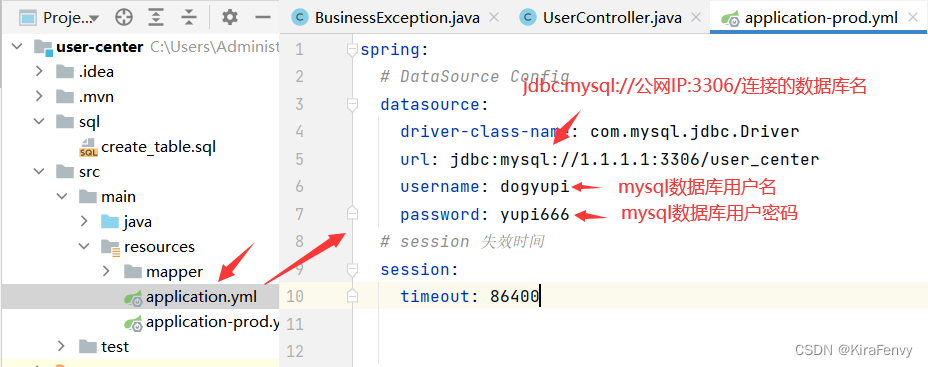
测试一下,在本地运行生产环境的项目,点击右侧maven->Lifecycle->双击package
会出现一个报错,说有一个单元测试没通过,一般情况下,在项目上线之前肯定要执行一遍单元测试的,单元测
试就是要保证咱们项目运行的时候是没有问题,不过现在改有点麻烦,我们以打包为主
点击小闪电图标,让它跳过单元测试,然后再双击package

target包下出现构建好的jar,进入该目录终端
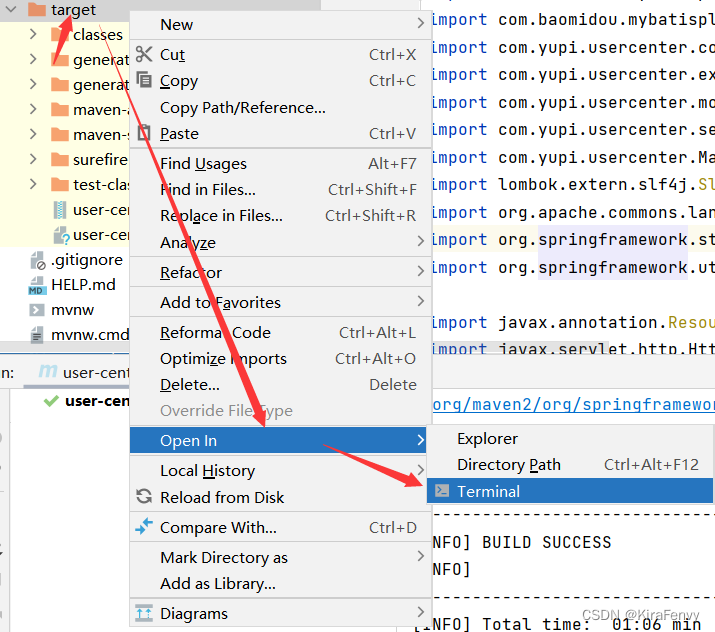
传入生产环境的参数运行jar包
java -jar .\user-center-0.0.1-SNAPSHOT.jar --spring.profiles.active=prod

如果此时能成功连接并插入数据,成功
边栏推荐
- 当 mysql 表从压缩表变成普通表会发生什么?
- MySQL addition, deletion, query and modification (basic)
- STM32串口发送和接收多个数据教程基于气体传感器实战
- Method of realizing horizontal and vertical centering of unknown width and height elements
- Deep learning experiment notes
- Properties of Gaussian distribution (including code)
- 2022长三角数学建模:齿轮箱故障诊断
- 基于MFC如何实现单个文档的文件读写
- 【LeetCode】735. 行星碰撞
- sublime基本操作
猜你喜欢



![[nodejs] npm/nrm cannot load the file because the script solution is prohibited in this system](/img/23/d4d55530e1afaa7b82c9c46f550620.png)
随机推荐
No, check it out
367. Effective complete square (necessary for entry)
ulsm配置案例
Chapter I Introduction
XX City high school network topology overall planning configuration
oracle 查询非自增长分区的最大分区
論文閱讀:U-Net++: Redesigning Skip Connections to Exploit Multiscale Features in Image Segmentation
Web semantics (emphasis tag EM italic) (emphasis tag strong bold) (custom list: DL, DT, DD)
laravel的问题
从 0 到 1 开展软件测试
如何将Excel中的数据粘贴到cxGrid中
374. Guess the size of numbers (must be able to get started)
HRNet
洛谷每日三题之第五天
第二章 线性表
The third day of the three questions of Luogu daily (make up on the fourth day)
Simple usage and interface introduction of labelme
【Nodejs】npm/nrm无法加载文件、因为在此系统禁止执行脚本解决方式
STM32串口发送和接收多个数据教程基于气体传感器实战
【LeetCode】745. 前缀和后缀搜索