当前位置:网站首页>Case: using kept+haproxy to build a Web Cluster
Case: using kept+haproxy to build a Web Cluster
2022-07-26 02:37:00 【Are prawns delicious】
Catalog
Haproxy It is a popular cluster scheduling tool , There are many similar cluster scheduling tools , Such as LVS and Nginx. By comparison ,LVS Best performance , But the construction is relatively complex ;Nginx Of upstream Module supports clustering , However, the health check function of cluster nodes is not strong , No performance Haproxy good .Haproxy The official website is http://www.haproxy.org/.
Case pre knowledge points
HTTP request Request mode GET The way POST The way Return status code The normal status code is 2××、3×× The abnormal status code is 4××、5××
Common scheduling algorithms for load balancing
RR(Round Robin): Polling scheduling LC(Least Connections): Minimum connections SH(Source Hashing): Source based access scheduling
Case environment
The goal of the experiment : Use haproxy build web to cluster around , Achieve load balancing and high availability , Use keepalived+haproxy Realize dual machine hot standby and load balancing .
Case preparation : Configure according to the following figure IP Address , The drift address is 192.168.1.100, Turn off firewall 、selinux、 build yum Warehouse .

build Nginx1
[[email protected] ~]# yum -y install pcre-devel zlib-devel
[[email protected] ~]# useradd -M -s /sbin/nologin nginx
[[email protected] ~]# eject
[[email protected] ~]# mount /dev/cdrom /media
mount: /dev/sr0 is write-protected, mounting read-only
[[email protected] ~]# tar zxf /media/nginx-1.12.0.tar.gz -C /usr/src
[[email protected] ~]# cd /usr/src/nginx-1.12.0/
[[email protected] nginx-1.12.0]# ./configure --prefix=/usr/local/nginx --user=nginx --group=nginx
[[email protected] nginx-1.12.0]# make && make install
The default information after installation is as follows .
Default installation directory :/usr/local/nginx
The default log :/usr/local/nginx/logs
Listening port :80
Default web Catalog :/usr/local/nginx/html
[[email protected] nginx-1.12.0]# cd /usr/local/nginx/html/
[[email protected] html]# echo 111111 > test.html                              // Create a test page
[[email protected] html]# /usr/local/nginx/sbin/nginx                          // start-up Nginx
[[email protected] html]# netstat -anpt | grep nginx
tcp        0      0 0.0.0.0:80              0.0.0.0:*               LISTEN      6762/nginx: master
After installation , Client access http://192.168.1.20/test.html test .
build Nginx2
The steps of compiling and installing are the same as Nginx1 identical , The difference lies in the test web page .
[[email protected] html]# echo 22222 > test.htmlAfter installation , Client access http://192.168.1.30/test.html test .
Compilation and installation Haproxy
[[email protected] ~]# yum -y install pcre-devel bzip2-devel
[[email protected] ~]# eject
[[email protected] ~]# mount /dev/cdrom /media/
mount: /dev/sr0 is write-protected, mounting read-only
[[email protected] ~]# tar zxf /media/haproxy-1.5.19.tar.gz -C /usr/src
[[email protected] ~]# cd /usr/src/haproxy-1.5.19/
[[email protected] haproxy-1.5.19]# make TARGET=linux26                    //64 Bit system
[[email protected] haproxy-1.5.19]# make install
Haproxy Server configuration
Build profile
[[email protected] haproxy-1.5.19]# mkdir /etc/haproxy                             // Create a directory of configuration files
[[email protected] haproxy-1.5.19]# cp examples/haproxy.cfg /etc/haproxy/          // take haproxy.cfg Copy the file to the configuration file directory
Haproxy Configuration item introduction
Haproxy The configuration file is usually divided into three parts , namely global、defaults and listen.global Configure for global ,defaults For default configuration ,listen Configure... For application components .
global The configuration items are described as follows :
global
        log 127.0.0.1   local0                      // Configure logging ,local0 For log devices , It is stored in the system log by default
        log 127.0.0.1   local1 notice               //notice For log level , Usually there are 24 A level
        maxconn 4096                                // maximum connection
        uid 99                                      // user uid
        gid 99                                      // user gid
defaults The configuration items are described as follows :
defaults
        log     global                              // Define the log as global Log definition in configuration
        mode    http                                // The model is http
        option  httplog                             // use http Log format log
        retries 3                                   // Check node server failures , Continuous over 3 Secondary failure , The node is considered unavailable
        redispatch                                  // When the server load is high , Automatically end connections that have been queued for a long time
        maxconn 2000                                // maximum connection
        contimeout      5000                        // Connection timeout
        clitimeout      50000                       // Client timeout
        srvtimeout      50000                       // Server timeout
global The configuration items are described as follows :
listen  appli4-backup 0.0.0.0:10004                                                 // Define a appli4-backup Application
        option  httpchk /index.html                                                 // Check the... Of the server index.html file
        option  persist                                                             // Force the request to be sent to already down Dropped servers
        balance roundrobin                                                          // The load balancing scheduling algorithm uses the polling algorithm
        server  inst1 192.168.114.56:80 check inter 2000 fall 3                     // Define online nodes
        server  inst2 192.168.114.56:81 check inter 2000 fall 3 backup              // Define backup nodes
According to the current cluster design , take haproxy.conf The content of the configuration file is modified as follows .
[[email protected] ~]# vim /etc/haproxy/haproxy.cfg
# this config needs haproxy-1.1.28 or haproxy-1.2.1
global
log 127.0.0.1 local0
log 127.0.0.1 local1 notice
#log loghost local0 info
maxconn 4096
#chroot /usr/share/haproxy // Comment out
uid 99
gid 99
daemon
#debug
#quiet
defaults
log global
mode http
option httplog
option dontlognull
retries 3
#redispatch // Comment out
maxconn 2000
contimeout 5000
clitimeout 50000
srvtimeout 50000
listen appli4-backup 0.0.0.0:80 // Copy listen Configuration item module content , Change the port number to 80
option httpchk GET /index.html //http The request method is changed to GET
balance roundrobin
server inst1 192.168.1.20:80 check inter 2000 fall 3 // Configuration of two node servers
server inst2 192.168.1.30:80 check inter 2000 fall 3 // Delete all the following configurations in the configuration file - Create a self starting script
[[email protected] ~]# cp /usr/src/haproxy-1.5.19/examples/haproxy.init /etc/init.d/haproxy
[[email protected] ~]# ln -s /usr/local/sbin/haproxy /usr/sbin/haproxy
[[email protected] ~]# chmod +x /etc/init.d/haproxy
[[email protected] ~]# chkconfig --add /etc/init.d/haproxy
[[email protected] ~]# /etc/init.d/haproxy start
Starting haproxy (via systemctl):                          [  OK  ]
install keepalived
install ipvsadm and keepalived package .
[[email protected] ~]# mount /dev/cdrom /media
mount: /dev/sr0 is write-protected, mounting read-only
[[email protected] ~]# yum -y install ipvsadm keepalived
To configure keepalived.cof
do haproxy+keepalived to cluster around , You only need to configure and modify the hot standby instance , Specify the primary and standby schedulers , name ,VIP Address , Priority and drift address are enough .
[[email protected] ~]# vim /etc/keepalived/keepalived.conf
! Configuration File for keepalived
global_defs {
......// Omit part
router_id R1 // Name of main regulator
}
vrrp_instance VI_1 {
state MASTER // Hot standby state
interface ens33 //VIP Address physical interface
virtual_router_id 51
priority 100 // priority
advert_int 1
authentication {
auth_type PASS
auth_pass 1111
}
virtual_ipaddress {
192.168.1.100 // Drift address
}
}
[[email protected] ~]# systemctl start keepalived
[[email protected] ~]# systemctl enable keepalivedHaproxy+keepalived The installation configuration of the backup scheduler is roughly the same , The only thing to notice is that keepalived When the configuration , Distinguish the main 、 Standby scheduler configuration ( Specify the primary and standby schedulers , name ,VIP Address , Priority and drift address ). Continue to configure according to the above configuration haproxy2+keepalived2.
Case test
The client opens the browser to access http://192.168.1.100/test.html, Refresh the browser twice to view the web content and test the load balance ( You should see 11111 and 22222 Two web pages ). To break off web1, Refresh twice in access to test high availability ( At this time, only 22222).
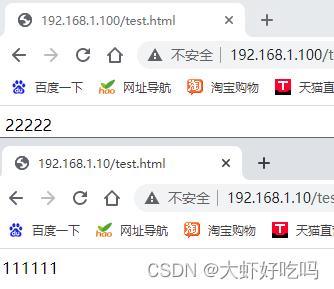

broken keepalived Master tuner network , Continue to visit http://192.168.1.100/test.html, Successful access means keepalived Load balancing successful ( You should see 11111 and 22222 Two web pages ).

Haproxy journal
Modify the log configuration options in the original configuration file , stay global Configuration in the project . Save and restart after modifying the configuration Haproxy.
[[email protected] ~]# vim /etc/haproxy/haproxy.cfg
        log /dev/log    local0 info
        log /dev/log    local0 notice
[[email protected] ~]# /etc/init.d/haproxy restart             // restart
Restarting haproxy (via systemctl):                        [  OK  ]
For ease of management , take Haproxy The relevant configuration is defined independently to haproxy.conf And on the /etc/rsyslog.d/ Next ,rsyslog All configuration files in this directory will be loaded automatically at startup .
[[email protected] ~]# vim /etc/rsyslog.d/haproxy.conf
if ($programname == 'haproxy' and $syslogseverity-text == 'info') then -/var/log/haproxy/haproxy-info.log
& ~
if ($programname == 'haproxy' and $syslogseverity-text == 'notice') then -/var/log/haproxy/haproxy-notice.log
& ~
[[email protected] ~]# systemctl restart rsyslog
After client access , You can use the following command to check in time Haproxy Access request log information for .
[[email protected] ~]# tail -f /var/log/haproxy/haproxy-info.log
Jul 23 23:08:35 localhost haproxy[43674]: 192.168.1.200:62207 [23/Jul/2022:23:08:35.157] appli4-backup appli4-backup/inst2 0/0/1/1/2 200 240 - - ---- 1/1/0/1/0 0/0 "GET /test.html HTTP/1.1"
Jul 23 23:08:35 localhost haproxy[43674]: 192.168.1.200:62207 [23/Jul/2022:23:08:35.159] appli4-backup appli4-backup/inst1 198/0/5/1/204 200 241 - - ---- 2/2/0/1/0 0/0 "GET /test.html HTTP/1.1"
Haproxy Parameter optimization of
| Parameters | Parameter description | Optimization Suggestions |
|---|---|---|
| maxconn | maximum connection | This parameter is adjusted according to the actual use of the application , Recommended 10240, meanwhile "defaults" The value of the maximum number of connections in cannot exceed "global" The definition in paragraph |
| daemon | Daemons mode | Haproxy You can use non - daemons mode to start , It is recommended to use daemon mode to start the production environment |
| nbproc | Number of concurrent processes for load balancing | It is recommended to contact the current server CPU Equal or equal in number of cores 2 times |
| retries | Retry count | Parameters are mainly used to check cluster nodes , If there are many nodes , And the volume is large , Set to 2 Time or 3 Time ; When there are few server nodes , You can set 5 Time or 6 Time |
| option http-server-close | Active shut down http Request options | It is recommended to use this option in the production environment , Avoid due to timeout Caused by too long time setting http Connection stacking |
| timeout http-keep-alive | Long timeout | This option sets the long connection timeout , For details, refer to the application's own characteristics , It can be set to 10s |
| timeout http-request | HTTP Request timeout | It is recommended that this time be set to 5~10s, increase http Connection release speed |
| timeout client | Client timeout | If the traffic is too large , Slow node response , You can set this time to be shorter , Recommended setting is 1min Left and right |
边栏推荐
猜你喜欢

How to effectively prevent others from wearing the homepage snapshot of the website
Effectively solve the problem of garbled code when idea runs the web project (with detailed steps)
如何有效的去防止别人穿该网站首页快照
![[early knowledge of activities] list of recent activities of livevideostack](/img/14/d2cdae45a18a5bba7ee1ffab903af2.jpg)
[early knowledge of activities] list of recent activities of livevideostack

HLS Experiment 1 -- multiplier

prometheus+blackbox-exporter+grafana 监控服务器端口及url地址

What can EAM system help enterprises do?

U++ common type conversion and common forms and proxies of lambda

ES6高级-利用原型对象继承方法

MySQL build websites data table
随机推荐
Games101 review: shading, rendering pipelines
eslint常见报错集合
The sixth day of the third question of daily Luogu
ERROR: could not extract tar starting at offset 000000000000020980+9231072+2
Overview of pytoch's API
Annotation development management third-party beans
[red team] att & CK - using bits services to achieve persistence
力扣148:排序链表
Uni app cross domain configuration
c# 单元测试
2022.7.25-----leetcode.919
Turn on the LED
【方向盘】工具提效:Sublime Text 4的常用快捷键合集
npm link的简单介绍及使用
Data warehouse: Practice of hierarchical structure of data warehouse in banking industry
AMD64(x86_64)架构abi文档:中
Recorded target detection NMS (non maximum suppression)
数仓:银行业数仓的分层架构实践
VOFA+ 串口调试助手
Information System Project Manager - Chapter 10 communication management and stakeholder management examination questions over the years