当前位置:网站首页>V831——AprilTag标签识别
V831——AprilTag标签识别
2022-07-16 11:43:00 【我与nano】
V831
前言
AprilTag 标记追踪是视觉很常用的一个标签,V831也具备这个功能。
一、AprilTag 标记追踪测距
先看代码
#!/usr/bin/python3
from maix import display, camera

f_x = (6 / 5.76) * 240 # 镜头的焦距是6MM,感光cmos的长是5.76mm,240像素是屏幕的长
f_y = (6 / 3.24) * 240 # 镜头的焦距是6MM,感光cmos的宽是3.24mm,240像素是屏幕的宽

c_x = 240 * 0.5  # 屏幕分辨率的一半
c_y = 240 * 0.5  # 屏幕分辨率的一半

while True:
    t = camera.capture()
    mks = t.find_apriltags(families = 16,fx = f_x,fy = f_y,cx = c_x,cy = c_y)
    for mk in mks:
      x_tran = mk['x_translation']
      y_tran = mk['y_translation']
      z_tran = mk['z_translation']
      #家族信息
      fam = mk['family']
      #外框数据
      x, y, w, h, id  =  mk['x'], mk['y'], mk['w'], mk['h'], mk['id']
      #内框数据
      x1,y1 = mk['corners'][0]   #访问字典的列表
      x2,y2 = mk['corners'][1]
      x3,y3 = mk['corners'][2]
      x4,y4 = mk['corners'][3]
      z1,z2 = mk['centroid']
      #虚拟距离
      length = (x_tran*x_tran + y_tran*y_tran + z_tran*z_tran)**0.5

      #画外框
      t.draw_rectangle(x, y, x + w, y + h, color=(0, 0, 255), thickness = 2)
      #打印ID
      t.draw_string(int(x + w*0.15) , int(y + h*0.15) , str(id), scale = 4.0, color = (255, 0, 0), thickness = 3)
      #画内框
      t.draw_line(x1, y1, x2, y2, color = (0, 255, 0), thickness = 3)
      t.draw_line(x2, y2, x3, y3, color = (0, 255, 0), thickness = 3)
      t.draw_line(x3, y3, x4, y4, color = (0, 255, 0), thickness = 3)
      t.draw_line(x4, y4, x1, y1, color = (0, 255, 0), thickness = 3)

      if(fam == 16):
        t.draw_string(x, y-20, "TAG36H11", scale = 1.0, color = (255, 0, 0), thickness = 2)

      t.draw_string(x, y+h+15, str(int(length * 3.0649 - 2))+" cm", scale = 1.0, color = (255, 0, 0), thickness = 2)

    display.show(t)
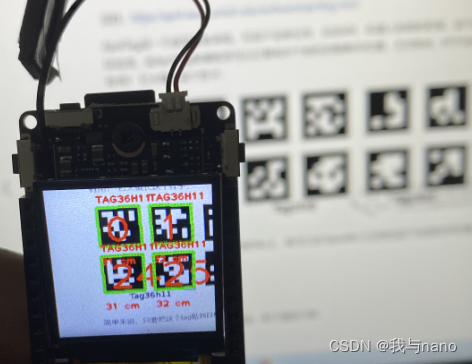
如果想要获取标签四个点的坐标只需要获取字典中键值为 corners 的列表中的值即可,而想获得外框(蓝色框)的坐标只需要获取字典中键值为 x , y , w , h 的的值,最后像代码中所操作的一样即可。
字典的键值如下所示: ‘x’ , ‘y’ , ‘w’ , ‘h’ , ‘id’ , ‘family’ , ‘centroid’ , ‘corners’ , ‘x_translation’ , ‘y_translation’ , ‘z_translation’ , ‘decision_margin’ , ‘hamming’ , ‘goodness’ , ‘x_rotation’ , ‘y_rotation’ , ‘z_rotation’。
介绍简单几个键值的含义。‘x’ , ‘y’ , ‘w’ , ‘h’ 键值返回的值分别是外框左上角 x 坐标和 y 坐标以及外框的长和宽。特别注意的是键值 ‘corners’ 返回的是一个列表,列表中的值代表着内框的四个顶点的坐标。
在这个代码里测距使用的原理同样类似于小孔成像,具体怎么用的可以去看之前的测距博客,我认识这个值并不是很准确(可能是追踪测距的缘故),后面我会将这个测距算法进行优化。
二、 AprilTag 获取角度信息以及三维坐标的显示
同样先看代码
#!/usr/bin/python3
from maix import display, camera
import math

f_x = (6 / 5.76) * 240 # 镜头的焦距是6MM,感光cmos的长是5.76mm,240像素是屏幕的长
f_y = (6 / 3.24) * 240 # 镜头的焦距是6MM,感光cmos的宽是3.24mm,240像素是屏幕的宽

c_x = 240 * 0.5 # 屏幕分辨率的一半
c_y = 240 * 0.5 # 屏幕分辨率的一半

while True:
    t = camera.capture()
    mks = t.find_apriltags(families = 16,fx = f_x,fy = f_y,cx = c_x,cy = c_y)
    for mk in mks:

      #内框数据
      x1,y1 = mk['corners'][0]   #访问字典的列表
      x2,y2 = mk['corners'][1]
      x3,y3 = mk['corners'][2]
      x4,y4 = mk['corners'][3]

      #获取角度信息
      x_rol = mk['x_rotation']
      y_rol = mk['y_rotation']
      z_rol = mk['z_rotation']
      #画内框
      t.draw_line(x1, y1, x2, y2, color = (0, 255, 0), thickness = 3)
      t.draw_line(x2, y2, x3, y3, color = (0, 255, 0), thickness = 3)
      t.draw_line(x3, y3, x4, y4, color = (0, 255, 0), thickness = 3)
      t.draw_line(x4, y4, x1, y1, color = (0, 255, 0), thickness = 3)

      #显示当前角度
      t.draw_string(2, 2, "X rotation is: "+str(int(180*x_rol/3.14))+" Angle", scale = 1.0, color = (0, 0, 255), thickness = 1)    #90° ~ 270°  正对着是180°。上下
      t.draw_string(2, 15, "Y rotation is: "+str(int(180*y_rol/3.14))+" Angle", scale = 1.0, color = (0, 0, 255), thickness = 1)   #0° ~ 90°,270° ~ 360°   正对着是0°。 左右
      t.draw_string(2, 30, "Z rotation is: "+str(int(180*z_rol/3.14))+" Angle", scale = 1.0, color = (0, 0, 255), thickness = 1)   #0° ~ 360°   正对着是0°。 顺时针旋转增加

      #右下角画框
      t.draw_string(140, 120, "Space", scale = 1.0, color = (125, 0, 0), thickness = 2)
      t.draw_rectangle(140, 140, 235, 235, color=(128, 128, 128), thickness=2)

      #画出三维坐标系
      t.draw_line(180, 200, int(180 - 40 * math.sin(z_rol)), int(240 - 40 * math.cos(z_rol) + 40 * math.cos(x_rol)), color = (255, 0, 0), thickness = 3)
      t.draw_line(180, 200, int(140 + 40 * math.cos(z_rol) + 40 * math.cos(y_rol)), int(200 - 40 * math.sin(z_rol)), color = (0, 255, 0), thickness = 3)
      t.draw_line(180, 200, int(180 + 40 * math.sin(y_rol)),int(200 - 40 * math.sin(x_rol)), color = (0, 0, 255), thickness = 3)

    display.show(t)
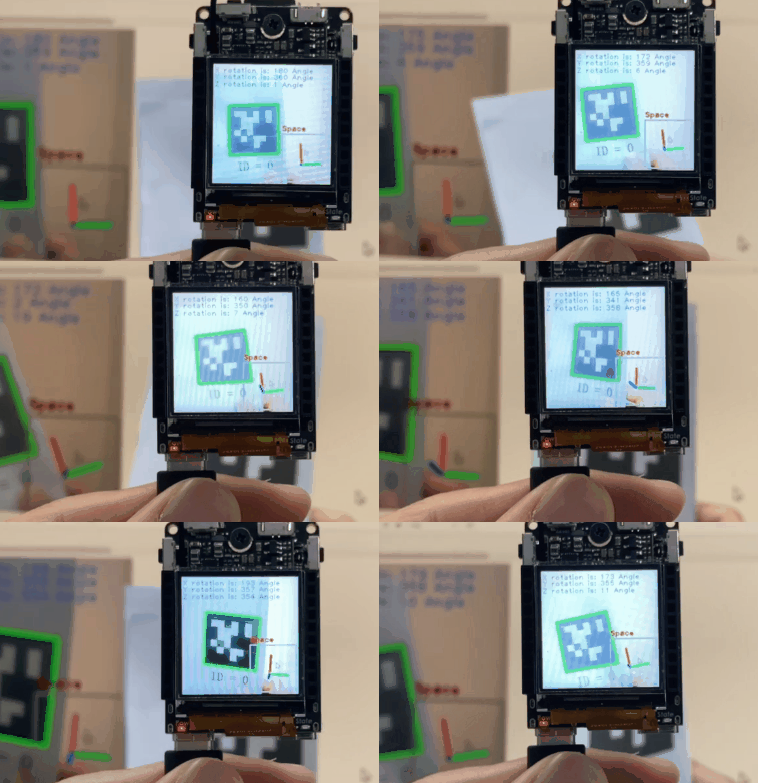
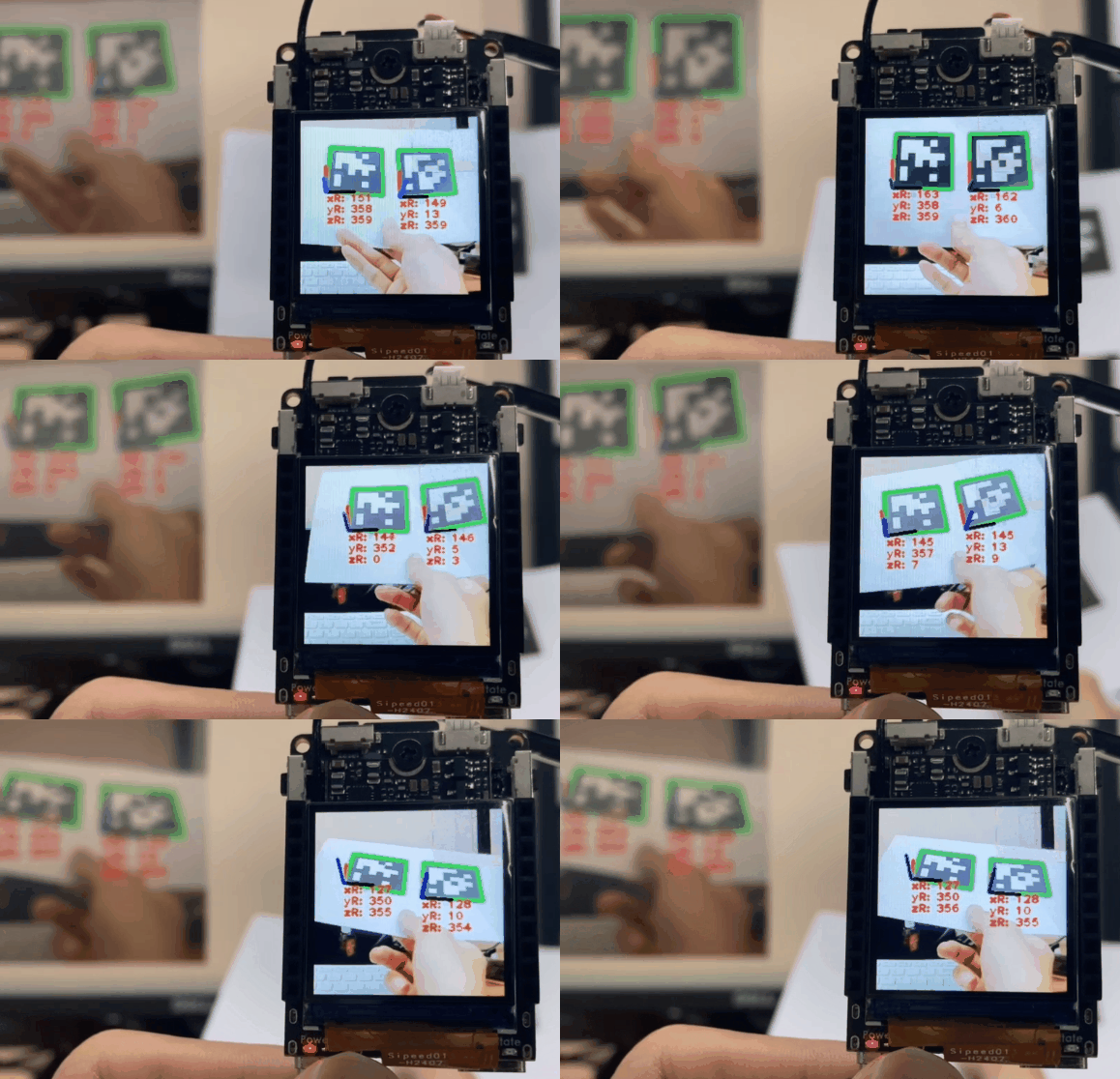
如果想要获取标签的角度信息只需要获取字典中键值分别是 x_rotation,y_rotation,z_rotation 的的值即可,需要指出的是获取的值是弧度,需要转换成角度的话需要使用弧度转角度公式。将获取的弧度其乘上 180 再除以 3.14 即可(3.14选取了圆周率小数点后两位)。
x_rotation 转为角度后取值范围是 [90°,270°] 正对着标签时显示为 180° ,在标签前后移动时变化。 y_rotation 转为角度后取值范围是 [0°,90°]U[270°,360°] 正对着标签时显示为 0° ,在标签左右移动时变化。z_rotation 转为角度后取值范围是 [0°,360°] 正对着标签时显示为 0° ,在标签旋转时变化。
三、AprilTag多个三维坐标的显示
from maix import display, camera
import math

f_x = (6 / 5.76) * 240
f_y = (6 / 3.24) * 240

c_x = 240 * 0.5
c_y = 240 * 0.5

while True:
    t = camera.capture()
    mks = t.find_apriltags(families = 16,fx = f_x,fy = f_y,cx = c_x,cy = c_y)
    for mk in mks:

      #内框数据
      x1,y1 = mk['corners'][0]   #访问字典的列表
      x2,y2 = mk['corners'][1]
      x3,y3 = mk['corners'][2]
      x4,y4 = mk['corners'][3]

      x_rol = mk['x_rotation']
      y_rol = mk['y_rotation']
      z_rol = mk['z_rotation']
      #画内框
      t.draw_line(x1, y1, x2, y2, color = (0, 255, 0), thickness = 3)
      t.draw_line(x2, y2, x3, y3, color = (0, 255, 0), thickness = 3)
      t.draw_line(x3, y3, x4, y4, color = (0, 255, 0), thickness = 3)
      t.draw_line(x4, y4, x1, y1, color = (0, 255, 0), thickness = 3)


      t.draw_string(x4, y4, "xR: "+str(int(180*x_rol/3.14)), scale = 1.0, color = (255, 0, 0), thickness = 2)    #90° ~ 270°  正对着是180°。上下
      t.draw_string(x4, y4 + 15, "yR: "+str(int(180*y_rol/3.14)), scale = 1.0, color = (255, 0, 0), thickness = 2)   #0° ~ 90°,270° ~ 360°   正对着是0°。 左右
      t.draw_string(x4, y4 + 30, "zR: "+str(int(180*z_rol/3.14)), scale = 1.0, color = (255, 0, 0), thickness = 2)   #0° ~ 360°   正对着是0°。 顺时针旋转增加

      t.draw_line(x4, y4, int(x4 - 40 * math.sin(z_rol)), int(y4 + 40 - 40 * math.cos(z_rol) + 40 * math.cos(x_rol)), color = (255, 0, 0), thickness = 3)
      t.draw_line(x4, y4, int(x4 - 40 + 40 * math.cos(z_rol) + 40 * math.cos(y_rol)), int(y4 - 40 * math.sin(z_rol)), color = (0, 0, 0), thickness = 3)
      t.draw_line(x4, y4, int(x4  + 40 * math.sin(y_rol)),int(y4 - 40 * math.sin(x_rol)), color = (0, 0, 255), thickness = 3)
    display.show(t)
总结
感觉加上一个jy-901陀螺仪,V831可以无限发挥他的功能。
边栏推荐
- 面试官:Redis主从集群切换数据丢失问题如何应对?
- Etcd database source code analysis -- etcdserver bootstrap to remove v2store
- 如何在Kubernetes上搭建code-server 云IDE平台
- How to build a code server cloud ide platform on kubernetes
- [actual combat] 1382- Yiwen owns your puppeter crawler application
- 2022年全球職業教育行業發展報告
- 支付宝沙箱测试手机网站支付,提示商户合作协议已到期,无法继续使用
- Access authentication of mqtt equipment on jetlinks platform
- 错误:SLF4J: Class path contains multiple SLF4J bindings
- [quick application] quick application user agreement and privacy policy content can jump many times. Click back and fail to return to the previous page. How to deal with it?
猜你喜欢
![[HMS core] [wallet kit] [solution] why can't Huawei wallet's client sample code run](/img/2f/46f9e9b74d2d62701c33d647d8eb9b.png)
[HMS core] [wallet kit] [solution] why can't Huawei wallet's client sample code run

Diabetes genetic risk testing challenge -toggle 30 days of ML

Basic permission management of Gerrit

1.4 流程控制语句

因果学习将开启下一代AI浪潮?九章云极DataCanvas正式发布YLearn因果学习开源项目
![[quick application] there are many words in the text component. How to solve the problem that the div style next to it will be stretched](/img/d2/d07736dab57ed8bba8751b17af7b13.png)
[quick application] there are many words in the text component. How to solve the problem that the div style next to it will be stretched
面试官:Redis主从集群切换数据丢失问题如何应对?

终于入选专业领域内容排行榜第一了,这段时间没有白累,感谢CSDN官方平台,幸苦了。
![[AGC] growth service 3-app linking example](/img/35/bd9eddd64ba71d0c625744bc44012a.png)
[AGC] growth service 3-app linking example

Stc8h Development (XIV): I2C Drive rx8025t high precision Real time clock chip
随机推荐
IPFs record
10 pictures teach you synchronous and asynchronous (Reprint)
An excellent graphical tool for information collection maltego
Postgresql源码(10)Xlog组装
How to multiply bank revenue through customer value analysis
Etcd database source code analysis -- etcdserver bootstrap initialization cluster and raft
exchange
How should both parties bear the large amount of child support after divorce
如何统计游戏中的数据
1.6 method
Web性能测试工具之ab入门篇
Postgresql源码(5)缓冲区管理
IDEA解决内存不足 low memory(亲测好用)
NFT商城/NFT盲盒/虚拟盲盒/NFT交易/可定制二开
[HMS core], [FAQ], [Health Kit] encountered some small problems in the process of integrating sports health services. Today, I share with you (Huawei watch, Bracelet + sports health service problems C
糖尿病遗传风险检测挑战赛-Coggle 30 Days of ML
支付宝沙箱测试手机网站支付,提示商户合作协议已到期,无法继续使用
SouthernBiotech 丨HRP标记Avidin亲和素的应用参数
ipfs记录
交换