当前位置:网站首页>Tensorflow2.0 advanced learning RNN generated audio (12)
Tensorflow2.0 advanced learning RNN generated audio (12)
2022-07-18 15:02:00 【Hekai】
RNN Generating audio
Leading package
import collections
import datetime
import fluidsynth
import glob
import numpy as np
import pathlib
import pandas as pd
import pretty_midi
import seaborn as sns
import tensorflow as tf

from IPython import display
from matplotlib import pyplot as plt
from typing import Dict, List, Optional, Sequence, Tuple
A lot of words , it is to be noted that fluidsynth and pretty_midi Installation , Refer to online materials .
Data familiarity
Some preparation
seed = 42
tf.random.set_seed(seed)
np.random.seed(seed)

#  Set the audio sampling rate , This is set to 16000
_SAMPLING_RATE = 16000
Download data
data_dir = pathlib.Path('data/maestro-v2.0.0')
if not data_dir.exists():
  tf.keras.utils.get_file(
      'maestro-v2.0.0-midi.zip',
      origin='https://storage.googleapis.com/magentadata/datasets/maestro/v2.0.0/maestro-v2.0.0-midi.zip',
      extract=True,
      cache_dir='.', cache_subdir='data',
  )
See how big the download data is
filenames = glob.glob(str(data_dir/'**/*.mid*'))
print('Number of files:', len(filenames))
#  altogether 1282 File
# Number of files: 1282
Yes MIDI Document processing
Look at the download data format , yes midi File format , This needs to be PrettyMIDI Library to deal with
sample_file = filenames[1]
print(sample_file)

# data/maestro-v2.0.0/2013/ORIG-MIDI_03_7_6_13_Group__MID--AUDIO_09_R1_2013_wav--2.midi
Define it as pretty_midi example , Easy to operate later
pm = pretty_midi.PrettyMIDI(sample_file)
Decide another method to play the data , The playback duration can be customized
def display_audio(pm: pretty_midi.PrettyMIDI, seconds=30):
  waveform = pm.fluidsynth(fs=_SAMPLING_RATE)
  # Take a sample of the generated waveform to mitigate kernel resets
  waveform_short = waveform[:seconds*_SAMPLING_RATE]
  return display.Audio(waveform_short, rate=_SAMPLING_RATE)
stay jupyter Execute the following code , The playback control will appear , It can play
display_audio(pm)
pm In addition to music, there are also some music introductions
print('Number of instruments:', len(pm.instruments))
instrument = pm.instruments[0]
instrument_name = pretty_midi.program_to_instrument_name(instrument.program)
print('Instrument name:', instrument_name)

# Number of instruments: 1
# Instrument name: Acoustic Grand Piano
The data to print
Printed pm It can be regarded as music score , There is some note information , With pitch , Have duration , And step size
for i, note in enumerate(instrument.notes[:10]):
  note_name = pretty_midi.note_number_to_name(note.pitch)
  duration = note.end - note.start
  print(f'{
      i}: pitch={
      note.pitch}, note_name={
      note_name},'
        f' duration={
      duration:.4f}')

0: pitch=75, note_name=D#5, duration=0.0677
1: pitch=63, note_name=D#4, duration=0.0781
2: pitch=75, note_name=D#5, duration=0.0443
3: pitch=63, note_name=D#4, duration=0.0469
4: pitch=75, note_name=D#5, duration=0.0417
5: pitch=63, note_name=D#4, duration=0.0469
6: pitch=87, note_name=D#6, duration=0.0443
7: pitch=99, note_name=D#7, duration=0.0690
8: pitch=87, note_name=D#6, duration=0.0378
9: pitch=99, note_name=D#7, duration=0.0742
take pm The information is processed into a format that the model can input
def midi_to_notes(midi_file: str) -> pd.DataFrame:
  pm = pretty_midi.PrettyMIDI(midi_file)
  instrument = pm.instruments[0]
  notes = collections.defaultdict(list)

  # Sort the notes by start time
  sorted_notes = sorted(instrument.notes, key=lambda note: note.start)
  prev_start = sorted_notes[0].start

  for note in sorted_notes:
    start = note.start
    end = note.end
    notes['pitch'].append(note.pitch)
    notes['start'].append(start)
    notes['end'].append(end)
    notes['step'].append(start - prev_start)
    notes['duration'].append(end - start)
    prev_start = start

  return pd.DataFrame({
    name: np.array(value) for name, value in notes.items()})

raw_notes = midi_to_notes(sample_file)
raw_notes.head()
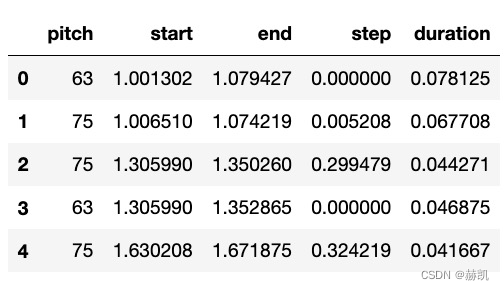
You can also see some note information
get_note_names = np.vectorize(pretty_midi.note_number_to_name)
sample_note_names = get_note_names(raw_notes['pitch'])
sample_note_names[:10]

# array(['D#4', 'D#5', 'D#5', 'D#4', 'D#5', 'D#4', 'D#7', 'D#6', 'D#7', 'D#6'], dtype='<U3')
Music scores can be expressed in the form of pictures
def plot_piano_roll(notes: pd.DataFrame, count: Optional[int] = None):
  if count:
    title = f'First {
      count} notes'
  else:
    title = f'Whole track'
    count = len(notes['pitch'])
  plt.figure(figsize=(20, 4))
  plot_pitch = np.stack([notes['pitch'], notes['pitch']], axis=0)
  plot_start_stop = np.stack([notes['start'], notes['end']], axis=0)
  plt.plot(
      plot_start_stop[:, :count], plot_pitch[:, :count], color="b", marker=".")
  plt.xlabel('Time [s]')
  plt.ylabel('Pitch')
  _ = plt.title(title)

plot_piano_roll(raw_notes, count=100)

Take a look at everything
plot_piano_roll(raw_notes)

Look at their histogram
def plot_distributions(notes: pd.DataFrame, drop_percentile=2.5):
  plt.figure(figsize=[15, 5])
  plt.subplot(1, 3, 1)
  sns.histplot(notes, x="pitch", bins=20)

  plt.subplot(1, 3, 2)
  max_step = np.percentile(notes['step'], 100 - drop_percentile)
  sns.histplot(notes, x="step", bins=np.linspace(0, max_step, 21))

  plt.subplot(1, 3, 3)
  max_duration = np.percentile(notes['duration'], 100 - drop_percentile)
  sns.histplot(notes, x="duration", bins=np.linspace(0, max_duration, 21))

plot_distributions(raw_notes)

create MIDI file
This is the method
def notes_to_midi(
  notes: pd.DataFrame,
  out_file: str,
  instrument_name: str,
  velocity: int = 100,  # note loudness
) -> pretty_midi.PrettyMIDI:

  pm = pretty_midi.PrettyMIDI()
  instrument = pretty_midi.Instrument(
      program=pretty_midi.instrument_name_to_program(
          instrument_name))

  prev_start = 0
  for i, note in notes.iterrows():
    start = float(prev_start + note['step'])
    end = float(start + note['duration'])
    note = pretty_midi.Note(
        velocity=velocity,
        pitch=int(note['pitch']),
        start=start,
        end=end,
    )
    instrument.notes.append(note)
    prev_start = start

  pm.instruments.append(instrument)
  pm.write(out_file)
  return pm

#  With the above note Information try
example_file = 'example.midi'
example_pm = notes_to_midi(
    raw_notes, out_file=example_file, instrument_name=instrument_name)

display_audio(example_pm)
Two methods notes_to_midi and midi_to_notes You can convert audio into model input data , It can also convert input data into audio , It's easy to say if you get through here .
Data preparation
First train with small data
num_files = 5
all_notes = []
for f in filenames[:num_files]:
  notes = midi_to_notes(f)
  all_notes.append(notes)

all_notes = pd.concat(all_notes)

n_notes = len(all_notes)
print('Number of notes parsed:', n_notes)

# Number of notes parsed: 15435
Finally, it has become what we love to see tf.data.Dataset 了
key_order = ['pitch', 'step', 'duration']
train_notes = np.stack([all_notes[key] for key in key_order], axis=1)
notes_ds = tf.data.Dataset.from_tensor_slices(train_notes)
notes_ds.element_spec

# TensorSpec(shape=(3,), dtype=tf.float64, name=None)
Since it is RNN, Is to use a continuous piece of data , Predict this data and the next data , You need to maintain a window to generate input and label
def create_sequences(
    dataset: tf.data.Dataset,
    seq_length: int,
    vocab_size = 128,
) -> tf.data.Dataset:
  """Returns TF Dataset of sequence and label examples."""
  seq_length = seq_length+1

  # Take 1 extra for the labels
  windows = dataset.window(seq_length, shift=1, stride=1,
                              drop_remainder=True)

  # `flat_map` flattens the" dataset of datasets" into a dataset of tensors
  flatten = lambda x: x.batch(seq_length, drop_remainder=True)
  sequences = windows.flat_map(flatten)

  # Normalize note pitch
  def scale_pitch(x):
    x = x/[vocab_size,1.0,1.0]
    return x

  # Split the labels
  def split_labels(sequences):
    inputs = sequences[:-1]
    labels_dense = sequences[-1]
    labels = {
    key:labels_dense[i] for i,key in enumerate(key_order)}

    return scale_pitch(inputs), labels

  return sequences.map(split_labels, num_parallel_calls=tf.data.AUTOTUNE)

seq_length = 25
vocab_size = 128
seq_ds = create_sequences(notes_ds, seq_length, vocab_size)
seq_ds.element_spec

# (TensorSpec(shape=(25, 3), dtype=tf.float64, name=None),
# {'pitch': TensorSpec(shape=(), dtype=tf.float64, name=None),
# 'step': TensorSpec(shape=(), dtype=tf.float64, name=None),
# 'duration': TensorSpec(shape=(), dtype=tf.float64, name=None)})
Look at a training data and tag
for seq, target in seq_ds.take(1):
  print('sequence shape:', seq.shape)
  print('sequence elements (first 10):', seq[0: 10])
  print()
  print('target:', target)

sequence shape: (25, 3)
sequence elements (first 10): tf.Tensor(
[[0.6015625  0.         0.09244792]
 [0.3828125  0.00390625 0.40234375]
 [0.5703125  0.109375   0.06510417]
 [0.53125    0.09895833 0.06119792]
 [0.5703125  0.10807292 0.05989583]
 [0.4765625  0.06640625 0.05338542]
 [0.6015625  0.01302083 0.0703125 ]
 [0.5703125  0.11979167 0.07682292]
 [0.3984375  0.109375   0.43619792]
 [0.609375   0.00130208 0.09505208]], shape=(10, 3), dtype=float64)

target: {
    'pitch': <tf.Tensor: shape=(), dtype=float64, numpy=54.0>, 'step': <tf.Tensor: shape=(), dtype=float64, numpy=0.005208333333333037>, 'duration': <tf.Tensor: shape=(), dtype=float64, numpy=0.46875>}
use 25 Data to predict the last data , Each data contains pitch 、 Step size and duration .
Real training data
batch_size = 64
buffer_size = n_notes - seq_length  # the number of items in the dataset
train_ds = (seq_ds
            .shuffle(buffer_size)
            .batch(batch_size, drop_remainder=True)
            .cache()
            .prefetch(tf.data.experimental.AUTOTUNE))

train_ds.element_spec

# (TensorSpec(shape=(64, 25, 3), dtype=tf.float64, name=None),
# {'pitch': TensorSpec(shape=(64,), dtype=tf.float64, name=None),
# 'step': TensorSpec(shape=(64,), dtype=tf.float64, name=None),
# 'duration': TensorSpec(shape=(64,), dtype=tf.float64, name=None)})
Model preparation
Customize a loss function
def mse_with_positive_pressure(y_true: tf.Tensor, y_pred: tf.Tensor):
  mse = (y_true - y_pred) ** 2
  positive_pressure = 10 * tf.maximum(-y_pred, 0.0)
  return tf.reduce_mean(mse + positive_pressure)
Define input dimensions 、 Learning rate 、 A network model .
input_shape = (seq_length, 3)
learning_rate = 0.005

inputs = tf.keras.Input(input_shape)
x = tf.keras.layers.LSTM(128)(inputs)

outputs = {

  'pitch': tf.keras.layers.Dense(128, name='pitch')(x),
  'step': tf.keras.layers.Dense(1, name='step')(x),
  'duration': tf.keras.layers.Dense(1, name='duration')(x),
}

model = tf.keras.Model(inputs, outputs)

loss = {

      'pitch': tf.keras.losses.SparseCategoricalCrossentropy(
          from_logits=True),
      'step': mse_with_positive_pressure,
      'duration': mse_with_positive_pressure,
}

optimizer = tf.keras.optimizers.Adam(learning_rate=learning_rate)

model.compile(loss=loss, optimizer=optimizer)

model.summary()
#  Output
Model: "model"
__________________________________________________________________________________________________
 Layer (type)                   Output Shape         Param # Connected to
==================================================================================================
 input_1 (InputLayer)           [(None, 25, 3)]      0           []

 lstm (LSTM)                    (None, 128)          67584       ['input_1[0][0]']

 duration (Dense)               (None, 1)            129         ['lstm[0][0]']

 pitch (Dense)                  (None, 128)          16512       ['lstm[0][0]']

 step (Dense)                   (None, 1)            129         ['lstm[0][0]']

==================================================================================================
Total params: 84,354
Trainable params: 84,354
Non-trainable params: 0
__________________________________________________________________________________________________
You can see that the loss function is also in the form of three numbers
losses = model.evaluate(train_ds, return_dict=True)
losses

{
    'loss': 5.4322004318237305,
 'duration_loss': 0.5619576573371887,
 'pitch_loss': 4.848946571350098,
 'step_loss': 0.021296977996826172}
Set some weights for model losses , The result is much smaller
model.compile(
    loss=loss,
    loss_weights={

        'pitch': 0.05,
        'step': 1.0,
        'duration':1.0,
    },
    optimizer=optimizer,
)

model.evaluate(train_ds, return_dict=True)

{
    'loss': 0.8257018327713013,
 'duration_loss': 0.5619576573371887,
 'pitch_loss': 4.848946571350098,
 'step_loss': 0.021296977996826172}
Run
callbacks = [
    tf.keras.callbacks.ModelCheckpoint(
        filepath='./training_checkpoints/ckpt_{epoch}',
        save_weights_only=True),
    tf.keras.callbacks.EarlyStopping(
        monitor='loss',
        patience=5,
        verbose=1,
        restore_best_weights=True),
]

epochs = 50

history = model.fit(
    train_ds,
    epochs=epochs,
    callbacks=callbacks,
)

Epoch 33/50
240/240 [==============================] - 9s 37ms/step - loss: 0.2175 - duration_loss: 0.0320 - pitch_loss: 3.4723 - step_loss: 0.0118
Epoch 34/50
240/240 [==============================] - ETA: 0s - loss: 0.2179 - duration_loss: 0.0344 - pitch_loss: 3.4621 - step_loss: 0.0104Restoring model weights from the end of the best epoch: 29.
240/240 [==============================] - 9s 36ms/step - loss: 0.2179 - duration_loss: 0.0344 - pitch_loss: 3.4621 - step_loss: 0.0104
Epoch 34: early stopping
Look at the curve of the loss function
plt.plot(history.epoch, history.history['loss'], label='total loss')
plt.show()

Generate notes
Prediction method
def predict_next_note(
    notes: np.ndarray,
    keras_model: tf.keras.Model,
    temperature: float = 1.0) -> int:
  """Generates a note IDs using a trained sequence model."""

  assert temperature > 0

  # Add batch dimension
  inputs = tf.expand_dims(notes, 0)

  predictions = model.predict(inputs)
  pitch_logits = predictions['pitch']
  step = predictions['step']
  duration = predictions['duration']

  pitch_logits /= temperature
  pitch = tf.random.categorical(pitch_logits, num_samples=1)
  pitch = tf.squeeze(pitch, axis=-1)
  duration = tf.squeeze(duration, axis=-1)
  step = tf.squeeze(step, axis=-1)

  # `step` and `duration` values should be non-negative
  step = tf.maximum(0, step)
  duration = tf.maximum(0, duration)

  return int(pitch), float(step), float(duration)
Predict a wave
temperature = 2.0
num_predictions = 120

sample_notes = np.stack([raw_notes[key] for key in key_order], axis=1)

# The initial sequence of notes; pitch is normalized similar to training
# sequences
input_notes = (
    sample_notes[:seq_length] / np.array([vocab_size, 1, 1]))

generated_notes = []
prev_start = 0
for _ in range(num_predictions):
  pitch, step, duration = predict_next_note(input_notes, model, temperature)
  start = prev_start + step
  end = start + duration
  input_note = (pitch, step, duration)
  generated_notes.append((*input_note, start, end))
  input_notes = np.delete(input_notes, 0, axis=0)
  input_notes = np.append(input_notes, np.expand_dims(input_note, 0), axis=0)
  prev_start = start

generated_notes = pd.DataFrame(
    generated_notes, columns=(*key_order, 'start', 'end'))
Look at the forecast data
generated_notes.head(10)

Listen
out_file = 'output.mid'
out_pm = notes_to_midi(
    generated_notes, out_file=out_file, instrument_name=instrument_name)
display_audio(out_pm)
Take a look at the picture below
plot_piano_roll(generated_notes)
plot_distributions(generated_notes)

It's kind of interesting
summary
Loss function customization , also RNN Input data output data generation
边栏推荐
- Lazada、速卖通、Shopee测评自养号,需要多少成本?
- 【成像】【7】太赫兹光学——光学元件和子系统
- Will the arrears of Alibaba cloud international ECS be automatically released?
- 小程序毕设作品之微信评选投票小程序毕业设计(7)中期检查报告
- How about the income of increased life insurance? Can it be a pension financial product?
- 小程序毕设作品之微信评选投票小程序毕业设计(5)任务书
- Deutsche Bank listed on the world Hong Kong Stock Exchange: with a market value of HK $3.9 billion, Shaanxi Automobile Group is the major shareholder
- 启动失败 Failed to determine a suitable driver class 问题解决方案
- 【sdx62】SBL阶段读取GPIO的状态操作
- 05-GuliMall VirtualBox给虚拟机设置固定IP
猜你喜欢

JVM memory model

QT学习日记16——QFile文件读写

「TakinTalks」_ 故障频繁发生,如何做好系统稳定性?

STM32 application development practice tutorial: multi computer communication application development based on CAN bus

AcWing 3433. Eat candy recursively | find rules

为什么电商平台要重点关注非法经营罪,这与二清又有什么关联?

风控人不能不知的黑产大揭秘

Boyun was selected as the representative manufacturer of Gartner China cloud management tool market guide

德银天下港交所上市:市值39亿港元 陕汽集团是大股东

2022T电梯修理操作证考试题及在线模拟考试
随机推荐
Three cycle structure of Microcomputer Principle and technology interface experiment
Hybridclr -- epoch-making unity native C # hot update technology
The first jd.com technology partnership conference was held, and Boyun joined hands with jd.com technology to create new digital growth in the industry
Going to sea has become a general trend. How can technology be empowered| ArchSummit
保研机试备考十四:BFS
21JVM(1)
How to choose databases and tables and newsql?
03 gulimall development environment configuration
06-GuliMall 基础CRUD功能创建
Preparation for Bao Yan machine test XIV: BFS
Writing a new app with swift5 requires some considerations
配置MaskRCNN环境吐槽(GeForce MX250+win10+tensorflow1.5.0 GPU版)
Eureka read-write lock fantasy, too top!
Total sequencing problem
Nc16857 [noi1999] birthday cake
AcWing 3619. Date date processing
Angr principle and Practice (I) -- principle
小程序畢設作品之微信評選投票小程序畢業設計(5)任務書
Vulnhub-DC9学习笔记
后台运行程序方法