当前位置:网站首页>PyTorch学习笔记【1】:使用张量表征真实数据
PyTorch学习笔记【1】:使用张量表征真实数据
2022-07-17 05:10:00 【zzzyzh】
前言
本文是基于《Pytorch深度学习实战》一书第四章的内容所整理的学习笔记
相关代码的解释以及对应的拓展。
本文使用的代码均基于jupyter
1. 处理图像
1.1. 加载图像文件
使用TorchVision处理图像和视频数据是一个很好的默认选择。但imageio可以更轻松地帮助我们进行入门。
import imageio.v3 as imageio
import torch
import numpy as np

img_arr = imageio.imread('data/p1ch4/image-dog/bobby.jpg')
img_arr.shape
1.2. 改变布局
1.2.1. 处理图像
img = torch.from_numpy(img_arr)
out = img.permute(2, 0, 1)
给定已知的HxWxC的输入张量,使用permute()依次布局通道2、0和1,从而得到适合PyTorch模块的CxHxW(通道、高度和宽度)。
# 批处理图像
batch_size = 3
batch = torch.zeros(batch_size, 3, 256, 256, dtype=torch.uint8)
预先分配一个适当大小的张量,并使用从目录中加载的图像填充它。
import os
data_dir = 'data/p1ch4/image-cats/'
filenames = [name for name in os.listdir(data_dir)
             if os.path.splitext(name)[-1] == '.png']
for i, filename in enumerate(filenames):
    img_arr = imageio.imread(os.path.join(data_dir, filename))
    img_t = torch.from_numpy(img_arr)
    img_t = img_t.permute(2, 0, 1)
    img_t = img_t[:3] # 这里我们只保留前三个通道,有时候图像还有一个表示透明度的alpha通道,但我们的网络只需要RGB输入
    batch[i] = img_t
1.2.2. 纬度变化
- reshape:纬度重组
x = np.array([1, 2, 3, 4, 5, 6])  # 一个大小为 6 的一维 numpy 数组
y = torch.Tensor([1, 2, 3, 4, 5, 6])  # 一个大小为 6 的一阶张量
print(x.reshape(2, 3))  # 重组 x 为结构为 (2, 3) 的数组
print(y.reshape(2, 3))  # 重组 y 为结构为 (2, 3) 的张量
- view:纬度重组
- 仅能对张量进行操作
- 且仅适用于连续的张量(transpose后的张量不可使用)
- 高阶变m阶时,先依次降纬至1阶,再重新分配成m阶.
# 1阶变3阶
x = torch.Tensor([1, 2, 3, 4, 5, 6, 7, 8, 9, 10, 11, 12])  # 一个含有 12 个元素的 1 阶张量
x.view(3, 2, 2)  # 返回一个 (3, 2, 2) 结构的 3 阶张量
# 2阶变3阶
x = torch.Tensor([[1, 2, 3],
                  [4, 5, 6],
                  [7, 8, 9],
                  [10, 11, 12]])  # 一个 (4, 3) 结构的 2 阶张量
y = torch.Tensor([1, 2, 3, 4, 5, 6, 7, 8, 9, 10, 11, 12])  # 一个含有 12 个元素的一阶张量
x.view(2, 2, 3),  # 返回一个 (2, 2, 3) 结构的 3 阶张量
y.view(2, 2, 3)  # 返回一个 (2, 2, 3) 结构的 3 阶张量
# 3阶变4阶
x = torch.Tensor([[[1, 2, 3],
                   [4, 5, 6]],
                  [[7, 8, 9],
                   [10, 11, 12]],
                  [[13, 14, 15],
                   [16, 17, 18]],
                  [[19, 20, 21],
                   [22, 23, 24]]])  # 一个 (4, 2, 3) 结构的 3 阶张量
y = torch.Tensor([[1, 2, 3],
                  [4, 5, 6],
                  [7, 8, 9],
                  [10, 11, 12],
                  [13, 14, 15],
                  [16, 17, 18],
                  [19, 20, 21],
                  [22, 23, 24]])  # 一个 (4*2, 3) 结构的 2 阶张量

print((y.view(2, 2, 2, 3)).equal(x.view(2, 2, 2, 3)))  # 两个张量转变后的结果相等
print(x.view(2, 2, 2, 3))  # 返回一个 (2, 2, 2, 3) 结构的 4 阶张量
- transpose:纬度互换
# 2阶张量
x = torch.Tensor([[1, 2],
                  [3, 4],
                  [5, 6]])  # 一个结构为 (3, 2) 的 2 阶张量
print(f'x.size() = {
      x.size()}')  # 返回张量 x 的结构
y = x.transpose(0, 1)  # 交换 h, w 两个维度
# y = x.t() # 对 x 进行转置
print(f'y.size() = {
      y.size()}')  # 返回张量 y 的结构
print(y)  # 打印交换维度后的张量 y,结构为 (2, 3)
# 3阶张量
x = torch.Tensor([[[1, 2, 3], [4, 5, 6]],
                  [[7, 8, 9], [10, 11, 12]],
                  [[13, 14, 15], [16, 17, 18]],
                  [[19, 20, 21], [22, 23, 24]]])  # 一个结构为 (4, 2, 3) 的 3 阶张量
print(f'x.size() = {
      x.size()}')  # 返回张量 x 的结构
print(x.transpose(0, 1))  # 交换张量的 c, h 维度, 结构为 (2, 4, 3)
# 4阶张量
x = torch.Tensor([[[[1, 2, 3], [4, 5, 6]],
                   [[7, 8, 9], [10, 11, 12]]],

                  [[[13, 14, 15], [16, 17, 18]],
                   [[19, 20, 21], [22, 23, 24]]]])  # 结构为 (2, 2, 2, 3) 的 4 阶张量
print(f'x.size() = {
      x.size()}')  # 返回张量 x 的结构
y = x.transpose(0, 3)  # 交换 n, w 维度
print(f'y.size() = {
      y.size()}')  # 返回张量 y 的结构
print(y)
- permute:纬度重排
一次进行多个纬度的交换即对纬度进行重排
与view和reshape的区别——view和reshape不必在意原先的纬度,permute是对已有的纬度进行一个再分配
x = torch.Tensor([[[1, 2, 3, 4],
                   [5, 6, 7, 8],
                   [9, 10, 11, 12]],

                  [[13, 14, 15, 16],
                   [17, 18, 19, 20],
                   [21, 22, 23, 24]]])  # 一个结构为 (2, 3, 4) 的 3 阶张量
print(f'x.size() = {
      x.size()}')  # 返回张量 x 的结构
y = x.permute(2, 0, 1)  # 对张量 x 进行维度重排
z = x.transpose(0, 1).transpose(0, 2)  # 对张量 x 连续交换两次维度
print(y.equal(z))  # 判断张量 y 和张量 z 是否相同
print(f'z.size() = {
      z.size()}')  # 返回张量 z 的结构
print(z)
1.3. 正则化数据
计算输入数据的均值和标准差,并对所有数据进行缩放,使每个通道的均值为0,标准差为1
n_channels = batch.shape[1]
for c in range(n_channels):
    mean = torch.mean(batch[:, c])
    std = torch.std(batch[:, c])
    batch[:, c] = (batch[:, c] - mean) / std
2. 表示表格数据
使用葡萄酒质量数据集进行演示
2.1. 加载葡萄酒数据张量
2.1.1. 读入数据
import csv
wine_path = "data/p1ch4/tabular-wine/winequality-white.csv"
wineq_numpy = np.loadtxt(wine_path, dtype=np.float32, delimiter=";",
                         skiprows=1) # skiprows:跳过前1行(2-跳过前两行)

wineq_numpy
col_list = next(csv.reader(open(wine_path), delimiter=';'))
wineq_numpy.shape, col_list
2.1.2. 将读入的Numpy数据转换为PyTorch张量
wineq = torch.from_numpy(wineq_numpy)
wineq.shape
2.1.3. 数值
- 连续值
用数字表示是最直观的,它们是严格有序的,不同值之间的差异具有严格的意义。无论 A 包裹的质量是 3千克还是 10千克,或者B包裹是来自 100英里还是 2000 英里之外,说 A包裹比 B包裹重 2千克,或者说 B 包裹比 A 包裹的距离远 200英里都是有固定意义的。如果你用单位来计算或测量某物,它可能是两个个连续的值。文献实际上进一步划分了连续值:在前面的例子中,可以说某个物体的质量或距离是另一个物体的 2倍或 3倍,这些值被称为比例尺度。另一方面,一天中的时问确实有差异,但声称 6:00是 3:00的 2倍是不合理的,因此一大中的时间只提供了一个区间尺度。 - 序数值
我们对连续值的严格排序仍然存在,但值之间的固定关系不再适用。一个很好的例子就是点一份小杯、中杯或大杯的饮料,将小杯映射为1、中杯为2、大杯为3,大杯饮料比中杯大,就像3比2大一样,但它没有告诉我们大了多少。如果我们将 1、2、3转换为实际体积,如8、12和24 液体盎司,那么它们将转换为区间值。重要的是要记住,除了对这些值进行排序,我们无法对它们进行 “数学运算”,试图将大杯等于 3、小杯等于 1的平均值计算不会得到中杯饮料的体积。 - 分类值
分类值对其值既没有排序意义,也没有数字意义。通常,只是分配任意数字的可能性的枚举。将水设定为 1、咖啡设定为 2、苏打水设定为 3、牛奶设定为 4,就是一个很好的例子。把水放在前面,把牛奶放在最后,这并没有什么逻辑可言,只是需要不同的值来区分它们。我们可以将咖啡设定为 10,牛奶设定为 -3,并不会有明显变化。因为分类数值没有意义,所以它们也被称为名义尺度。
2.2. 表示分数
我们通常会从输入数据的张量中删除分数,并将其单独保存在单独的张量中
data = wineq[:, :-1] # 选择所有行和除最后一列以外的所有列
data, data.shape
target = wineq[:, -1] # 选择所有行和最后一列
target, target.shape
2.3. 独热编码
如果分数是完全离散的,通常我们会采用独热编码,因为没有隐含的顺序和距离
2.3.1. 制作标签张量
target_onehot = torch.zeros(target.shape[0], 10)
target_onehot.scatter_(1, target.unsqueeze(1), 1.0) # 按列填充1
2.3.2. 获取标签张量
- unsqueeze():纬度拓展
在指定纬度上拓展一个纬度
与unsqueeze_()的区别:unsqueeze需要一个新的tensor来赋予新的值;unsqueeze_对使用unsqueeze_的tensor本身进行改变
a = torch.arange(0,6).view(2,3) # view():可以用于设置纬度
a = a.unsqueeze(1)
a
- scatter_(input, dim, index, src):
将src中数据根据index中的索引按照dim的方向填进input
dim:沿着哪个维度进行索引
index:用来 scatter 的元素索引
src:用来 scatter 的源元素,可以是一个标量或一个张量使用scatter,待插入的和编码
后的tensor列数要一样
x = torch.rand(2, 5)
point = torch.zeros(3, 5).scatter_(0, torch.LongTensor([[0, 1, 2, 0, 0], [2, 0, 0, 1, 2]]), x)
""" index[1][0] = 2,即x中第1行第0列的值填入point第2行第0列 index[1][1] = 0,即x中第1行第1列的值填入point第0行第1列 """
x, point
2.4. 分类
2.4.1 何时分类
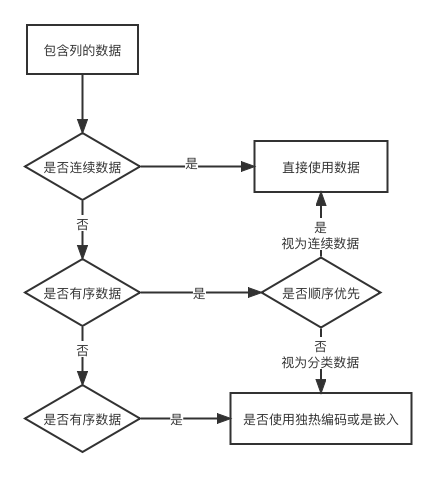
2.4.2. 数据归一化
data_mean = torch.mean(data, dim=0)
data_mean
data_var = torch.var(data, dim=0)
data_var
不设置dim,返回的是一个标量,设置了返回一个tensor
# dim = 0表示沿纬度0执行正则
data_normalized = (data-data_mean) / torch.sqrt(data_var)
data_normalized
2.5. 寻找阈值
2.5.1. 计算阈值
bad_indexes = target<=3
# bad_indexes = torch.le(target, 3) pytorch提供的比较函数

bad_indexes.shape, bad_indexes.dtype, bad_indexes.sum()
bad_data = data[bad_indexes]
bad_data.shape
此时可以使用数据类型torch.bool来索引张量data,即过滤张量data,使其仅包含索引张量中与True对应的项或行
过滤后的张量有20行,与张量bad_indexes中为True的行数相等,且保留了所有列
利用上述方法,将就分为好中差三类
bad_data = data[target <= 3]
mid_data = data[(target > 3) & (target < 7)] # <1>
good_data = data[target >= 7]

bad_mean = torch.mean(bad_data, dim=0)
mid_mean = torch.mean(mid_data, dim=0)
good_mean = torch.mean(good_data, dim=0)

for i, args in enumerate(zip(col_list, bad_mean, mid_mean, good_mean)):
    print('{:2} {:20} {:6.2f} {:6.2f} {:6.2f}'.format(i, *args))
2.5.2. 计算方法
- zip()
将传入zip的参数中下标对应相等的元素压缩成一个tuple
a = ['a', 'b', 'c', 'd']
b = ['1', '2', '3', '4']
list(zip(a, b))
*与**
- 调用函数时
*:把序列 args 中的每个元素,当作位置参数传进去**:把 kwargs 变成关键字参数传递
def test(a, b, c): print(f'{ a},{ b},{ c}') args = [1,2,3] test(*args) # test(1, 2, 3) kwargs = { 'a':4,'b':5,'c':6} test(**kwargs) # test(a=4,b=5,c=6) - 构造函数时
*:收集参数
def test(*args): print(args) test(1,2,3)**:收集关键字参数
def test(**kwargs):
    print(kwargs)
test(x=4,y=5,z=6)
- enumerate
这个函数的基本应用就是用来遍历一个集合对象,它在遍历的同时还可以得到当前元素的索引位置。
第二个参数用来指定开始的索引
names = ["Danny","Eric","Henry"]
for index, value in enumerate(names,1):
    print(f'{
      index}: {
      value}')
2.5.3. 用二氧化硫总量的阈值作为区分好酒和劣质酒的粗略标准
total_sulfur_threshold = 141.83
total_sulfur_data = data[:,6]
predicted_indexes = torch.lt(total_sulfur_data, total_sulfur_threshold)

predicted_indexes.shape, predicted_indexes.dtype, predicted_indexes.sum()
actual_indexes = target > 5

actual_indexes.shape, actual_indexes.dtype, actual_indexes.sum()
n_matches = torch.sum(actual_indexes & predicted_indexes).item()
n_predicted = torch.sum(predicted_indexes).item()
n_actual = torch.sum(actual_indexes).item()

n_matches, n_matches / n_predicted, n_matches / n_actual
3. 处理时间序列
3.1. 增加时间纬度
import numpy as np
import torch
torch.set_printoptions(edgeitems=2, threshold=50, linewidth=75)

bikes_numpy = np.loadtxt(
    "data/p1ch4/bike-sharing-dataset/hour-fixed.csv",
    dtype=np.float32,
    delimiter=",",
    skiprows=1,
    converters={
    1: lambda x: float(x[8:10])}) # 将日期字符串转换为与第一列中的月和日对应的数字
bikes = torch.from_numpy(bikes_numpy)
bikes
3.2. 按时间段调整数据
按天划分数据集,就有了序列长度为L,样本数量为N的集合C。即此时的时间序列数据集将是一个纬度为3、形状为NxCxL的张量。C为17(数据集中记录的数据种类的个数),而L为24,表示一天中的24个小时
bikes.shape, bikes.stride()
- stride()
显示tensor的步长,即在指定维度dim中从一个元素跳到下一个元素所必需的步长。当没有参数传入时,返回所有步长的元组。否则,将返回一个整数值作为特定维度dim中的步长。
需要注意的是,这里的0代表的是最外层的纬度
a = torch.arange(0,6).view(2,3)
a.stride(), a.stride(0)
daily_bikes = daily_bikes.transpose(1, 2)
daily_bikes.shape, daily_bikes.stride()
3.3. 准备训练
3.3.1. 获取索引
对原始数据集进行操作
first_day = bikes[:24].long()
first_day[:,9]
weather_onehot = torch.zeros(first_day.shape[0], 4)
weather_onehot.scatter_(
    dim=1,
    index=first_day[:,9].unsqueeze(1).long() - 1, # 值减1是由于天气状况的级别为1~4,而索引是从0开始的
    value=1.0)
3.3.2.拼接索引
torch.cat((bikes[:24], weather_onehot), 1)[:2]
- torch.cat()
在指定维度dim上拼接多个张量
x = torch.randn(2, 3)
x,
torch.cat((x, x, x), 0),
torch.cat((x, x, x), 1)
3.3.3. 对重塑数据集重复操作
daily_weather_onehot = torch.zeros(daily_bikes.shape[0], 4, daily_bikes.shape[2])
daily_weather_onehot.shape
daily_bikes = torch.cat((daily_bikes, daily_weather_onehot), dim=1)
daily_bikes[:, 9, :] = (daily_bikes[:, 9, :] - 1.0) / 3.0
正则化数据
temp = daily_bikes[:, 10, :]
daily_bikes[:, 10, :] = ((daily_bikes[:, 10, :] - torch.mean(temp)) / torch.std(temp))
总结
本文主要讲解了:
- 将真实数据表示为PyTorch张量
- 处理一系列数据类型
- 从文件中加载数据
- 将数据转换为张量
- 塑造张量以适应神经网络模型的输入
边栏推荐
- gradle
- 1. Neusoft cross border e-commerce warehouse demand specification document
- MySQL comma separated data for branches
- D3.V3.js数据可视化 -- 力导向图之图片和提示
- 跨域和处理跨域
- MySQL事务
- 软件过程与管理复习(七)
- Ambari 2.7.5 integrated installation hue 4.6
- Use of MySQL
- Scala primary practice - statistics of mobile phone traffic consumption (1)
猜你喜欢

微信小程序的常用組件

5. Spark core programming (1)

Scala primary practice - statistics of mobile phone traffic consumption (1)
Scala初级实践——统计手机耗费流量(1)

运行基于MindSpore的yolov5流程记录

Edge AI边缘智能:Communication-Efficient Edge AI: Algorithms and Systems(未完待续)

Use Flink SQL to transfer market data 1: transfer VWAP

Macro definition of C language

1 SparkSQL概述

Wxml template syntax in wechat applet
随机推荐
gradle自定义插件
正则替换group(n)内容
Functions and parameters
Wechat applet password display hidden (small eyes)
Solve idea new module prompt module XXXX does exits
Page navigation of wechat applet
PCM silent detection
Scala primary practice - statistics of mobile phone traffic consumption (1)
安卓实现真正安全的退出app
微信小程序代码的构成
Judging prime
Android realizes truly safe exit from App
Pointnet++代码详解(一):farthest_point_sample函数
软件过程与管理总复习
Common components of wechat applet
Object to map
5.数据采集通道搭建之业务分析
Preorder, middle order and postorder traversal of binary tree
[efficiency of function]
Pointnet++代码详解(七):PointNetSetAbstractionMsg层