Project Overview
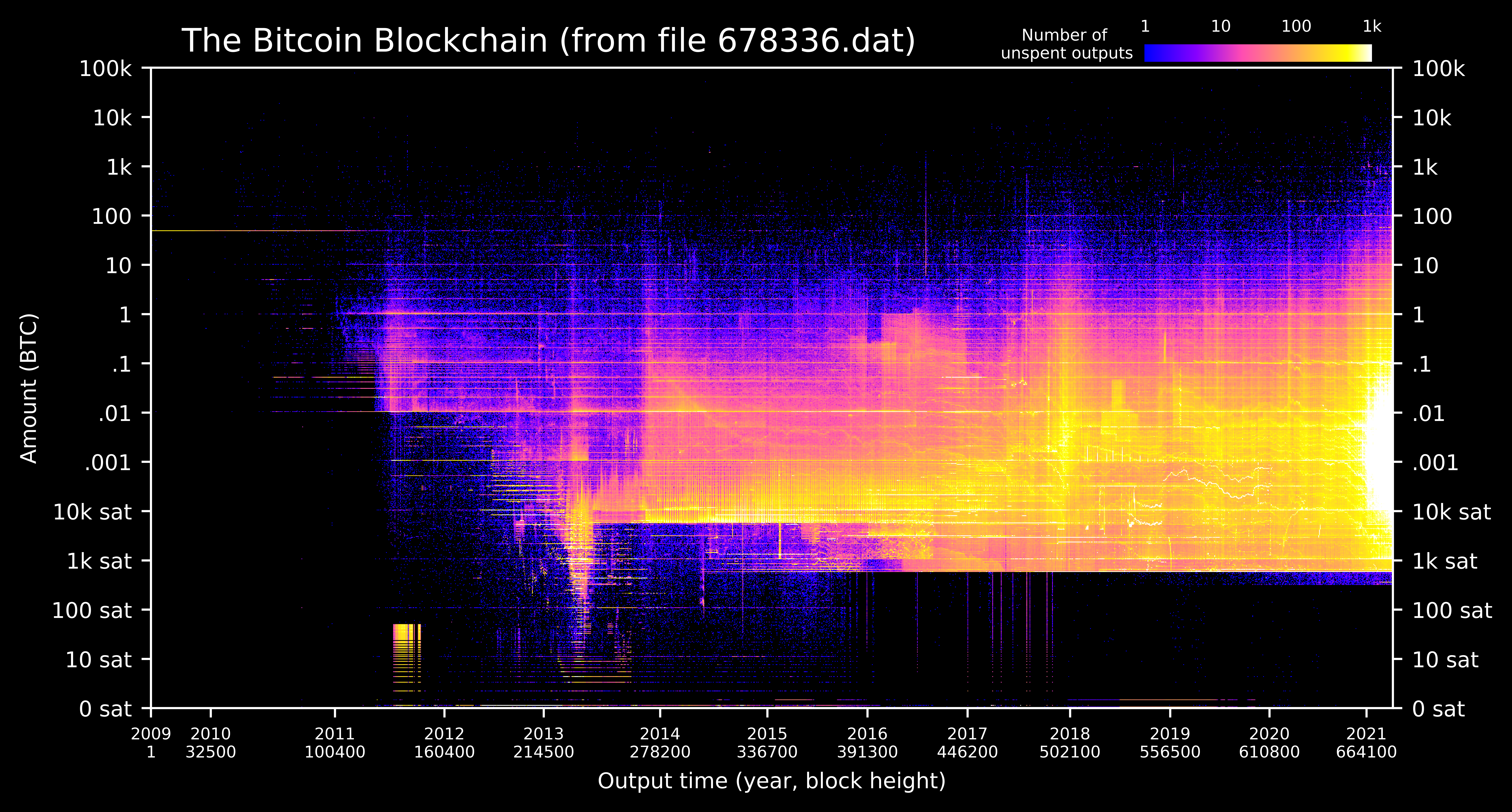
A new feature in Bitcoin Core 0.20 allows users to dump the state of the blockchain (the UTXO set) using the command dumptxoutset. I've written a python script utxo-live.py that takes the ouput of dumptxoutset and generates a heatmap of the blockchain via the UTXO set. Thus all of the active bitcoin in the blockchain is visualized in a single image from your own node.
Privacy & Security
With the new dumptxouset command, the python script no longer requires an RPC password to access Core's databases. The script simply reads the dump file without interacting with Core at all. No private keys, passwords, xpubs, or wallet addresses are exchanged between Core and the python script.
Requirements
- Bitcoin Core version 0.20 or higher
- Python3 (comes standard on all operating systems)
Instructions for experienced users
- Create a folder called
utxo-livein a familiar location - Dump the utxo set
bitcoin-cli dumptxoutsetwhere xxxxxxx is the current block height (10-20 min) (Note:/xxxxxx.dat bitcoin-clidoesn't ship with Core on Mac OS, use Window->Console instead) - Install two python dependencies
python3 -m pip install numpy matplotlib - Download utxo-live.py to your
utxo-livefolder and run itpython3 utxo-live.py(20 min)
Step by step instructions
-
Make sure Bitcoin Core (version 0.20 or higher) is running and synchronized.
-
Create a new folder called
utxo-livein a familiar location on your machine (e.g. in your Documents folder). -
Open a terminal window and display the current folder path. Do this by:
- Windows: open a terminal (Start -> Command Prompt) and type:
echo %cd%
- Mac/Linux: open a terminal (Mac: Applications -> Utilities -> Terminal) and type:
pwd
- Navigate to the
utxo-livefolder using the change directorycdcommand. For example if you're currently inUsers/Steve/(or on WindowsC:\Users\Steve\) and you've created the folderSteve/Documents/bitcoin-tools/utxo-live/then type:
cd Document/bitcoin-tools/utxo-live/
Note: Windows sometimes requires forward slashes / instead of back slashes \.
-
Again display the current folder (Step 3) and copy to your clipboard the full path to the
utxo-livefolder. We will be pasting this path into Bitcoin Core soon. -
Leave the terminal window momentarily, and open the Bitcoin Core console window. (Alternatively for bitcoin-cli users, open another terminal window and type the console commands in the next steps as
bitcoin-clicommands.)
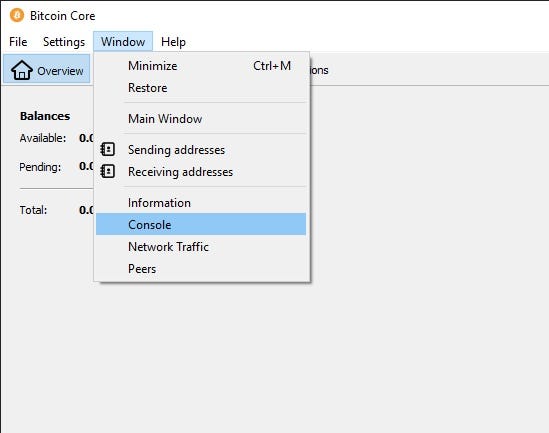
- Get the current block count by typing in the console window:
getblockcount
and hitting enter. The output will look like:

- Dump the current utxo set by typing in the console window:
dumptxoutset <PATH to utxo-live>/<xxxxxx.dat>
where
dumptxoutset /Users/Steve/Documents/bitcoin-tools/utxo-live/678505.dat
If there are no error messages after hitting enter, then it's working. It will take 10-20 minutes. Look in your utxo-live folder and you should see the file being created as xxxxxx.dat.incomplete.
- While the utxo file is dumping, download
utxo-live.pyand install two python dependencies. To do this:
-
Right click on utxo-live.py, choose "Save Link As" and select the
utxo-livefolder. -
In the terminal window (not the Bitcoin console), type the following command to install two python dependencies:
python3 -m pip install numpy matplotlib
Note: you might already have these installed, but running the command won't hurt anything.
- If 10-20 minutes have passed, check that the utxo dump is completed. Do this in two ways:
- Check that the file no longer has
.incompleteafterxxxxxx.dat - Check that the Bitcoin Core console displays the results of the dump as something like:
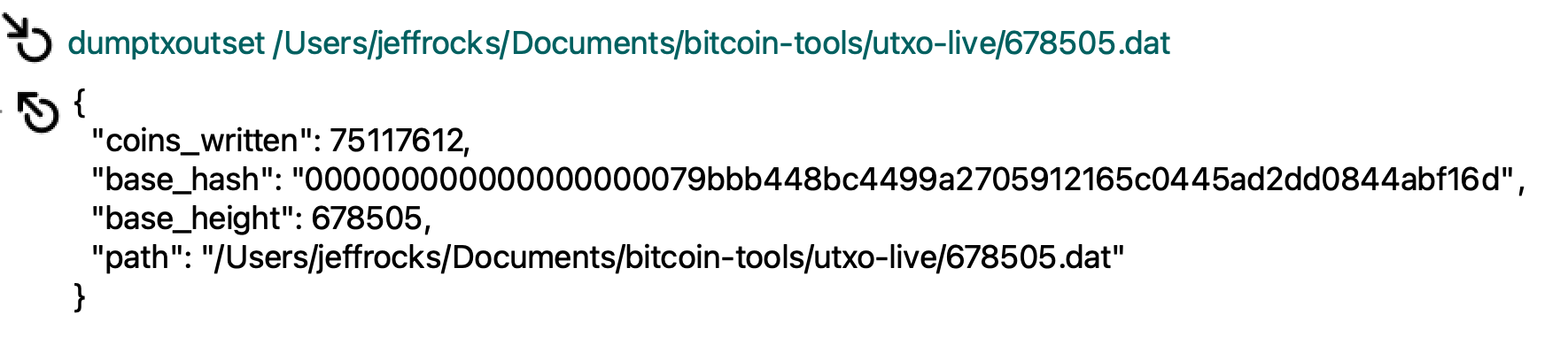
- If the dump file is finished and Step 9 is completed (utxo-live.py is downloaded and python dependencies were installed), then run utxo-live.py by typing in the terminal:
python3 utxo-live.py
- The program will take 20-30 minutes to complete and it will update you on the progress. If there are multiple xxxxxxx.dat files in the folder, it will ask you which one you'd like to process. When finished the image is stored in the folder as
utxo_heatmap_xxxxxx.png.
Acknowledgements
I'm indebted to three main projects for the code, understanding, and inspiration for this project. The python functions that parse and decode the utxo dump file were adapted from Bitcoin_Tools. I learned how Core serializes utxos from Bitcoin-UTXO-Dump . An inspiring project that visualizes changes in the UTXO set as a movie is BitcoinUtxoVisualizer .

 179 Nov 29, 2022
 1 Sep 01, 2022
 1 Jan 06, 2022
 1 Sep 28, 2021
 17.9k Dec 31, 2022
 1 Feb 10, 2022
 43 Sep 03, 2022
 1 Jul 12, 2022
 1.2k Jan 01, 2023
 1 Jan 11, 2022
 23 Jan 06, 2023
 169 Dec 27, 2022
 13 Oct 12, 2022
 0 Jul 09, 2022
 1 Oct 21, 2021
 2 Dec 16, 2022
 110 Dec 22, 2022
 2.8k Jan 03, 2023
 0 May 27, 2022
 9 Dec 31, 2021