Solseum NFT Generator for Solana!
Check this guide here!
Creating your randomized uniques NFTs, getting rarity information and displaying it on a webpage has never been easier!
tags: solana nfts generator tutorials free
Hello Art Enjoyers, WrathionTBP here.
I'm the main developer of Solseum: Online VR Solana Museum, a metaverse where you, your friends and other users can interact while enjoy our art collections and all the other collections that you, users, want to share with the entire community.
One of our objectives as a team, is share all of our knowledge and tools with the entire world!. The main reason to do this is because we want to use our museum to show the pieces of art that other developers create and the NFTs that users own and want to share.
Today I come to share with you our NFT generator that we will use for our Art Collection called GanSol (If u are interested in our project you can read more about at https://www.solseum.com, also follow us on Twitter and join to our Discord server).
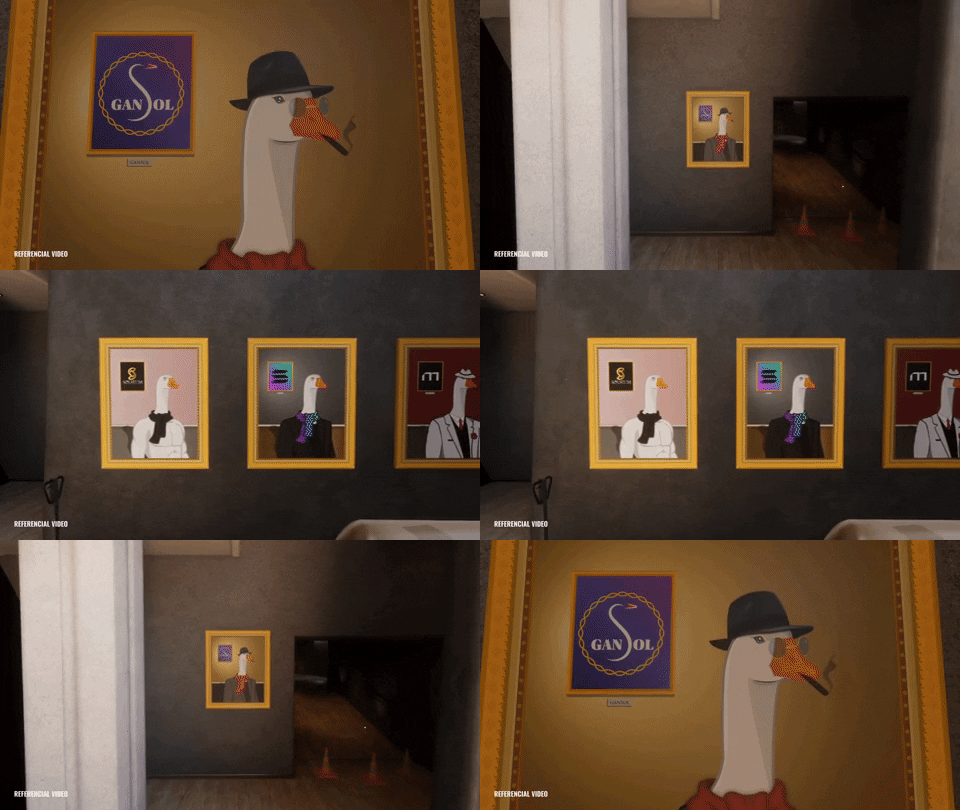
So… the ==main questions== that you should have right now is: How its differ from the others NFT Generator?, and why should I use it?. ==The answer are listed below==:
- Let the users to create automatically unique PNG+Json pairs, on a layer based system, for different purposes like Whitelists, Giveaways and Public Mint at the same time.
- Also allows to output the NFTs in a random order in relation to how they were generated.
- In addition, this tool support a color based rarity system that uses weights for each item.
- Aswell, this tool will automatically produce colored plots/charts for the rarities each attribute.
- And last but not least, this will make an easy-to-map json to design an rarity page for your project.
This and more ==WITHOUT CODING ANYTHING!!!==, so grab your glass of water and prepare to learn with us!.
:thinking_face: What does our NFTs Generator offer?
This NFT Generator allows the user to create up to three completly unique assets folder with no duplicated NFTs. In addition, NFTs can be randomized (the 0.png and 0.json can be the NFT #1564 instead of NFT #1). Lastly, you can test the rarities of your attributes without generate any NFT, because generating 10000 NFTs takes some time.
| Features | Short Command | Description | Example |
|---|---|---|---|
| Create Public NFTs | -p <N> | Generate N uniques png+json data to create a Public Candy Machine. [default=0] | python3 main.py -p 800 |
| Create Whitelist NFTs | -w <N> | Generate N uniques png+json data to create a Whitelist Candy Machine. [default=0] | python3 main.py -w 300 |
| Create Giveaways NFTs | -g <N> | Generate N uniques png+json data to create a Giveaway Candy Machine. [default=0] | python3 main.py -g 100 |
| Test rarities | -t 1 | Generate a sample of a -p <N> + -w <N> + -g <N> NFTs, storing the easy-to-map json and the rarity plots without creating NFTs. [default=False] | python3 main.py -w 3333 -g 100 -t 1 |
| Randomize NFTs output | -r 1 | Shuffle the output of the entire NFT collection to allow a mint in no particular order. [default=False] | python3 main.py -p 2200 -w 578 -g 100 -r 1 |
You can mix the values of -p <N>, -w <N> and -g <N> as you wish!.
You can see this info using:
python3 main.py -h.
Also we generate colored plots for each attributes. The colors depends on the percentage of occurrence of each item in a attribute. The following image is an example of the rarity distribution for the attribute border dots using a sample of 9500 NFTs.

Finally, we generate a json file containing all the information of the rarity distribution of each attribute. This file can be easily mapped in React, which allows you to generate a page to display the rarities to your users! We generated a very basic rarity page by mapping the json file located in output/rarity and displaying the items from the assets folder located in input, an extract of this page is shown in the following image.

You can modify
main.pyto change the default values of the rarity colors, rarity names, rarity percentages and also you can add more than 3 output assets for extra Candy Machines!.
📝
What do I need?
Step 1: Check if you have this installed!
- Command git installed on your PC.
- Python3 installed on your PC
- An code editor like VS Code, Sublime Text, Notepadd, etc.
- An terminal to run the commands.
Step 2: Install the tool
To start creating ur uniques NFTs for Solana you will have to clone our github repository. Open your terminal and execute the followings commands:
git clone https://github.com/Solseum/solseum-nft-generator.gitcd solseum-nft-generatorpython3 -m pip install -r requeriments.txt
Step 3: Be one with the folders!
In this section we will explain it to you how is the hierarchy of the project.
Don't erase any folder unless we said that can be modified!
The following image shows you the root directory of this project.

The root directory has three folders, one python code and the requirements that allow you to run this project.
The includes folder is where the magic happens, and has four files python that allows you to use all the functions that we offer. You can check the content in the image below

The input folder is the most important on the entire project. This is the place that you have to modify.

The template.json has the following format:
{
    "name": "Cute Squares",
    "symbol": "CS",
    "description": "Cutest squares on Solana Network!!",
    "seller_fee_basis_points": 500,
    "image": "image.png",
    "external_url": "YOUR WEBPAGE",
    "attributes":
    [
    ],
    "collection":
    {
        "name": "Solana Cute Squares",
        "family": "Solseum NFT Generator"
    },
    "properties":
    {
        "files":
        [
            {
                "uri": "image.png",
                "type": "image/png"
            }
        ],
        "category": "image",
        "creators":
        [
            {
                "address": "GaPBj9cKX3DixkispB3WhqYcrhb6Uz3PhqWyk5DB31k1",
                "share": 90
            },
            {
                "address": "2QvVjytnfYyFJUnVC9xGu3ejjVTNDzTUjfvodrn6NVcn",
                "share": 10
            }
        ]
    }
}
The fields that you must edit are:
- name,
- symbol,
- description,
- seller_fee_basis_points (500 means 5% of royalties, 1000 means 10%),
- external_url,
- name inside collection,
- family inside collection,
- all the address and share in properties-creators (you need an minimum of 1 and a maximum of 5, you can erase or add until that limit!). BE SURE THAT THE SUM OF ALL THE share VALUES IS EXACTLY EQUAL TO 100!.
You can always check the Token Metadata Standard at Metaplex docs and in this Medium post
The assets folder (inside input, showed in the image below) has one folder for each attribute that your NFT will use. This project includes by default 6 differente attributes.
A very important thing is that the folders MUST be numbered from 0 to X (0 to 6 in our case). This number means the order in which the layers will be pasted (from 0 to X).
The separation between the layer number and the layer name must be with the symbol - and the symbol _ will act as spaces in the layer name.
For example the folder 4-simple_draw means that it is layer 4 and the attribute will be named as Simple draw.

Within an attribute folder you will find all the items, of that attribute, that can be selected to create an NFT. The image below shows the items for the fifth layer (watermark).
All the items between all the attributes HAS TO HAVE THE SAME PIXEL SIZE (our example occupies images of 600x600 pixels).
The separation between the prefix number and the item name must be with the symbol - and the symbol _ will act as spaces in the item name.
If you observe the image below, u will noticed a prefix number after the actual item name. This is mandatory and the meaning of this number is the number of occurrences of this item when you create a number of NFTs equal to the sum of all the prefix numbers of the attribute.
For example the sum of our prefix numbers are 100 (1+3+6+12+30+48 = 100), so the items should appear 1, 3, 6, 12, 30 and 48 times in a sample of 100 NFTs respectively.
We recommend that the sum of prefix number in a attribute has to be 100 so u can work with percentages.

In this tutorial we will use the asset folder included in the project, ==you can always upload your own assets folder (replace the folders inside assets), just make sure you follow the format showed before.==
The output folder is where the metadata pairs and rarity info will be generated (nfts and rarity respectively).

📓
How I use the program?
Here you will find some examples commands and what should be the output of each commands!.
==We recommend creating a total number of NFTs less than or equal to 20% of your possible number of combinations. This is because the larger ammount of NFTs you create, higher chances has a the rarest items to appear, and you dont want that
python3 main.py -p 2500 -g 101 -w 1500- 2500 NFTs will be created at output/nfts/public_mint_assets.
- 1500 NFTs will be created at output/nfts/whitelist_mint_assets.
- 101 NFTs will be created at output/nfts/giveaway_assets.
- The NFTs output will DON'T be randomized.
- All the NFTs will be uniques.
- Rarity charts will use 4101 NFTs to be created at output/rarity/plots.
- Rarity json will use 4101 NFTs to be created at output/rarity/raritiesToReactMap.json.
python3 main.py -g 500 -p 25 -r 1- 500 NFTs will be created at output/nfts/public_mint_assets.
- 25 NFTs will be created at output/nfts/giveaway_assets.
- The NFTs output will BE randomized.
- All the NFTs will be uniques.
- Rarity charts will use 525 NFTs to be created at output/rarity/plots.
- Rarity json will use 525 NFTs to be created at output/rarity/raritiesToReactMap.json.
python3 main.py -w 2333 -r 1- 2333 NFTs will be created at output/nfts/whitelist_mint_assets.
- The NFTs output will BE randomized.
- All the NFTs will be uniques.
- Rarity charts will use 2333 NFTs to be created at output/rarity/plots.
- Rarity json will use 2333 NFTs to be created at output/rarity/raritiesToReactMap.json.
python3 main.py -w 100 -p 15 -r 1 -l 1- 0 NFTs will be created.
- Rarity charts will use 115 NFTs to be created at output/rarity/plots.
- Rarity json will use 115 NFTs to be created at output/rarity/raritiesToReactMap.json.
python3 main.py -g 10000 -l 1- 0 NFTs will be created.
- Rarity charts will use 10000 NFTs to be created at output/rarity/plots.
- Rarity json will use 10000 NFTs to be created at output/rarity/raritiesToReactMap.json.
🚀
Let's start creating NFTs!
After you install the requeriments.txt and follow the format to uses ur assets and modify the template.json, you are ready to generate ur own collection of NFTs.
In this example we want to create 2 Candy machines, one for public minting with 9500 NFTs and the other for whitelist/presale with 500 NFTs. But first I want to test how the rarities of my items will look, to see the distribution per item. So I run the following code:
python3 main.py -p 9500 -w 500 -t 1
This creates in output/rarity/plots the rarity distribution for all the attributes. If the rarity distribution of a certain attribute does not suit me, I can change the prefix numbers of the items in that attribute to change the distribution until I like it.
After some testing I finally likes how the rarity distribution is looking for each attribute, so I can go and generate the NFTs, but I want that the NFTs be generated without an order so it can be minted randomly. So I run the following code:
python3 main.py -p 9500 -w 500 -r 1
When the code finnishes executing I want to see if really the NFTs were generated in a randomly order, so I do open the folder output/nfts/public_mint_assets and open the 0.json. If the 0.json name field has a number different than #1, it means that the randomization worked. So I open the 0.json file:
{
    "name": "Cute Squares #155",
    "symbol": "CS",
    "description": "Cutest squares on Solana Network!!",
    "seller_fee_basis_points": 500,
    "image": "image.png",
    "external_url": "YOUR WEBPAGE",
    "attributes": [
        {
            "trait_type": "Background",
            "value": "Orange"
        },
        {
            "trait_type": "Border color",
            "value": "Cyan border"
        },
        {
            "trait_type": "Border dots",
            "value": "Dark blue dots"
        },
        {
            "trait_type": "Example text",
            "value": "Example 6"
        },
        {
            "trait_type": "Simple draw",
            "value": "Nothing"
        },
        {
            "trait_type": "Watermark",
            "value": "Down middle"
        },
        {
            "trait_type": "Border mark",
            "value": "1 both sides"
        }
    ],
    "collection": {
        "name": "Solana Cute Squares",
        "family": "Solseum NFT Generator"
    },
    "properties": {
        "files": [
            {
                "uri": "image.png",
                "type": "image/png"
            }
        ],
        "category": "image",
        "creators": [
            {
                "address": "GaPBj9cKX3DixkispB3WhqYcrhb6Uz3PhqWyk5DB31k1",
                "share": 90
            },
            {
                "address": "2QvVjytnfYyFJUnVC9xGu3ejjVTNDzTUjfvodrn6NVcn",
                "share": 10
            }
        ]
    }
}
So the name of 0.json is the #155, great!. Now I want to see if the attributes are the same in the picture, so I open the 0.png:

So finally I want to see if my whitelist get randomized, as I already created 9500 nfts, if it is not randomized then the 0.json of my whitelist should start with 9501. So I open the folder output/nfts/whitelist_mint_assets to open the json and I found the following:
{
    "name": "Cute Squares #314",
    "symbol": "CS",
    "description": "Cutest squares on Solana Network!!",
    "seller_fee_basis_points": 500,
    "image": "image.png",
    "external_url": "YOUR WEBPAGE",
    "attributes": [
        {
            "trait_type": "Background",
            "value": "Orange"
        },
        {
            "trait_type": "Border color",
            "value": "Cyan border"
        },
        {
            "trait_type": "Border dots",
            "value": "Magenta dots"
        },
        {
            "trait_type": "Example text",
            "value": "Example 4"
        },
        {
            "trait_type": "Simple draw",
            "value": "Paw"
        },
        {
            "trait_type": "Watermark",
            "value": "Middle right"
        },
        {
            "trait_type": "Border mark",
            "value": "1 both sides"
        }
    ],
    "collection": {
        "name": "Solana Cute Squares",
        "family": "Solseum NFT Generator"
    },
    "properties": {
        "files": [
            {
                "uri": "image.png",
                "type": "image/png"
            }
        ],
        "category": "image",
        "creators": [
            {
                "address": "GaPBj9cKX3DixkispB3WhqYcrhb6Uz3PhqWyk5DB31k1",
                "share": 90
            },
            {
                "address": "2QvVjytnfYyFJUnVC9xGu3ejjVTNDzTUjfvodrn6NVcn",
                "share": 10
            }
        ]
    }
}
It has the number 314 so I only need to see if the png match with the attributes and I'm ready to upload the files to the Candy Machines. I open the 0.png for whitelist:

And the images is also correct so I can upload my two Candy Machines. Also, with the images uploaded you can already create your rarity page in your webpage using the json file output/rarity/raritiesToReactMap.json data and customize as you want!.
We create a really basic rarity webpage that used this example nfts, you can check here it https://nft-map.vercel.app/.
📹
Video explanation comming soon!
I will let you know when I upload the video explaining this step-by-step. So stay tunned on our Twitter and joining to our Discord server for more updates!.
We will also teach you how to create a Candy Machine from scratch using this generator soon!!!
💸
Tips
If you found it useful, try to stay tuned for more tutorials, give us your feedback, join our community (Twitter, Discord server) and share to all the people who are interested in this beautiful crypto-world!. That's the best tip that you can give us!

 35 Sep 19, 2022
 5 Aug 09, 2022
 16 Sep 21, 2022
 3 Apr 22, 2022
 290 Dec 26, 2022
 1 Nov 15, 2021
 1 Feb 01, 2022
 29 Dec 14, 2022
 12 Sep 02, 2022
 1 Dec 27, 2021
 37 Oct 01, 2022
 2k Jan 02, 2023
 12 Nov 29, 2022
 1 Jan 07, 2022
 85 Dec 09, 2022
 6 Nov 23, 2022
 6 Dec 11, 2022
 4 Oct 03, 2022
 2 Jan 17, 2022
 25 Dec 30, 2022